
Indledning
Thank you for choosing the GEWA 902620 CMT-100 Tuner/Metronome. This versatile device combines a chromatic tuner, a metronome, and a tone generator into one compact unit, designed for musicians of all levels. This manual provides detailed instructions for proper setup, operation, and maintenance to ensure optimal performance and longevity of your device.
The CMT-100 features a large LCD screen with switchable backlight, 3 LEDs for tuning indication, Jack input and output, a headphone connection, volume control, and a convenient rear stand.
Produktegenskaber
- Chromatic Tuner, Metronome, and Tone Generator functions.
- Large LCD screen with switchable backlight and 3 LED indicators.
- Tuner range: 433-447 Hz, with flat-tuning capability (up to 4 semitones).
- Supports C, Eb, F, or B instrument modes for tuning.
- Metronome tempo range: 30-250 BPM, with 7 beat types and 5 rhythms.
- TAP function for setting metronome tempo.
- Tone generator with 1-octave range, flat-tuning, and C, Eb, F or B modes.
- Jack input and output for instrument connection.
- Headphone connection for private practice.
- Justerbar lydstyrkekontrol.
- Integrated rear stand for convenient placement.
- Compact size: 99 x 72 x 18 mm, lightweight: 86 g.
Pakkens indhold
- GEWA 902620 CMT-100 Tuner/Metronome unit
- 2 x AA alkaliske batterier (inkluderet)
- Brugervejledning (dette dokument)
Opsætning
1. Batteriinstallation
The GEWA CMT-100 requires two AA alkaline batteries for operation. These are included with your device.
- Find batteridækslet på bagsiden af enheden.
- Skub dækslet åbent i pilens retning.
- Insert two AA batteries, ensuring the correct polarity (+ and -) as marked inside the compartment.
- Luk batterirummets dæksel forsvarligt.
Note: Always use fresh alkaline batteries. Remove batteries if the device will not be used for an extended period to prevent leakage.
2. Tilslutning af eksterne enheder
- Instrument Input (Jack IN): Connect your instrument (e.g., guitar, bass) to the Jack IN port using a standard 1/4-inch instrument cable for direct tuning.
- Output (Jack OUT): If desired, connect the Jack OUT port to an amplifier eller andet lydudstyr.
- Hovedtelefoner: For silent practice or monitoring, plug standard headphones into the headphone jack.
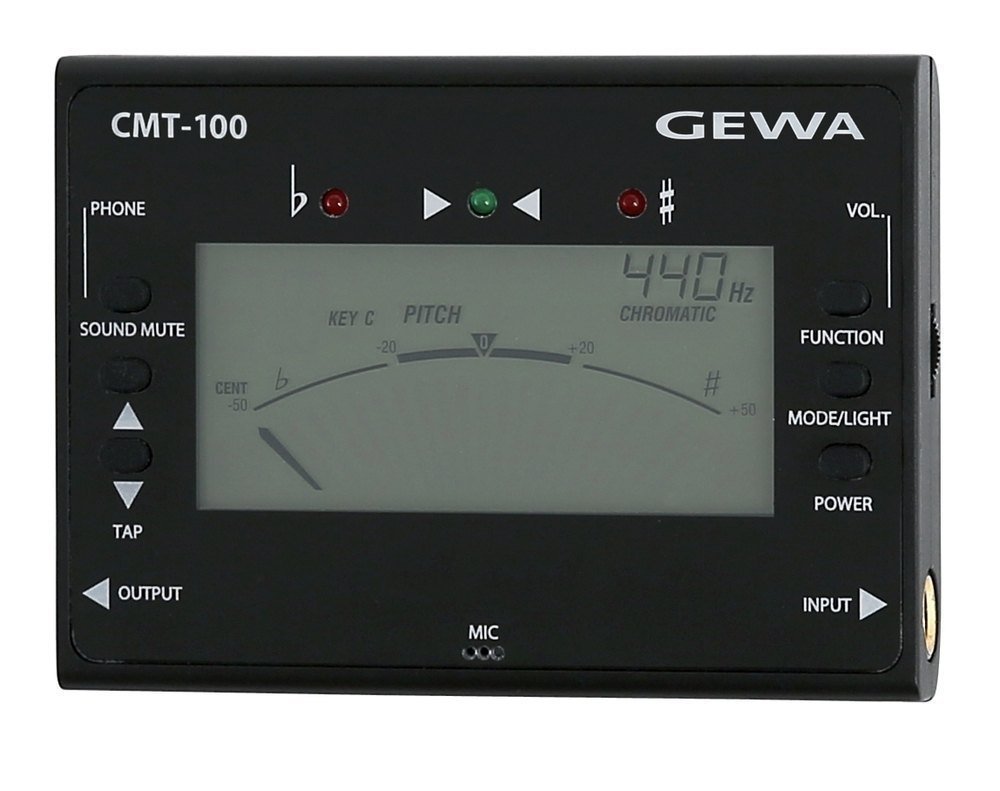
Figur 1: Forside og side view of the GEWA 902620 CMT-100 Tuner/Metronome, showing the display, control buttons, and input/output jacks.
Betjeningsvejledning
1. Tænd/sluk
Tryk og hold på MAGT button (usually located on the front or side) to turn the device on or off. The LCD screen will illuminate upon power-on.
2. Valg af tilstand
Brug MODE button to cycle through the three main functions: Tuner, Metronome, and Tone Generator. The current mode will be indicated on the LCD screen.
3. Tuner -tilstand
In Tuner mode, the device detects the pitch of your instrument. The LCD will display the note name, and the LEDs will indicate tuning accuracy.
- Kromatisk stemming: Play a single note on your instrument. The display will show the detected note.
- LED-indikatorer:
- Left LED (red): Note is flat.
- Right LED (red): Note is sharp.
- Center LED (green): Note is in tune.
- A4 Calibration: Adjust the A4 reference frequency (433-447 Hz) using the appropriate buttons (refer to device markings, typically OP/NED or CALIB).
- Flad tuning: For instruments requiring flat tuning, activate the flat-tuning function (up to 4 semitones) using the designated button (e.g., FLAD).
- Instrument Modes (C, Eb, F, B): Select the appropriate mode for your instrument (e.g., C for guitar/bass, Eb for alto saxophone) using the INSTRUMENT or NØGLE knap.
4. Metronome Mode
The metronome provides a steady beat for rhythm practice.
- Tempo justering: Brug OP/NED buttons to set the desired tempo (30-250 BPM).
- Beat Type: Select from 7 different beat types (e.g., 1/4, 2/4, 3/4) using the SLÅ knap.
- Rytmevalg: Choose from 5 different rhythms using the RYTME knap.
- TAP Function: Tryk på TAP button repeatedly at your desired tempo to set the BPM automatically.
- Start/Stop: Tryk på START/STOP button to begin or pause the metronome.
5. Tone Generator Mode
Tonegeneratoren producerer en referencetonehøjde til gehørtræning eller manuel stemming.
- Bemærk valg: Brug OP/NED buttons to select the desired note within the 1-octave range.
- Flad tuning: Apply flat-tuning if needed using the FLAD knap.
- Instrument Modes (C, Eb, F, B): Select the appropriate instrument mode for the generated tone.
6. Lydstyrkekontrol
Adjust the output volume for the metronome and tone generator using the dedicated BIND control (typically a dial or buttons).
7. Baggrundsbelysning
The LCD screen features a switchable backlight for visibility in low-light conditions. Press the LYS or BAGGRUNDSLYS knappen for at slå den til eller fra.
Opretholdelse
- Rensning: Wipe the unit with a soft, dry cloth. Do not use abrasive cleaners, solvents, or waxes.
- Udskiftning af batteri: Replace batteries when the display becomes dim or the unit stops functioning correctly. Always replace both batteries at the same time with new AA alkaline batteries.
- Opbevaring: Opbevar enheden et køligt, tørt sted væk fra direkte sollys og ekstreme temperaturer. Fjern batterierne, hvis den opbevares i længere perioder.
- Undgå fugt: Do not expose the unit to water or high humidity.
Fejlfinding
- Enheden tændes ikke:
- Kontroller, om batterierne er isat korrekt med den rigtige polaritet.
- Udskift med nye AA alkaliske batterier.
- Tuner is not detecting notes accurately:
- Ensure your instrument is properly connected to the Jack IN port.
- Check the A4 calibration setting.
- Ensure the correct instrument mode (C, Eb, F, B) is selected if applicable.
- Play notes clearly and sustain them for accurate detection.
- Metronome sound is too low or absent:
- Juster lydstyrken.
- Hvis du bruger hovedtelefoner, skal du sørge for, at de er tilsluttet korrekt og fungerer korrekt.
Specifikationer
| Modelnummer | 902620 CMT-100 |
| Funktioner | Chromatic Tuner, Metronome, Tone Generator |
| Tuner rækkevidde | A4 = 433-447 Hz |
| Flad tuning | Up to 4 semitones |
| Metronom Tempo Range | 30-250 BPM |
| Beat Types | 7 typer |
| rytmer | 5 typer |
| Tonegenerator-rækkevidde | 1 oktav |
| Stik | Jack Input, Jack Output, Headphone Jack |
| Strømforsyning | 2 x AA-alkaliske batterier |
| Dimensioner (L x B x H) | 99 x 72 x 18 mm (3.9 x 2.8 x 0.7 tommer) |
| Vægt | 86 g (0.19 lbs) |
| Fabrikant | GEWA |
Garanti og support
GEWA products are manufactured to high-quality standards. This product is covered by a manufacturer's warranty against defects in materials and workmanship. Please refer to the warranty card included with your purchase or visit the official GEWA webhjemmeside for detaljerede garantivilkår.
For technical support, service, or inquiries, please contact your authorized GEWA dealer or visit the GEWA official webwebsted for kontaktoplysninger.
Webwebsted: www.gewamusic.com