
1. Introduktion
The Gustard U12 is a high-performance USB Digital Audio Interface designed to convert USB audio signals into various digital output formats. It utilizes the XMOS X-CORE 32-bit digital signal processing unit, offering robust multi-core processing capabilities for high-fidelity audio. The U12 supports asynchronous USB Audio Class 2.0 and features an independent power supply for optimal audio performance.
Nøglefunktioner omfatter:
- Support for 32-bit / 384kHz asynchronous 2.0 audio.
- Native 32-bit / 384kHz XMOS DAC capabilities.
- Precision audio clock circuit using 0.1PPM active crystals.
- Independent power supply for enhanced audio quality.
- Multiple digital outputs: Coaxial (RCA), Optical, AES/EBU, and IIS (HDMI port).
2. Pakkens indhold
Sørg for, at alle genstande er til stede ved udpakning:
- Gustard U12 Digital Audio Interface Unit
- Strømkabel
- Mini-CD with XMOS Driver (version 3.20 or later)
3. Enhedslayout
3.1 Frontpanel
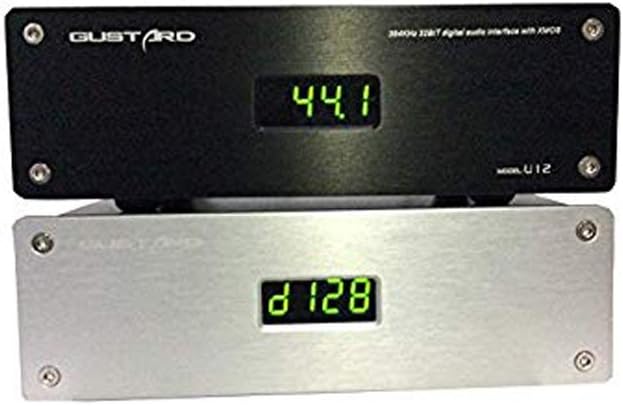
Figur 3.1: Front view of the Gustard U12, displaying the current sample sats.
The front panel features a digital display that indicates the current audio sample rate. There are no physical controls on the front panel.
3.2 Bagpanel

Figur 3.2: Rear panel connections of the Gustard U12.
Bagpanelet indeholder alle nødvendige input- og output-tilslutninger:
- 230V/115V AC Input: Strømforbindelse.
- AES: AES/EBU digital audio output.
- COAX: Coaxial (RCA) digital audio output.
- IIS: IIS digital audio output via HDMI port.
- OPTISK: Optical (Toslink) digital audio output.
- USB IN: USB 2.0 input for connection to a computer.
4. Opsætningsvejledning
- Strømtilslutning: Connect the provided power cable to the 230V/115V AC input on the rear panel of the U12 and then to a suitable power outlet.
- USB-forbindelse: Connect a USB cable from your computer (Windows, macOS, or Linux) to the USB IN port on the rear panel of the U12.
- Digital udgangsforbindelse: Connect one of the digital outputs (Coaxial, Optical, AES/EBU, or IIS) from the U12 to the corresponding digital input on your Digital-to-Analog Converter (DAC) or audio amplivligere.
- Driver Installation (Windows Users):
- Insert the provided mini-CD into your computer's CD drive.
- Locate and install the XMOS driver. A common driver version is 4.13.0 (e.g., "XMOS-Stereo-USB-Audio-Class2-Driver-3033_v4.13.0").
- Følg instruktionerne på skærmen for at fuldføre driverinstallationen. Genstart computeren, hvis du bliver bedt om det.
- For optimal performance, it is recommended to use ASIO output when configuring your audio playback software (e.g., jRiver Media Player, Foobar2000).
- Driver Installation (macOS/Linux Users): The U12 is generally plug-and-play with macOS and Linux operating systems, requiring no additional driver installation.
- Første gang tændt: Once all connections are secure and drivers are installed (if applicable), the U12 will power on automatically when the computer is turned on or when the USB cable is connected. The front display will show the current sample sats.
5. Betjeningsvejledning
5.1 Lydafspilning
After successful setup, select the Gustard U12 as your audio output device in your computer's sound settings or preferred audio playback software. Begin playing audio, and the U12 will automatically detect and display the incoming sample rate on its front panel.
5.2 Supported Output Formats and Sample Priser
- Coaxial (RCA), Optical, AES/EBU: These outputs conform to IEC60958 and AES3-r2009 standards, supporting a maximum resolution of 24-bit / 192kHz.
- IIS (HDMI port): This output can transmit up to 32-bit / 384kHz audio.
The U12 employs two independent active crystals to provide precise clock signals for different sample rate series: one for 44.1/88.2/176.4/352.8kHz and another for 48/96/192/384kHz. Only the crystal corresponding to the selected clock rate operates, preventing mutual interference.
5.3 Strømstyring
The U12 features an automatic standby mode. When your computer enters sleep mode or is powered off (provided the USB power is also off), the U12's display will turn off. Waking your computer or restoring USB power will instantly reactivate the U12 and its display.

Figur 5.1: The U12's display indicating various sample satser.
6. Vedligeholdelse
To ensure the longevity and optimal performance of your Gustard U12, follow these maintenance guidelines:
- Rensning: Brug en blød, tør klud til at tørre enhedens yderside af. Undgå at bruge flydende rengøringsmidler eller slibende materialer, da de kan beskadige overfladen.
- Placering: Place the U12 on a stable, flat surface with adequate ventilation. Avoid placing it near heat sources, direct sunlight, or in areas with high humidity.
- Sluk: Hvis enheden ikke skal bruges i længere tid, anbefales det at tage stikket ud af stikkontakten.
- Interne komponenter: Do not attempt to open the unit or service it yourself. Refer all servicing to qualified personnel. Opening the unit may void your warranty.

Figur 6.1: Indre view of the U12's XMOS chip and circuitry.

Figur 6.2: Indre view highlighting the independent power supply with toroidal transformer.
7. Fejlfinding
| Problem | Mulig årsag | Løsning |
|---|---|---|
| Ingen strøm / Skærm slukket |
|
|
| No sound / Device not recognized by computer |
|
|
| Juttering, clicking, or loss of sync on Coaxial output at high sample rates (e.g., 192kHz/24bit) |
|
|
| Enheden slukker tilfældigt |
|
|
8. Specifikationer
| Mærke | Gustard |
| Modelnummer | U12 |
| Kompatible enheder | Personlig computer |
| Forbindelsesteknologi | USB, XLR (for AES/EBU) |
| Antal kanaler | 4 |
| Varens vægt | 1.5 kilo |
| Operativsystemsupport | Linux, Windows, macOS |
| Lydindgang | USB |
| Maksimum Sample Sats | 384 KHz |
| Digitale udgange | Coaxial (RCA), Optical (Toslink), AES/EBU (XLR), IIS (HDMI) |
| UPC | 652252617682, 674387795905, 686560911064 |
| ASIN | B00PU3R6KY |
9. Garanti og support
For garantioplysninger eller teknisk support henvises til den dokumentation, der fulgte med dit køb, eller kontakt producenten direkte. Gem din købsbevis til garantikrav.
Manufacturer: Gustard