
1. Introduktion
This manual provides detailed instructions for the proper setup, operation, and maintenance of your DENON AVC-1550 AV Surround Amplifier. The AVC-1550 is equipped with a built-in AAC decoder and DTS-E decoder, and is compatible with Dolby Pro Logic II, offering a rich audio experience for your home theater system. Please read this manual thoroughly before using the amplifier for at sikre optimal ydeevne og sikkerhed.
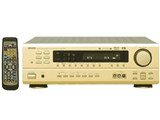
Figur 1: Front view of the DENON AVC-1550 AV Surround Amplifier. This image displays the main unit with its control knobs and display panel.
2. Vigtige sikkerhedsoplysninger
For at forhindre elektrisk stød, brand eller skade på enheden skal du overholde følgende sikkerhedsforanstaltninger:
- Strømkilde: Tilslut kun enheden til en stikkontakt med vekselstrøm.tage angivet på bagpanelet.
- Ventilation: Ensure adequate ventilation. Do not block ventilation openings. Install the unit in a location with sufficient space around it.
- Vand og fugt: Udsæt ikke enheden for regn eller fugt. Placer ikke genstande fyldt med væsker, såsom vaser, på enheden.
- Fremmedobjekter: Do not insert any metallic objects or flammable materials into the unit's openings.
- Service: Forsøg ikke selv at udføre service på enheden. Overlad al service til kvalificeret servicepersonale.
- Rensning: Disconnect the power cord from the wall outlet before cleaning. Use a dry, soft cloth for cleaning.
3. Opsætning
3.1 Udpakning
Fjern forsigtigt amplifier from its packaging. Retain the original packaging materials for future transport or storage.
3.2 Højttalerforbindelser
Connect your speakers to the appropriate terminals on the rear panel of the AVC-1550. Ensure correct polarity (+ to + and - to -) for all speakers.
- Forreste højttalere: Tilslut til de forreste L/R-terminaler.
- Center højttaler: Tilslut til CENTER-terminalen.
- Surroundhøjttalere: Tilslut til SURROUND L/R-terminalerne.
- subwoofer: Connect to the SUBWOOFER PRE OUT terminal using an RCA cable.
3.3 Audio/Video Component Connections
Connect your audio and video sources (e.g., DVD player, Blu-ray player, TV, game console) to the corresponding input jacks on the rear panel.
- Use appropriate cables (RCA, optical, coaxial) for audio connections.
- For video, use composite, S-video, or component video cables as supported by your devices and the amplivligere.
3.4 Strømtilslutning
After all other connections are made, plug the ampSæt apparatets netledning i en passende stikkontakt.
4. Betjeningsvejledning
4.1 Grundlæggende betjening
- Tænd/sluk: Tryk på MAGT knappen på frontpanelet eller fjernbetjeningen for at tænde eller slukke enheden.
- Valg af input: Brug INPUTVÆLGER knob on the front panel or the input buttons on the remote control to choose your desired audio/video source.
- Lydstyrkekontrol: Juster mastervolumen med den store BIND knappen på frontpanelet eller LYDSTYRKE +/- knapperne på fjernbetjeningen.
4.2 lydtilstande
The AVC-1550 supports various sound modes to enhance your listening experience. Use the MODE button on the remote or front panel to cycle through available modes such as:
- Dolby Pro Logic II: For converting stereo sources into 5.1 channel surround sound.
- DTS-E: For decoding DTS-ES encoded soundtracks.
- Stereoanlæg: For standard two-channel audio playback.
- Direkte: Bypasses tone controls for pure audio playback.
4.3-tonekontrol
Adjust the bass and treble levels using the BASS og DISKANT controls on the front panel or remote control to customize the sound to your preference.
5. Vedligeholdelse
5.1 Rengøring
For at bevare udseendet og ydeevnen af din amplivligere:
- Tag altid netledningen ud før rengøring.
- Brug en blød, tør klud til at tørre de udvendige overflader af.
- Brug ikke slibende rengøringsmidler, voks eller opløsningsmidler, da de kan beskadige finishen.
- Rengør ventilationsåbningerne med jævne mellemrum for at forhindre støvophobning.
5.2 Opbevaring
If you plan to store the unit for an extended period, disconnect it from the power outlet and store it in a cool, dry place, preferably in its original packaging.
6. Fejlfinding
If you experience problems with your AVC-1550, refer to the following common issues and solutions before contacting service personnel.
| Problem | Mulig årsag | Løsning |
|---|---|---|
| Ingen strøm | Power cord not connected securely. Unit is in standby mode. | Check power cord connection. Press the POWER button. |
| Ingen lyd | Incorrect input selected. Volume is too low or muted. Speaker cables disconnected. | Select correct input source. Increase volume, check mute function. Verify speaker cable connections. |
| Ingen video | Incorrect video input selected. Video cables not connected properly. | Select correct video input. Check video cable connections between source, amplifter og TV. |
| Fjernbetjening virker ikke | Batteries are depleted. Obstruction between remote and unit. | Replace batteries. Remove any obstructions. Ensure remote is pointed at the unit's sensor. |
7. Specifikationer
Key specifications for the DENON AVC-1550 AV Surround Amplivligere:
- Mærke: Denon
- Model: AVC-1550
- Lydudgangstilstand: Omgive
- Varens vægt: 9.7 kilo
- Kontrolmetode: Fjern
- Decoder Support: Dolby Pro Logic II, AAC, DTS-E
- ASIN: B00MIOWE7S
Bemærk: Specifikationerne kan ændres uden varsel med henblik på produktforbedring.
8. Garanti og support
For garantioplysninger og kundesupport henvises til garantikortet, der følger med dit produkt, eller besøg den officielle Denon-side. webwebsted. Behold din købskvittering som købsbevis i tilfælde af garantikrav.
Official Denon Webwebsted: www.denon.com