
Indledning
This manual provides detailed instructions for the setup, operation, and maintenance of your iBall Tarang F5 5.1 Speakers for PC. Please read this manual thoroughly before using the product to ensure proper functionality and to prevent damage.
Pakkens indhold
Bekræft, at alle nedenstående varer er til stede i din pakke:
- 1 x subwoofer-enhed
- 5 x Satellite Speaker Units
- 1 x fjernbetjening
- Audio Connection Cables (RCA to 3.5mm, RCA to RCA)
- Brugervejledning (dette dokument)
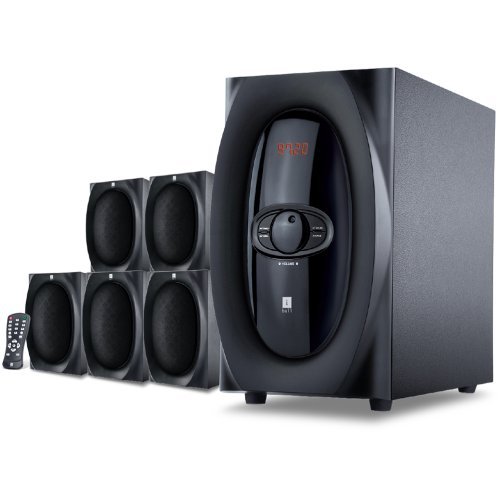
Billede: Overview of the iBall Tarang F5 5.1 Speaker System, showing the subwoofer and five satellite speakers.
Opsætningsinstruktioner
- Placering af højttalere: Place the subwoofer on a stable surface, preferably on the floor. Arrange the five satellite speakers around your listening area for optimal 5.1 surround sound. Typically, one center speaker, two front left/right, and two rear left/right speakers.
- Tilslutning af satellithøjttalere: Connect each satellite speaker to the corresponding output ports on the rear panel of the subwoofer unit. Ensure correct polarity (positive to positive, negative to negative) if applicable, or match color-coded connectors.
- Tilslutning af lydkilde:
- For PC/MP3 Player (2.1Ch or 5.1Ch input): Use the provided audio cables to connect the audio output of your device to the "Audio Input" ports on the subwoofer. For 5.1 channel input, ensure your source device supports 5.1 output and connect all relevant channels (Front L/R, Rear L/R, Center/Sub). For 2.1 channel, connect to the stereo input.
- For USB/SD/MMC Card: Insert your USB drive or SD/MMC card into the designated slot on the front panel of the subwoofer.
- Strømtilslutning: Connect the power cord to the subwoofer unit and then plug it into a standard AC power outlet.
- Tænd: Turn on the main power switch located on the rear or front panel of the subwoofer. The LED display should illuminate.

Image: Illustrative diagram of the subwoofer's rear panel, detailing connections for satellite speakers and various audio input sources.
Betjeningsvejledning
Front Panel Controls and Remote Control
The iBall Tarang F5 can be operated using the controls on the front panel of the subwoofer or via the included full-function remote control.
- Tænd/sluk: Tryk på MAGT button on the remote or the main power switch on the unit.
- Valg af inputkilde: Tryk på INPUT button on the remote or front panel to cycle through available sources: 2.1Ch, 5.1Ch, USB, SD/MMC, FM Radio. The selected source will be displayed on the LED screen.
- Lydstyrkejustering: Brug VOL+ og VOL- buttons on the remote or the master volume knob on the front panel to adjust the overall volume.
- Justering af bas/diskant: Brug dedikeret BASS +/BAS- og TREBLE +/TREBLE- buttons on the remote control to fine-tune audio output.
- Mute-funktion: Tryk på STUM knappen på fjernbetjeningen for midlertidigt at slå lyden fra. Tryk igen for at slå lyden til.
USB/SD/MMC Playback
When a USB drive or SD/MMC card is inserted, the system will automatically switch to the USB/SD input mode and begin playing compatible audio files. Use the remote control for playback functions:
- Afspil/pause: Tryk på AFSPIL/PAUSE knap.
- Næste / forrige nummer: Brug NÆSTE og FORR knapper.
Betjening af FM-radio
Sådan bruger du FM-radiofunktionen:
- Switch the input source to FM tilstand ved hjælp af INPUT knap.
- Automatisk scanning: Tryk og hold på AFSPIL/PAUSE knap (eller en dedikeret SCAN button if available on the remote) to automatically scan and save available FM stations.
- Manuel indstilling: Brug NÆSTE og FORR buttons to manually tune to specific frequencies or navigate through saved stations.
Opretholdelse
- Rensning: Use a soft, dry cloth to clean the speaker surfaces. Do not use liquid cleaners, aerosols, or solvents, as these may damage the finish or internal components.
- Ventilation: Ensure the subwoofer's ventilation openings are not blocked to prevent overheating.
- Placering: Undgå at placere højttalerne i direkte sollys, i nærheden af varmekilder eller i områder med høj luftfugtighed eller støv.
- Strømledning: Undersøg regelmæssigt netledningen for skader. Hvis den er beskadiget, skal du ophøre med at bruge den og kontakte kundesupport.
Fejlfinding
| Problem | Mulig årsag | Løsning |
|---|---|---|
| Ingen strøm | Netledning ikke tilsluttet; Strømafbryder slukket; Strømstik defekt | Ensure power cord is securely connected. Turn on the power switch. Test the power outlet with another device. |
| Ingen lyd | Incorrect input source; Volume too low; Audio cables loose/damaged; Mute function active | Select the correct input source. Increase volume. Check all audio cable connections. Deactivate mute. |
| Forvrænget lyd | Lydstyrken er for høj; Dårlig lydkvalitet i kilden; Løse højttalerkabler | Reduce volume. Test with a different audio source. Check satellite speaker connections. |
| Fjernbetjening virker ikke | Batterierne er opbrugt; Blokering mellem fjernbetjening og enhed; Fjernbetjeningssensor blokeret | Replace remote control batteries. Ensure clear line of sight to the subwoofer's IR sensor. |
| Dårlig FM -modtagelse | Antennen er ikke trukket ud/placeret korrekt; Område med svagt signal | Extend and adjust the FM antenna for better reception. Try auto-scanning again. |
Specifikationer
| Feature | Detalje |
|---|---|
| Mærke | iBall |
| Model | Tarang F5 |
| Kanalkonfiguration | 5.1 Surround Sound |
| Subwoofer-driverstørrelse | 5.25 tommer |
| Størrelse på satellitdriveren | 3 cm (hver) |
| Subwoofer-impedans | 8 Ohm |
| Satellite Impedance | 4 Ohm |
| Kompatible enheder | Computers, MP3 Players, SD Cards |
| Forbindelsesteknologi | USB, RCA (for 2.1Ch/5.1Ch input) |
| Særlige funktioner | FM Radio, USB/SD/MMC Playback, Remote Control, LED Display, Wooden Cabinets |
| Strømkilde | AC |
| Materiale | Træ |
| Varens vægt | 8 kg |
| Pakkedimensioner (B x H x D) | 40.4 x 34.2 x 32.8 cm |
Garanti og support
Your iBall Tarang F5 5.1 Speakers are covered by a limited warranty from the date of purchase. Please refer to the warranty card included in your package for specific terms and conditions.
For technical support, service, or warranty claims, please contact iBall customer service:
- Webwebsted: www.iball.co.in/support (Examplinket, det faktiske link kan variere)
- E-mail: support@iball.co.in (Exampe-mail, den faktiske e-mail kan variere)
- Telefon: 1800-XXX-XXXX (Example number, actual number may vary)
Please have your product model number (Tarang F5) and proof of purchase ready when contacting support.