
1. Produktet er slutview
The Soundstream VR-930B is a single DIN car DVD player featuring a 9.3-inch motorized LCD touchscreen display and Bluetooth connectivity. This unit supports playback of various media types including CD, CD-R/RW, DVD, DVD-R/RW, MP3, WMA, and AAC. It includes a front USB input and a front SD card slot for expanded media options. The device also offers AM/FM radio tuning and MP3 ID3 Tag Display for track information.
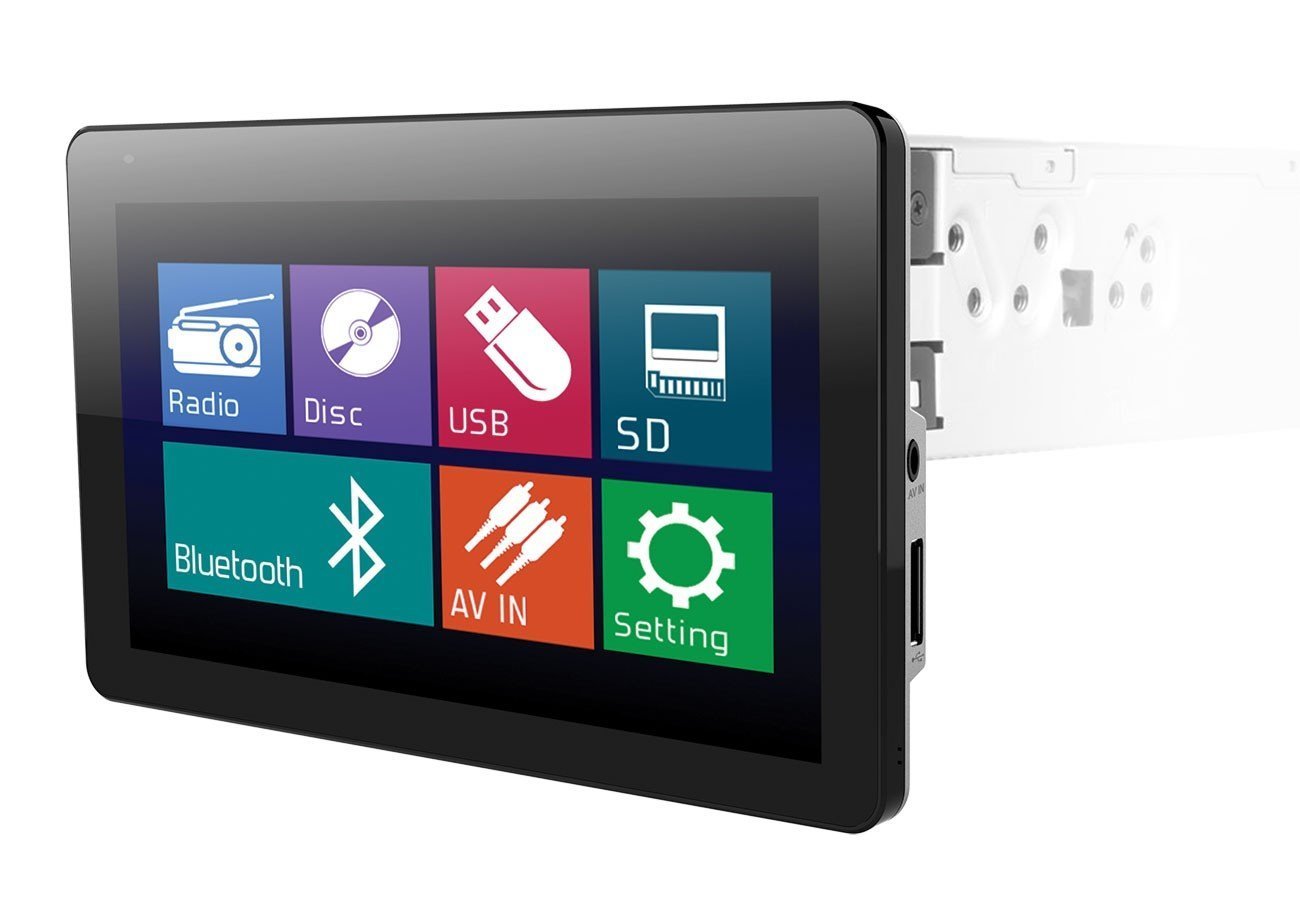
Image: The Soundstream VR-930B car DVD player, showcasing its large 9.3-inch motorized LCD touchscreen display in a vehicle dashboard.
Nøglefunktioner:
- Single DIN chassis with a 9.3-inch motorized LCD touchscreen display.
- Bluetooth for audio streaming and hands-free calling.
- Media playback from CD, DVD, USB, and SD cards.
- AM/FM tuner with MP3 ID3 Tag Vise.
- Maximum power output of 52 watts x 4 channels.
- Aftagelig frontplade for sikkerhed.
- Inkluderer en trådløs fjernbetjening.
2. Sikkerhedsoplysninger
Read all instructions carefully before installation and operation. Failure to follow these instructions may result in damage to the unit, vehicle, or personal injury. Always ensure the vehicle is parked and the parking brake is engaged when operating features that require visual attention, such as DVD playback or extensive menu navigation. Do not operate the unit in a manner that distracts you from driving safely. Consult a professional for installation if you are unsure about any wiring or mounting procedures.
3. Pakkens indhold
Verify that all items are present in the package before beginning installation. The typical package includes:
- Soundstream VR-930B Head Unit
- Ledningsnet
- Trådløs fjernbetjening
- Monteringshardware
- Brugervejledning (dette dokument)
4. Opsætning
4.1 Installation
The VR-930B is designed for single DIN dashboard openings. Professional installation is highly recommended to ensure proper wiring and functionality. Incorrect installation can lead to damage to the unit or vehicle electrical system. Ensure the vehicle's battery is disconnected before starting any installation work.
4.2 Ledningsdiagram
Refer to the detailed wiring diagram provided in the separate installation guide or on the unit's chassis for specific connections. Key connections include power (constant 12V, accessory 12V, ground), speaker outputs, antenna, parking brake sensor, and reverse gear input.
4.3 Indledende tænding
After installation, reconnect the vehicle battery. Press the power button on the unit or remote control. The unit should power on and display the Soundstream logo. Follow any on-screen prompts for initial setup, such as language selection or clock setting.
5. Betjeningsvejledning
5.1 Grundlæggende kontroller
- Power knap: Tryk for at tænde/slukke enheden.
- Volume Knob/Buttons: Juster lydudgangsniveauet.
- Mode knap: Cycle through available audio sources (Radio, DVD, USB, SD, Bluetooth, AUX).
- Menu-knap: Access the main system settings and options.
5.2 DVD/CD-afspilning
Insert a DVD or CD into the disc slot. The unit will automatically detect the disc and begin playback. Use the on-screen controls or remote control for functions such as Play, Pause, Stop, Skip Track/Chapter, and Fast Forward/Rewind. Ensure the parking brake is engaged for video playback.
5.3 Bluetooth-forbindelse
Sådan parrer du en Bluetooth-enhed:
- Aktiver Bluetooth på din mobilenhed.
- On the VR-930B, select the Bluetooth source.
- Søg efter available devices on your mobile phone. The unit's name will typically appear as "Soundstream VR-930B" or similar.
- Select the unit and enter the default PIN (usually "0000") if prompted.
Once paired, you can stream audio from your device or make/receive hands-free calls through the unit.
5.4 USB/SD Media Playback
Insert a USB drive into the front USB port or an SD card into the front SD card slot. The unit will automatically switch to the respective source and display the media files. Navigate through folders and select files using the touchscreen or remote control. Supported formats include MP3, WMA, and AAC.
5.5 Radiobetjening (AM/FM)
Select the Radio source. Use the 'Seek' or 'Tune' functions to find radio stations. You can save your favorite stations as presets for quick access. Press the 'Band' button to switch between AM and FM bands.
5.6 Betjening af berøringsskærmen
The 9.3-inch LCD is a resistive touchscreen. Use light pressure with your fingertip or a stylus to interact with on-screen icons and menus. The motorized screen allows for angle adjustment to optimize viewing.
6. Vedligeholdelse
6.1 Rengøring af enheden
Wipe the unit's surface and touchscreen with a soft, dry cloth. For stubborn dirt, use a slightly damp cloth with a mild, non-abrasive cleaner. Avoid using harsh chemicals or solvents, as they can damage the finish or screen. Ensure the unit is powered off before cleaning.
6.2 Pleje af disken
Handle discs by their edges to avoid fingerprints and scratches. Store discs in their cases when not in use. Clean dirty discs with a soft, lint-free cloth, wiping from the center outwards. Do not use abrasive cleaners or solvents on discs.
7. Fejlfinding
If you encounter issues with your VR-930B, refer to the table below for common problems and solutions.
| Problem | Mulig årsag | Løsning |
|---|---|---|
| Enheden tænder ikke. | Forkert ledningsføring; Sprunget sikring; Lavt batteriniveau. | Kontroller strøm- og jordforbindelser. Undersøg køretøjets sikringer. Sørg for, at batteriet er opladet. |
| Ingen lyd. | Volume too low; Mute activated; Speaker wires disconnected. | Increase volume. Deactivate mute. Check speaker wiring connections. |
| Disc error. | Beskidt eller ridset disk; Ikke-understøttet diskformat. | Rengør disken. Prøv en anden disk. Sørg for, at diskformatet understøttes. |
| Bluetooth opretter ikke forbindelse. | Bluetooth er ikke aktiveret på enheden; Enhed ikke i parringstilstand; Interferens. | Ensure Bluetooth is on and visible. Put unit in pairing mode. Move closer to the unit. |
| Video not playing. | Parking brake not engaged; Incorrect video format. | Ensure parking brake is fully engaged. Check video file formatkompatibilitet. |
8. Specifikationer
Below are the technical specifications for the Soundstream VR-930B:
| Feature | Specifikation |
|---|---|
| Modelnummer | VR-930B |
| Skærmstørrelse | 9.3 tommer |
| Display Type | Motorized LCD Touchscreen |
| Skærmopløsning | 800 x 480 |
| Max effekt | 52 watt x 4 kanaler |
| Understøttede medietyper | CD+RW, CD-R, MP3, DVD, DVD-R/RW, WMA, AAC |
| Forbindelsesteknologi | Bluetooth, USB |
| Strømkilde | 12V |
| Produktets vægt | 2.8 pund |
| GTIN / UPC | 709483047792 |
9. Garantioplysninger
Soundstream-produkter er designet og fremstillet efter de højeste kvalitetsstandarder. Dette produkt er dækket af en begrænset garanti mod defekter i materialer og udførelse. Garantiens varighed og vilkår kan variere afhængigt af region og forhandler. Gem venligst din købsbevis til garantikrav. For specifikke garantioplysninger henvises til garantikortet, der fulgte med dit produkt, eller kontakt Soundstreams kundesupport.
10. Kundesupport
For teknisk assistance, fejlfinding ud over denne manual eller garantiforespørgsler, bedes du kontakte Soundstreams kundesupport. Besøg den officielle Soundstream website for contact information, FAQs, and additional resources. When contacting support, please have your product model number (VR-930B) and proof of purchase readily available.


