
1. Introduktion
This manual provides detailed instructions for the installation, operation, and maintenance of your Logisys 4-Port 3.5-inch Bay USB 3.0/2.0 Hub. This device is designed to expand the USB connectivity of your desktop computer by utilizing an available 3.5-inch drive bay, providing convenient access to multiple USB ports directly from the front panel of your PC.
The hub features a combination of USB 3.0 and USB 2.0 ports, including a dedicated i-Charger port for efficient device charging. Please read this manual thoroughly before installation and use to ensure proper functionality and safety.

Figur 1: Forside view of the Logisys 4-Port 3.5-inch Bay USB 3.0/2.0 Hub, showing the four USB ports and the Logisys branding.
2. Pakkens indhold
Kontroller venligst, at alle varer er til stede i pakken:
- Logisys 4-Port 3.5-inch Bay USB 3.0/2.0 Hub
- Monteringsskruer (typisk 4)
- USB 3.0 Internal Header Cable (if not integrated)
- USB 2.0 Internal Header Cable (if not integrated)
- SATA Power Cable (if required for additional power)
If any items are missing or damaged, please contact your retailer or Logisys support.
3. Produktfunktioner
- 4 USB -porte: Provides two USB 3.0 ports and two USB 2.0 ports for versatile connectivity.
- 3.5-inch Bay Design: Fits into a standard 3.5-inch drive bay on desktop computers.
- USB 3.0 SuperSpeed: Supports data transfer rates up to 5Gbps (backward compatible with USB 2.0/1.1).
- USB 2.0 High-Speed: Supports data transfer rates up to 480Mbps.
- i-Charger Port: Dedicated port for faster charging of compatible devices.
- Plug and Play: Ingen drivere kræves til de fleste operativsystemer.
- Holdbar konstruktion: Designed for reliable long-term use.
4. Opsætning og installation
Before beginning installation, ensure your computer is powered off and unplugged from the wall outlet. It is recommended to wear an anti-static wrist strap to prevent damage to internal components.
- Åben computerkasse: Fjern sidepanelet på computerens kabinet for at få adgang til de interne komponenter.
- Locate 3.5-inch Bay: Identify an available 3.5-inch drive bay on the front of your computer case. You may need to remove a blank panel cover.
- Insert Hub: Slide the Logisys USB Hub into the chosen 3.5-inch bay from the front of the case until its mounting holes align with those on the drive bay.
- Secure Hub: Use the provided mounting screws to secure the hub firmly in place.
- Tilslut USB 3.0-kablet: Locate an available 20-pin USB 3.0 header on your motherboard. Connect the hub's internal USB 3.0 cable to this header. Ensure the connection is secure and correctly oriented.
- Tilslut USB 2.0-kablet: Locate an available 9-pin USB 2.0 header on your motherboard. Connect the hub's internal USB 2.0 cable to this header. Ensure the connection is secure and correctly oriented.
- Connect Power Cable (if applicable): If your hub requires additional power (e.g., for the i-Charger port or high-power devices), connect the SATA power cable from your power supply to the corresponding port on the hub.
- Luk sag: Replace the computer's side panel and secure it.
- Tænd: Plug your computer back into the wall outlet and power it on. The operating system should automatically detect and install the necessary drivers for the hub.
5. Betjeningsvejledning
Once installed, the Logisys USB Hub operates as a standard USB expansion device. Simply plug your USB devices into the available ports.
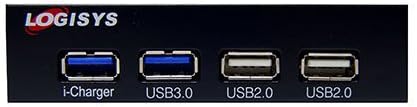
Figur 2: Nærbillede view of the hub's front panel, highlighting the 'i-Charger', 'USB3.0', and 'USB2.0' labels for each port.
- USB 3.0-porte: Use these ports for devices that require high-speed data transfer, such as external hard drives, SSDs, or high-resolution webcams. These ports are typically blue internally.
- USB 2.0-porte: Suitable for devices like keyboards, mice, printers, USB flash drives, and other peripherals where high-speed data transfer is not critical. These ports are typically black or white internally.
- i-Charger Port: This port is optimized for faster charging of compatible mobile devices. While it can also transfer data, its primary function is enhanced power delivery.
The hub is hot-swappable, meaning you can connect and disconnect USB devices without needing to restart your computer.
6. Vedligeholdelse
The Logisys USB Hub requires minimal maintenance.
- Rensning: Use a soft, dry cloth to gently wipe the exterior of the hub. Avoid using liquid cleaners or abrasive materials, as they may damage the finish or internal components.
- Miljø: Ensure the computer case has adequate ventilation to prevent overheating. Avoid exposing the hub to extreme temperatures, humidity, or direct sunlight.
- Kabelstyring: Ensure internal cables are neatly routed and not obstructing airflow or other components.
7. Fejlfinding
If you encounter issues with your Logisys USB Hub, refer to the following troubleshooting steps:
- Enhed ikke genkendt:
- Ensure the hub's internal USB cables are securely connected to the motherboard headers.
- Try connecting the USB device directly to a motherboard USB port to verify the device itself is functional.
- Genstart din computer.
- Check Device Manager in Windows (or System Information in macOS/Linux) to see if the hub is listed without errors.
- Langsomme dataoverførselshastigheder:
- Ensure you are using the USB 3.0 ports for USB 3.0 devices. USB 2.0 devices will operate at USB 2.0 speeds even when connected to a USB 3.0 port.
- Verify that your motherboard's USB 3.0 header is functioning correctly.
- Avoid connecting too many high-bandwidth devices simultaneously to the same hub.
- No Power to Devices / Charging Issues:
- Ensure the optional SATA power cable is connected from your power supply to the hub (if required for your model).
- Test with a different USB device to rule out a faulty device.
- Check your power supply's capacity if you are connecting many power-hungry devices.
- Hub ikke fundet:
- Re-check all internal cable connections to the motherboard.
- Try a different 3.5-inch bay or motherboard header if available.
8. Specifikationer
| Mærke | Logisys |
| Samlet USB-porte | 4 (2x USB 3.0, 2x USB 2.0) |
| Hardware-interface | USB |
| Særlige funktioner | Plug and Play, Fast Charging (i-Charger port) |
| Kompatible enheder | USB-enheder |
| Formfaktor | 3.5-tommer drevbås |
| Varens vægt | 3.2 ounce (ca. 90.7 gram) |
| Pakkedimensioner | 7 x 4.9 x 1.5 tommer (ca. 17.8 x 12.4 x 3.8 cm) |
| Dato først tilgængelig | 16. juni 2014 |
9. Garanti og support
Logisys products are designed for reliability and performance. For specific warranty information, please refer to the warranty card included with your product or visit the official Logisys website. If you encounter any issues that cannot be resolved using the troubleshooting guide, please contact Logisys customer support for assistance.
Gem venligst dit købsbevis for garantikrav.


