
1. Introduktion
This manual provides comprehensive instructions for the Adesso AKB-132UY Luminous Large Print Multimedia Desktop USB Keyboard. This keyboard is designed with large, high-contrast keys to enhance readability, particularly for users with visual impairments. It also integrates multimedia controls for convenience.

Figure 1: Adesso AKB-132UY Luminous Large Print Multimedia Desktop USB Keyboard. This image displays the full keyboard with its black frame and bright yellow keys, featuring large black characters.
2. Pakkens indhold
Bekræft at alle varer er til stede i pakken:
- Adesso EasyTouch 132 - Florescent Yellow Multimedia Desktop Keyboard
- Hurtig startvejledning
3. Opsætningsvejledning
3.1 Tilslutning af tastaturet
- Find en ledig USB-port på din computer.
- Plug the USB connector of the Adesso AKB-132UY keyboard into the USB port.
- Operativsystemet vil automatisk registrere og installere de nødvendige drivere. Der kræves typisk ingen yderligere softwareinstallation.
The keyboard is powered via the USB connection.
4. Betjening af tastaturet
4.1 Nøglefunktioner
- Fluorescent 4X Large Print Keys: The keyboard features black characters printed in a large 4X size on bright fluorescent yellow keys. This design provides high contrast for improved visibility and readability, particularly beneficial for users with visual impairments.

Figur 2: Nærbillede view of the keyboard's QWERTY section, highlighting the large black characters on fluorescent yellow keys.
- Multimediekontrol: Dedicated hotkeys allow for one-touch control of media functions. These include:
- Medieafspiller
- Lydstyrke ned
- Lydstyrke op
- Stum
- Afspil/pause
- Forrige spor
- Næste spor
- Stop

Figur 3: Nærbillede view of the numeric keypad and dedicated multimedia control keys located on the upper right side of the keyboard.
- Windows One-Touch Controls: Access common Windows applications directly with dedicated hotkeys:
- Min computer
- Søg
- Kalkulator
- Post
- Home (Browser)
- Favorites (Browser)
- Quiet Membrane Key Switches: The keyboard utilizes membrane key switches designed to provide a responsive and quiet typing experience. These switches are rated for a lifespan of up to five million keystrokes.
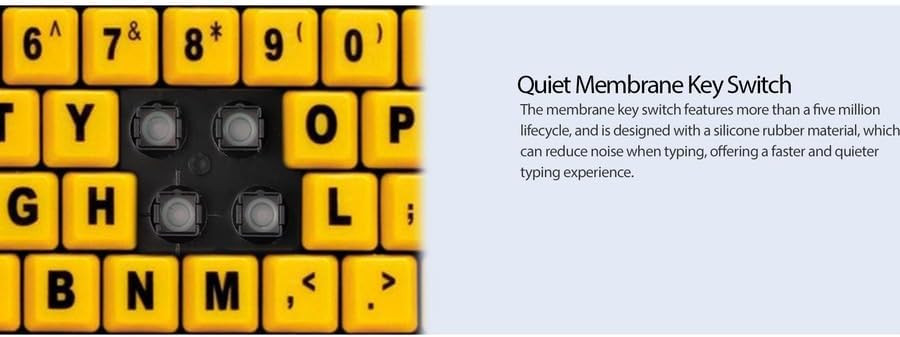
Figur 4: Detaljeret view showing the internal membrane key switch mechanism beneath a keycap.
- 104-Key US Layout: The keyboard features a standard 104-key US layout, providing a familiar typing experience.
5. Vedligeholdelse
5.1 Rengøring af tastaturet
Sådan bevarer du tastaturets udseende og funktionalitet:
- Frakobl tastaturet fra computeren, før du rengør det.
- Brug en blød, let damp cloth to wipe the surface of the keys and the keyboard body.
- For stubborn dirt or debris between keys, use compressed air or a soft brush.
- Undgå at bruge skrappe kemikalier, slibende rengøringsmidler eller overdreven fugt, da disse kan beskadige tastaturets finish eller interne komponenter.
6. Fejlfinding
If you encounter issues with your Adesso AKB-132UY keyboard, refer to the following troubleshooting steps:
6.1 Tastaturet reagerer ikke
- Tjek USB-forbindelse: Ensure the keyboard's USB cable is securely plugged into a functioning USB port on your computer. Try unplugging and re-plugging the cable.
- Prøv en anden USB-port: Connect the keyboard to another USB port on your computer to rule out a faulty port.
- Genstart computeren: Nogle gange kan en simpel systemgenstart løse forbindelsesproblemer.
- Test på en anden computer: Hvis det er muligt, så test tastaturet på en anden computer for at afgøre, om problemet skyldes tastaturet eller computerens opsætning.
6.2 Taster sidder fast eller registreres ikke
- Clean Under Keys: Dust, crumbs, or debris can get lodged under keys. Use compressed air to clear any obstructions.
- Undgå spild: Liquid spills can cause keys to stick or malfunction. If a spill occurs, disconnect the keyboard immediately and allow it to dry completely before reconnecting.
7. Specifikationer
| Feature | Beskrivelse |
|---|---|
| Mærke | Adesso |
| Modelnummer | AKB-132UY |
| Modelnavn | EasyTouch 132 |
| Forbindelsesteknologi | USB |
| Tastaturbeskrivelse | Membran |
| Speciel funktion | Large Print Keys |
| Farve | Sort Gul |
| Materiale | Plast |
| Antal nøgler | 104 |
| Tastaturlayout | QWERTY (US Layout) |
| Strømkilde | USB-strøm |
| Varens vægt | 1.5 pund |
| Kompatible enheder | PC |
8. Garantioplysninger
The Adesso AKB-132UY keyboard comes with a 1 års begrænset garanti from the date of purchase. This warranty covers defects in materials and workmanship under normal use. For specific terms and conditions, please refer to the warranty card included in your package or visit the official Adesso webwebsted.
9. Support
For technical support, product registration, or additional information, please visit the official Adesso website kl www.adesso.com. You may also find FAQs and driver downloads on their support pages.