
APEX AL-A300ATX
APEX AL-A300ATX 300W ATX12V Power Supply User Manual
Model: AL-A300ATX
1. Introduktion
This manual provides essential information for the safe and efficient installation, operation, and maintenance of your APEX AL-A300ATX 300W ATX12V Power Supply. Please read this manual thoroughly before installation and retain it for future reference.
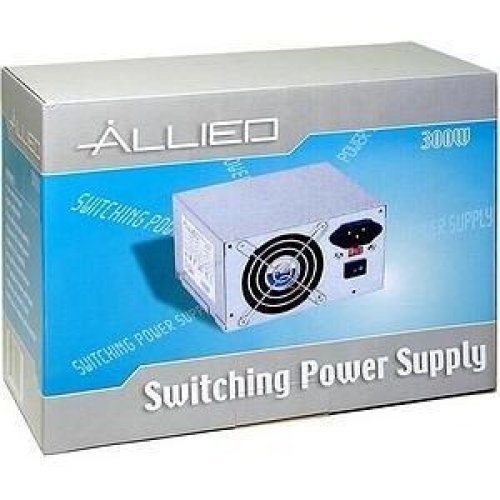
Image: The AL-A300ATX 300W ATX12V Power Supply shown in its retail packaging, indicating it is a "Switching Power Supply" from "ALLIED".
2. Sikkerhedsoplysninger
Always observe the following safety precautions to prevent injury or damage to the power supply or other components:
- Ensure the power supply is disconnected from the AC outlet before installation or removal.
- Åbn ikke strømforsyningen casing. Høj volumentages are present inside, even when disconnected. There are no user-serviceable parts.
- Install the power supply in a well-ventilated area. Do not block ventilation openings.
- Undgå at udsætte strømforsyningen for fugt eller ekstreme temperaturer.
- Use only the cables provided or approved for use with this power supply.
- If the power supply is damaged or malfunctioning, discontinue use immediately and contact support.
3. Pakkens indhold
Bekræft at alle varer er til stede i pakken:
- APEX AL-A300ATX 300W ATX12V Power Supply Unit
- Netledning (kan variere afhængigt af region)
- Monteringsskruer
- Brugervejledning (dette dokument)
4. Opsætning og installation
Follow these steps to install the power supply into your computer system:
- Forberedelse:
- Turn off your computer and unplug the AC power cord from the wall outlet.
- Open your computer case. Refer to your computer case manual for specific instructions.
- Hvis du udskifter en eksisterende strømforsyning, skal du frakoble alle kabler fra den gamle strømforsyning og fjerne den fra kabinettet.
- Montering af strømforsyningen:
- Carefully slide the AL-A300ATX power supply into the designated PSU bay in your computer case.
- Align the screw holes on the power supply with those on the case.
- Fastgør strømforsyningen med de medfølgende monteringsskruer.
- Tilslutning af kabler:
- 24-Pin ATX Main Power Connector: Connect this large connector to the corresponding port on your motherboard. Ensure it clicks into place.
- CPU Power Connector (4-pin or 8-pin): Connect the appropriate CPU power cable to the CPU power port on your motherboard.
- SATA strømstik: Connect these flat connectors to your SATA hard drives, SSDs, and optical drives.
- Molex (Peripheral) Connectors: Connect these 4-pin connectors to older drives or case fans if needed.
- PCI-E Power Connectors (if applicable): If your graphics card requires additional power, connect the appropriate PCI-E power cable from the PSU to the graphics card. This model is listed with a "24 Pin" PCI-Express Connector Configuration, implying the main ATX connector.
- Kabelstyring: Før kablerne pænt for at forbedre luftgennemstrømningen og æstetikken i dit kabinet.
- Endelig kontrol: Dobbelttjek alle forbindelser for at sikre, at de er sikre.
- Luk sag: Close your computer case and secure it.
5. Betjeningsvejledning
After successful installation, follow these steps to power on your system:
- Tilslut vekselstrøm: Plug the AC power cord into the power supply's inlet and then into a grounded wall outlet or surge protector.
- Afbryderen: Locate the power switch on the back of the power supply (usually a rocker switch labeled "I" for ON and "O" for OFF). Ensure it is in the "ON" (I) position.
- Tænd computeren: Press the power button on your computer case. The system should now power on.
To turn off your computer, always use the operating system's shutdown procedure. Do not use the power supply's switch for regular shutdowns, as this can lead to data loss or system instability.
6. Vedligeholdelse
Proper maintenance helps ensure the longevity and optimal performance of your power supply:
- Støvrensning: Periodically (every 3-6 months, depending on environment) clean dust from the power supply's fan and ventilation grilles using compressed air. Ensure the computer is powered off and unplugged before cleaning.
- Luftstrøm: Ensure that the computer case has adequate airflow and that the power supply's fan is not obstructed.
- Kabelstyring: Sørg for en ordentlig kabelføring for at forhindre blokering af luftstrømmen.
7. Fejlfinding
Hvis du støder på problemer med din strømforsyning, kan du se følgende almindelige problemer og løsninger:
| Problem | Mulig årsag | Løsning |
|---|---|---|
| Computeren tænder ikke. |
|
|
| Systemet tænder, men lukker ned med det samme. |
|
|
| Ventilatoren larmer eller drejer ikke. |
|
|
If the problem persists after attempting these solutions, contact APEX customer support or a qualified technician.
8. Specifikationer
| Feature | Detalje |
|---|---|
| Modelnavn | AL-A300ATX |
| Mærke | SPIDS |
| Output Wattage | 300 watt |
| Formfaktor | ATX12V |
| Kompatible enheder | Personlig computer |
| Connector Type | ATX (24 Pin PCI-Express Connector Configuration) |
| Afkølingsmetode | Luft |
| Minimum input voltage | 110 volt (AC) |
| Varens vægt | 3.64 pund |
| Pakkedimensioner | 9.6 x 7.2 x 4.1 tommer |
| Dato først tilgængelig | 22. april 2014 |
9. Garanti og support
For information regarding warranty coverage, technical support, or service, please refer to the official APEX webwebstedet eller kontakt deres kundeservice direkte. Behold din købskvittering som købsbevis.
APEX Contact Information: Please visit the official APEX webwebstedet for de seneste kontaktoplysninger og supportressourcer.
Ask a question about this manual
Ask about setup, troubleshooting, compatibility, parts, safety, or missing instructions. Manuals+ will review the question and use this page’s manual context to help answer it.