
Indledning
This manual provides essential information for the safe and efficient operation of your ASK Proxima C3257-A Portable LCD Projector. Please read this manual thoroughly before using the projector and retain it for future reference. It covers setup, operation, maintenance, troubleshooting, and technical specifications.
Opsætning
Udpakning og placering
Carefully remove the projector and all accessories from the packaging. Place the projector on a stable, flat surface. Ensure adequate ventilation around the unit to prevent overheating. Avoid placing the projector in direct sunlight or near heat sources.
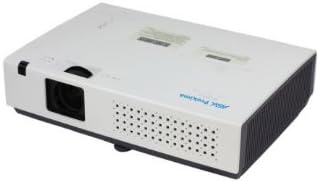
Figur 1: Foran til højre view of the ASK Proxima C3257-A Portable LCD Projector, showing the lens and ventilation.
Tilslutning af enheder
The C3257-A projector supports various connectivity options:
- HDMI: Connect high-definition video and audio sources.
- DisplayPort: Connect compatible video sources.
- USB: Til tilslutning af USB-enheder eller til service.
Connect the appropriate cable from your source device (e.g., laptop, DVD player) to the corresponding input port on the projector. Plug the power cord into the projector and then into a wall outlet.

Figur 2: Øverst view of the ASK Proxima C3257-A Portable LCD Projector, illustrating the control panel and labels.
Første gang tændt
Press the power button on the projector or the remote control to turn on the unit. The power indicator light will illuminate. Allow a few moments for the projector to warm up and display an image.
Betjeningsvejledning
Justering af fokus og zoom
Rotate the focus ring on the lens to achieve a clear image. Use the zoom ring (if available) to adjust the image size without moving the projector. The projector features 1.2x optical zoom.
Image Size and Throw Distance
The projector can produce an image size ranging from 30 inches to 300 inches diagonally. The optimal throw distance is between 31.5 inches and 425.2 inches, depending on the desired image size.
Keystone korrektion
If the projected image appears trapezoidal, use the automatic keystone correction feature to adjust the image to a rectangular shape. The projector supports auto keystone correction of ±30 degrees.
Valg af inputkilde
Use the 'Source' button on the projector's control panel or remote control to cycle through available input sources (HDMI, DisplayPort, USB).
Projiceringsmetoder
The C3257-A supports various projection methods:
- Frontprojektion: Projector placed in front of the screen.
- Bagprojektion: Projector placed behind a translucent screen.
- Loftprojektion: Projector mounted upside down on the ceiling, either front or rear.
Adjust the projection settings in the projector's menu to match your chosen method.
Opretholdelse
Lamp Liv og erstatning
The projector uses a 215 W UHP lamp. The typical lamp life is approximately 4,000 hours in normal mode and up to 6,000 hours in Eco mode. When the lamp life is nearing its end, a warning message may appear on the screen. Refer to the full service manual for detailed lamp udskiftningsvejledning.
Rengøring af projektoren
Regularly clean the projector's exterior with a soft, dry cloth. For the lens, use a lens cleaning cloth and solution specifically designed for optical surfaces. Do not use abrasive cleaners or solvents. Ensure ventilation grilles are free from dust and obstructions.
Fejlfinding
Intet billede vist
- Sørg for, at projektoren er tændt, og at strømindikatoren lyser.
- Verify that the input source cable is securely connected to both the projector and the source device.
- Vælg den korrekte inputkilde ved hjælp af knappen 'Kilde'.
- Check if the source device is outputting a signal.
Billedet er sløret
- Juster fokusringen på projektorlinsen.
- Ensure the projector is within the recommended throw distance for the screen size.
Billedet er trapezformet
- Use the automatic keystone correction feature to adjust the image geometry.
- Sørg for, at projektoren er placeret så vinkelret på skærmen som muligt.
Projektor overophedning
- Ensure all ventilation grilles are clear and unobstructed.
- Brug projektoren i et godt ventileret område.
- If the issue persists, power off the projector and allow it to cool down before restarting.
Specifikationer
| Feature | Detalje |
|---|---|
| Mærke | SPØRG Proxima |
| Model | C3257-A |
| Vis enhed | 0.63" LCD-skærm |
| Indfødt opløsning | XGA (1024x768) |
| Maksimal skærmopløsning | 1920 x 1080 |
| Lysstyrke | 2700 ANSI lumen |
| Kontrastforhold | 4000:1 |
| Aspektforhold | 4:3 |
| Antal farver | Fuld farve |
| Lamp Type | 215 W UHP |
| Typisk Lamp Liv | Normal: 4,000 hours, Eco: 6,000 hours |
| Linse | F: 2.1-2.3, 1.2x optics, f=18.82-22.60mm |
| Digital Zoom | 1/4~16 |
| Kasteforhold | 1.46 - 1.76 |
| Billedstørrelse | 30” - 300” |
| Kasteafstand | 31.5” - 425.2” |
| Keystone korrektion | Auto ±30 degrees |
| Projiceringsmetoder | For, Bag, Loft |
| Forbindelsesteknologi | DisplayPort, HDMI, USB |
| Video Signals Supported | PAL, SECAM, NTSC 4.43, PAL-M, PAL-N, 480i, 480p, 576i, 576p, 720p, 1035i, 1080i |
| Speciel funktion | Internet-ready (for network control/connectivity) |
Garanti og support
For warranty information and technical support, please refer to the documentation provided with your purchase or visit the official ASK Proxima webwebsted. Gem din købsbevis til garantikrav.