
InFocus IN126x
InFocus Projector User Manual
Model: IN126x (F321717)
Indledning
This manual provides comprehensive instructions for the setup, operation, and maintenance of your InFocus IN126x WXGA Network Projector. Designed for both business presentations and home cinema, this projector delivers 4200 lumens and excellent image quality with high contrast and BrilliantColor technology. Its compact and lightweight design ensures portability while maintaining powerful performance.

Figure 1: InFocus IN126x Projector Front View
This image displays the InFocus IN126x projector from a front-right angle, highlighting its main lens and the sleek black casing. The top panel features control buttons and the InFocus logo.
Vigtige sikkerhedsoplysninger
Please read all safety instructions carefully before operating the projector. Failure to follow these instructions may result in fire, electric shock, or other injuries.
- Strømkilde: Use only the power adapter supplied with the projector. Ensure the power outlet matches the voltage krav.
- Ventilation: Do not block ventilation openings. Adequate airflow is essential to prevent overheating.
- Varme: Projektoren lamp and surrounding areas can become very hot during operation. Avoid touching these areas.
- Lamp Advarsel: Lamp contains mercury. Dispose of lamps according to local regulations. Do not open the lamp compartment until the projector has cooled down.
- Væskeeksponering: Udsæt ikke projektoren for regn, fugt eller andre væsker.
- Service: Forsøg ikke selv at servicere dette produkt. Overlad al service til kvalificeret servicepersonale.

Figure 2: Projector Bottom Panel with Warning Labels
This image shows the underside of the InFocus IN126x projector, displaying various regulatory and safety labels. Notable warnings include information about mercury in the lamp and instructions for lamp replacement, emphasizing the need to allow the unit to cool down before servicing.
Opsætningsvejledning
1. Udpakning og placering
Carefully remove the projector and all accessories from the packaging. Place the projector on a stable, flat surface or mount it securely. Ensure there is adequate space around the projector for proper ventilation.

Figur 3: Projektorens dimensioner
This image illustrates the physical dimensions of the InFocus IN126x projector. The measurements are approximately 29.2 cm (length), 22.1 cm (width), and 9.8 cm (height), providing a clear understanding of its compact size for placement considerations.
2. Tilslutning af strøm
Connect the power cord to the projector's power inlet and then plug the other end into a grounded electrical outlet.
3. Tilslutning af indgangskilder
The InFocus IN126x projector supports various input sources. Connect your device (e.g., laptop, Blu-ray player) to the appropriate port on the projector's rear panel.
- HDMI: Til digital video og lyd i høj opløsning.
- VGA (Computer 1/2): For analog computer video input.
- S-Video/Video: Til video i standardopløsning.
- Audio In (Audio 1/2): Til analog lydindgang.
- USB-A/USB-B: For service or specific data transfer.
- LAN: Til netværksforbindelse.
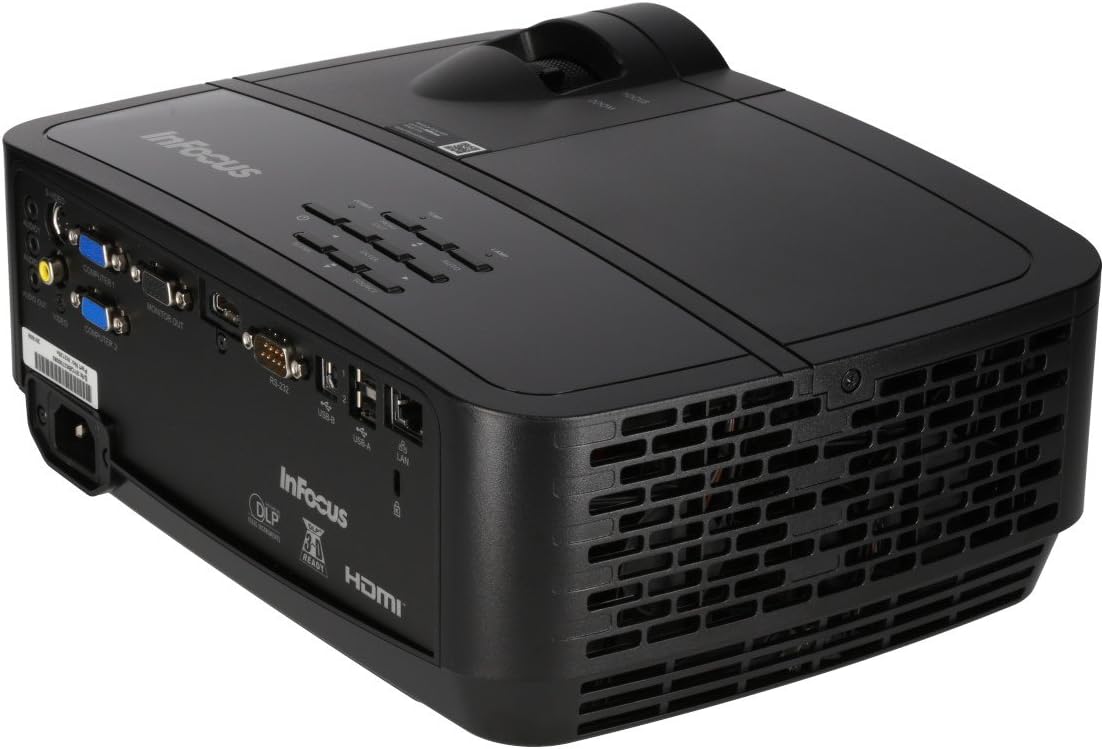
Figure 4: Projector Rear Panel Connectivity
Dette billede giver en detaljeret view of the rear panel of the InFocus IN126x projector, clearly showing all available input and output ports. These include HDMI, VGA (Computer 1 and 2), S-Video, Video, Audio In (Audio 1 and 2), Monitor Out, RS-232, USB-B, USB-A, and LAN ports, facilitating diverse connectivity options.
4. Første opstart og justering
Press the power button on the projector or remote control. The projector will power on and display the input source. Use the focus and zoom rings on the lens to adjust the image clarity and size to your desired projection area.

Figur 5: Betjeningselementer på projektorens toppanel
This image shows the top surface of the InFocus IN126x projector, highlighting the control panel with various buttons for navigation and settings adjustment. The focus and zoom rings on the lens are also visible, used for fine-tuning the projected image.
Betjeningsvejledning
Grundlæggende kontrol
The projector can be operated using the control panel on the top of the unit or the included remote control.
- Power knap: Tænder eller slukker for projektoren.
- Kildeknap: Cycles through available input sources (HDMI, VGA, etc.).
- Menu-knap: Åbner skærmmenuen (OSD).
- Navigationsknapper: Bruges til at navigere gennem menupunkter og justere indstillinger.
- Enter knap: Bekræfter valg i menuen.
Menu navigation og indstillinger
Press the Menu button to access the OSD. Use the navigation buttons to select categories such as Picture, Display, Setup, and Advanced. Within each category, you can adjust settings like:
- Lysstyrke og kontrast: Optimer billedets synlighed.
- Farve og farvetone: Finjuster farvenøjagtigheden.
- Aspektforhold: Select between 4:3, 16:9, or other ratios to match your content.
- Keystone-korrektion: Adjust image shape if the projector is not perfectly perpendicular to the screen.
- BrilliantColor Technology: Enhance color vibrancy and detail.
Avancerede funktioner
The IN126x supports a superior viewing experience, including 3D home cinema (3D Glasses sold separately). For enhanced connectivity, the projector can easily connect to your phone or iPad with a LightCast Key (sold separately).
Opretholdelse
Lamp Udskiftning
Projektoren lamp has a lifespan of over 5,000 hours. When the lamp reaches the end of its life, a warning message may appear, or the lamp indicator light may illuminate. Always allow the projector to cool down completely (at least 60 minutes) before attempting to replace the lamp. Refer to the safety information on the bottom of the projector for specific warnings regarding mercury content and replacement procedures.
Rensning
- Linse: Brug en blød, fnugfri klud, der er specielt designet til optiske linser. Brug ikke slibende rengøringsmidler.
- Projektor Casing: Tør af med en blød, damp klæde. Undgå skrappe kemikalier.
- Luftventiler: Regularly check and clean the air vents to ensure proper airflow and prevent overheating. Use a soft brush or compressed air to remove dust.

Figure 6: Projector Side Ventilation
This image displays the side of the InFocus IN126x projector, prominently featuring the ventilation grilles. These grilles are crucial for dissipating heat generated during operation, and keeping them clear of obstructions is vital for the projector's longevity and performance.
Fejlfinding
| Problem | Mulig årsag | Løsning |
|---|---|---|
| Intet billede på skærmen |
|
|
| Image is dim or poor quality |
|
|
| Ingen lyd |
|
|
Specifikationer
| Feature | Detalje |
|---|---|
| Mærke | InFokus |
| Modelnummer | F321717 (IN126x) |
| Produktdimensioner | 18.58 x 20.67 x 7.44 tommer |
| Varens vægt | 5.5 pund |
| Skærmopløsning | 1280 x 800 (WXGA) |
| Forbindelsesteknologi | HDMI, VGA, S-Video, USB, LAN |
| Lamp Liv | Over 5,000 timer |
| Speciel funktion | Transportabel |
| Første ledige dato | 7. august 2016 |
Garantioplysninger
The InFocus IN126x Projector comes with a 2 års garanti. InFocus stands behind its products and provides customer service for any issues you may encounter. Please retain your proof of purchase for warranty claims.
Kundesupport
For technical assistance, troubleshooting beyond this manual, or warranty inquiries, please contact InFocus customer support. Visit the official InFocus website for the most up-to-date contact information, including phone numbers and online support resources.
You can also refer to the official InFocus webwebsted for yderligere ressourcer og ofte stillede spørgsmål: www.infocus.com
Ask a question about this manual
Ask about setup, troubleshooting, compatibility, parts, safety, or missing instructions. Manuals+ will review the question and use this page’s manual context to help answer it.