
1. Introduktion
This manual provides detailed instructions for the installation, operation, and maintenance of your Sagemcom DSI83 HD tivùsat satellite receiver. Please read this manual thoroughly before using the device to ensure proper setup and functionality. The Sagemcom DSI83 HD is a high-definition satellite receiver designed to access tivùsat satellite platform channels and other free-to-air satellite broadcasts.
2. Produktet er slutview
The Sagemcom DSI83 HD receiver is a compact and versatile device. Familiarize yourself with its components before proceeding with installation.
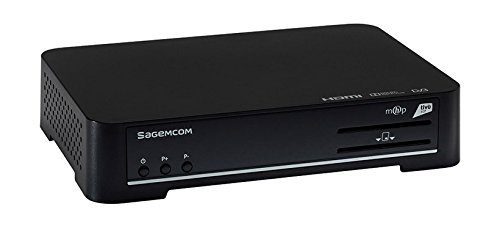
Figure 1: Sagemcom DSI83 HD Front Panel. This image displays the front panel of the Sagemcom DSI83 HD tivùsat receiver. Visible features include the Sagemcom logo, power button, channel up/down buttons, and slots for smart cards.
Frontpanelets funktioner:
- Power knap: To switch the receiver on or off (standby).
- Kanal op/ned-knapper: To navigate through channels.
- Smart Card Slot: For inserting the tivùsat smart card.
Rear Panel Features (Typical):
- LNB IN: Connection for the satellite dish cable.
- HDMI udgang: Connects to your television for high-definition video and audio.
- Ethernet-port: For network connection and advanced features.
- Strømindgang: Tilsluttes strømadapteren.
- USB-port (hvis til stede): For potential software updates or external storage.
3. Opsætning
3.1 Udpakning
Fjern forsigtigt alle komponenter fra emballagen. Sørg for, at følgende dele er til stede:
- Sagemcom DSI83 HD Receiver
- Fjernbetjening
- Strømadapter
- tivùsat Smart Card
- Brugervejledning (dette dokument)
3.2 Tilslutning til dit fjernsyn
- Ensure both your television and the receiver are powered off.
- Connect one end of an HDMI cable (not included) to the HDMI output port on the rear of the DSI83 HD receiver.
- Tilslut den anden ende af HDMI-kablet til en ledig HDMI-indgangsport på dit fjernsyn. Notér HDMI-indgangsnummeret (f.eks. HDMI 1, HDMI 2).
3.3 Connecting to the Satellite Dish
- Connect the coaxial cable from your satellite dish (LNB) to the 'LNB IN' port on the rear of the DSI83 HD receiver.
- The DSI83 HD supports single cable distribution systems for simplified installation.
3.4 Inserting the tivùsat Smart Card
- Locate the smart card slot on the front panel of the receiver.
- Insert the tivùsat smart card with the chip facing downwards and towards the receiver, until it clicks into place.
- Follow the activation instructions provided with your tivùsat smart card.
3.5 Strømtilslutning
- Connect the power adapter to the 'Power Input' port on the receiver.
- Sæt strømadapteren i en passende stikkontakt.
3.6 Guide til indledende opsætning
- Tænd dit fjernsyn, og vælg den korrekte HDMI-indgangskilde.
- Press the power button on the receiver or remote control to turn it on.
- The receiver will display an initial setup wizard. Follow the on-screen prompts to:
- Vælg dit foretrukne sprog.
- Configure satellite settings (if prompted).
- Perform an automatic channel scan. The receiver features automatic channel sorting (LCN) for tivùsat channels.
4. Betjeningsvejledning
4.1 Grundlæggende funktioner
- Tænd/sluk: Tryk på MAGT knappen på fjernbetjeningen.
- Kanalvalg: Brug CH + / CH- knapperne til at skifte kanal sekventielt, eller indtast kanalnummeret direkte ved hjælp af det numeriske tastatur.
- Lydstyrkekontrol: Brug VOL + / VOL- knapper for at justere lydstyrken.
- Stum: Tryk på STUM knappen for midlertidigt at slå lyden fra.
4.2 Elektronisk programguide (EPG)
Tryk på EPG button on your remote control to access the Electronic Program Guide. This feature displays program schedules for current and upcoming broadcasts, allowing you to plan your viewing.
4.3 Kanalstyring
- Yndlingskanaler: You can create a list of your favorite channels for quick access. Refer to the on-screen menu for instructions on adding and managing favorite channels.
- Manuel kanalsøgning: If needed, you can perform a manual channel search through the receiver's menu.
4.4 Forældrekontrol
The receiver includes a parental control feature to restrict access to certain channels or programs. This function is typically protected by a PIN code. Access the parental control settings via the main menu to set up and manage restrictions.
4.5 Softwareopdateringer (OTA)
The Sagemcom DSI83 HD supports Over-The-Air (OTA) software updates. The receiver can automatically detect and install new software versions to improve performance and add new features. Ensure your receiver is connected to the satellite signal for OTA updates.
4.6 Ethernet-forbindelse
Connect an Ethernet cable to the receiver's Ethernet port and your home network for access to interactive services and additional functionalities, as supported by the tivùsat platform.
5. Vedligeholdelse
5.1 Rengøring
To clean the receiver, disconnect it from the power supply. Use a soft, dry cloth to wipe the exterior surfaces. Do not use liquid cleaners, abrasive materials, or solvents, as these can damage the finish or internal components.
5.2 Opbevaring
If storing the receiver for an extended period, ensure it is disconnected from power and all cables. Store it in a cool, dry place, away from direct sunlight and extreme temperatures.
6. Fejlfinding
If you encounter issues with your Sagemcom DSI83 HD receiver, refer to the following common troubleshooting steps:
- Ingen strøm: Check if the power adapter is securely connected to both the receiver and the electrical outlet. Ensure the outlet is functional.
- Intet billede/lyd:
- Kontroller, at dit tv er indstillet til den korrekte HDMI-indgangskilde.
- Check the HDMI cable connection between the receiver and the TV.
- Ensure the receiver is powered on and not in standby mode.
- Intet satellitsignal:
- Check the satellite cable connection to the 'LNB IN' port.
- Ensure your satellite dish is correctly aligned. Severe weather can sometimes affect signal reception.
- 'Coded Signal' Message:
- Verify that the tivùsat smart card is correctly inserted into the slot.
- Ensure your smart card is activated and valid.
- Some channels may require specific subscriptions or may not be part of the tivùsat package.
- Fjernbetjeningen virker ikke:
- Udskift batterierne i fjernbetjeningen.
- Ensure there are no obstructions between the remote control and the receiver's front panel.
If the problem persists after attempting these steps, please contact Sagemcom customer support for further assistance.
7. Specifikationer
| Modelnummer | DSI83HD |
| Dimensioner (BxHxD) | 216 mm x 40 mm x 150 mm |
| Vægt | Cirka 2.2 lbs (1 kg) |
| Satellit-tuner | DVB-S2 / DVB-S |
| Video afkodning | MPEG2 MP@HL (50Hz, max 15 Mbit/s), MPEG4 AVC HP@L4 (HD, 50Hz, max 20 Mbit/s), MPEG-4 AVC HP@L3 (SD, max 10 Mbit/s) |
| Lydafkodning | MPEG-1 Layer I & II, MPEG2 Layer II, DOLBY DIGITAL (passthrough/downmixed), DOLBY DIGITAL PLUS (passthrough/transcoded/downmixed) |
| Videodefinition | HD (High Definition) |
| Forbindelse | 1x HDMI, Ethernet |
| Kontrolmetode | Fjernbetjening |
| Funktioner | Interactive Decoder (MHP), Radio Reception, Software Update (OTA), Automatic Channel Sorting (LCN), Automatic/Manual Channel Search, Timer, Parental Control, EPG, Favorite Channel List, Teletext/Subtitles, PIN Code, LNB/Motor Commands |
8. Garanti og support
For information regarding the product warranty, please refer to the warranty card included with your purchase or visit the official Sagemcom website. For technical support, troubleshooting assistance beyond this manual, or service inquiries, please contact Sagemcom customer support through their official channels.