
1. Introduktion
Thank you for choosing the SCHWAIGER DCR600HD Full HD Cable TV Receiver. This manual provides essential information for the safe and efficient use of your device. Please read these instructions carefully before installation and operation, and keep them for future reference.
2. Sikkerhedsinstruktioner
- Strømforsyning: Only use the power adapter supplied with the device. Ensure the voltage matcher din lokale strømforsyning.
- Ventilation: Do not block ventilation openings. Ensure adequate space around the receiver for proper airflow to prevent overheating.
- Fugtighed: Keep the device away from water, moisture, and high humidity. Do not expose it to rain or splashes.
- Rensning: Afbryd strømmen før rengøring. Brug en blød, tør klud. Brug ikke flydende rengøringsmidler eller aerosolrengøringsmidler.
- Beliggenhed: Place the receiver on a stable, flat surface. Avoid direct sunlight, heat sources, and strong magnetic fields.
- Service: Forsøg ikke at åbne eller reparere enheden selv. Overlad al service til kvalificeret personale.
3. Pakkens indhold
Tjek venligst pakken for følgende varer:
- SCHWAIGER DCR600HD Cable TV Receiver
- Fjernbetjening
- Power Cable (integrated or separate adapter)
- Brugervejledning (dette dokument)
4. Produktet er slutview
4.1 Frontpanel
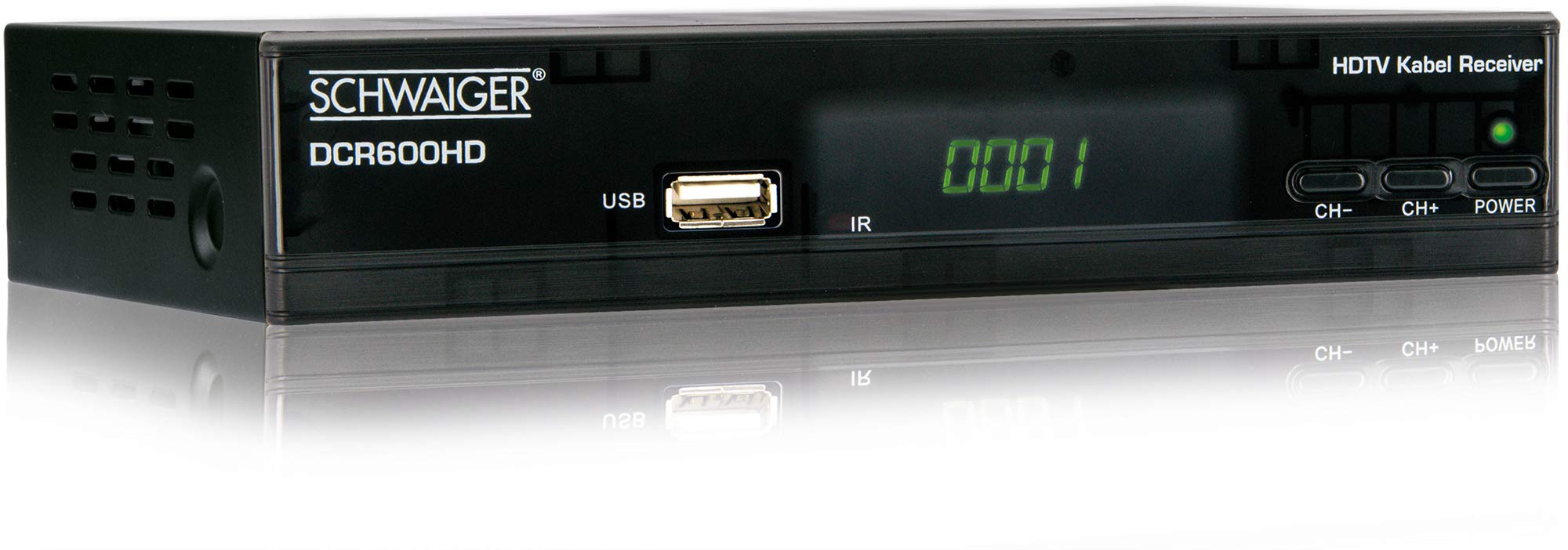
Billede: Front view of the SCHWAIGER DCR600HD receiver, showing the display, USB port, IR receiver, and control buttons.
- Vise: Viser kanalnummer eller tid.
- USB-port: Til tilslutning af USB-lagerenheder til medieafspilning.
- IR: Infrarød modtager til fjernbetjeningen.
- CH- / CH+: Buttons for changing channels.
- MAGT: Button to turn the receiver on or off (standby).
4.2 Bagpanel

Billede: Bag view of the SCHWAIGER DCR600HD receiver, displaying various input and output ports.
- RF IN: Input for connecting to your cable TV network.
- ETHERNET / LAN: For network connection (if supported for updates or specific services).
- HDMI: High-Definition Multimedia Interface-udgang til tilslutning til et HD-TV.
- TV SCART (CVBS): SCART output for connecting to older TVs or other devices.
- ~220-240V 50/60Hz: Strømindgang til receiveren.
4.3 Fjernbetjening

Billede: Layout of the SCHWAIGER DCR600HD remote control, showing various function buttons.
The remote control allows you to operate all functions of your receiver. Familiarize yourself with the button layout for easy navigation.
5. Opsætning
5.1 Tilslutning af modtageren
- Connect to Cable Network: Connect your cable TV antenna cable to the RF IN porten på modtagerens bagpanel.
- Tilslut til tv:
- For High Definition (HD) picture quality, connect an HDMI cable from the HDMI port on the receiver to an HDMI input on your TV.
- For standard definition (SD) or older TVs, connect a SCART cable from the TV SCART (CVBS) port on the receiver to the SCART input on your TV.
- Tilslut strøm: Plug the power cable into the receiver's power input and then into a wall outlet.
- Tænd for fjernsynet: Switch on your television and select the correct input source (HDMI or SCART) corresponding to your connection.
5.2 Førstegangsinstallation
Upon first power-on, the receiver will typically guide you through an initial setup process:
- Sprogvalg: Use the remote control to select your preferred language for the on-screen menus.
- Valg af land: Select your country. This helps configure regional settings and channel frequencies.
- Kanalscanning: The receiver will prompt you to perform an automatic channel scan. Confirm to start scanning for available cable TV channels. This process may take several minutes.
- Gem indstillinger: Once the scan is complete, save the found channels. Your receiver is now ready for use.
6. Betjeningsvejledning
6.1 Grundlæggende betjening
- Tænd/sluk: Tryk på MAGT button on the remote control or front panel to switch the receiver on or to standby mode.
- Kanalvalg: Brug CH+ / CH- buttons on the remote or front panel to change channels sequentially. Alternatively, use the number buttons to directly enter a channel number.
- Lydstyrkejustering: Brug VOL+ / VOL- knapperne på fjernbetjeningen for at justere lydstyrken.
- Stum: Tryk på STUM knappen for midlertidigt at slukke for lyden. Tryk igen for at gendanne den.
6.2 Elektronisk programguide (EPG)
The EPG provides a schedule of current and upcoming TV programs.
- Tryk på EPG button on the remote control to access the Electronic Program Guide.
- Navigate through channels and program times using the arrow buttons.
- Trykke OK til view detaljerede oplysninger om et valgt program.
6.3 Medieafspilning via USB
Du kan afspille multimedier files (AVI, MKV, MP3) from a USB storage device.
- Insert a USB flash drive or external hard drive into the USB porten på frontpanelet.
- The receiver should detect the USB device and prompt you to open the media player, or you can access it via the main menu.
- Naviger gennem din files and folders using the arrow buttons and press OK at vælge og afspille en file.
- Use the media control buttons (Play, Pause, Stop, Fast Forward, Rewind) on the remote control for playback.
6.4 Tekst-tv
Access teletext services provided by broadcasters.
- Tryk på TTX button on the remote control to activate teletext.
- Use the number buttons to enter page numbers or the arrow buttons to navigate.
- Trykke TTX again to exit teletext.
7. Vedligeholdelse
- Rensning: Regularly wipe the receiver with a soft, dry, lint-free cloth. Do not use abrasive cleaners, waxes, or solvents.
- Ventilation: Ensure that the ventilation slots are not obstructed by dust or other objects.
- Softwareopdateringer: Kontroller jævnligt producentens website for any available software updates for your model. Follow the instructions provided with the update carefully.
8. Fejlfinding
If you encounter problems with your receiver, refer to the following common issues and solutions:
| Problem | Mulig årsag/løsning |
|---|---|
| Intet billede eller lyd |
|
| Fjernbetjening virker ikke |
|
| Ingen kanaler fundet under scanningen |
|
| USB-medier afspilles ikke |
|
9. Specifikationer
| Feature | Beskrivelse |
|---|---|
| Modelnavn | DCR600HD |
| Produkttype | Digital DVB TV Tuner / Digital Player |
| Farve | Sort |
| Dimensioner (B x D x H) | 17 cm x 4.5 cm x 10 cm |
| Vægt | 380 g |
| Forbindelsesteknologi | HDMI, USB, SCART, RF |
| Kompatible enheder | Television |
| Videokodning | H.264 |
| Understøttede opløsninger | 576i, 576p, 720p, 1080i, 1080p |
| Billedformater | 4:3, 16:9 |
| Lydudgangstilstand | Stereoanlæg |
| Understøttede lydformater | MP3 |
| Understøttede medietyper | AVI, MKV, MP3 |
| Samlet USB-porte | 1 (USB 4-pin Type A) |
| Total HDMI-porte | 1 |
| Strømforbrug | 3.8 W |
| Voltage | 240 volt |
| Særlige funktioner | Electronic Program Guide (EPG), Teletext, Built-in Bluetooth (Note: Bluetooth functionality may vary by region/firmware) |
| Fjernbetjening | Inkluderet |
10. Garanti og support
For warranty information and technical support, please refer to the documentation included with your product packaging or visit the official SCHWAIGER webwebsted. Behold din købskvittering som købsbevis i tilfælde af garantikrav.