
Gembird KB-BT-001-W-DE
Gembird KB-BT-001-W-DE Slimline Bluetooth Keyboard User Manual
Model: KB-BT-001-W-DE | Brand: Gembird
1. Introduktion
This manual provides detailed instructions for the Gembird KB-BT-001-W-DE Slimline Bluetooth Keyboard. Please read this manual thoroughly before using the product to ensure proper operation and to maximize its lifespan. This keyboard is designed for seamless wireless connectivity with various Bluetooth-enabled devices.
2. Pakkens indhold
- Gembird KB-BT-001-W-DE Bluetooth Keyboard (German QWERTZ Layout, White)
- USB kabel
- Brugermanual
3. Nøglefunktioner
- Slimline Bluetooth V 3.0 Wireless Keyboard (German QWERTZ Layout)
- Ultra-flat and ergonomic design
- Supports common Bluetooth-enabled devices: smartphones, tablets, PCs, and laptops
- Soft-touch keys for comfortable typing
- Convenient multimedia keys
- Compact size (28.7 x 2 x 13.7 cm) ideal for travel
- Compatible with Windows (XP, Vista, 7, 8) and Apple (iPad, iPhone, iPod Touch, MAC OS)
- Driftsområde: Op til 10 meter
4. Systemkrav
- Device with Bluetooth connectivity (e.g., PC, laptop, tablet, smartphone)
- Supported Operating Systems: Windows XP/Vista/7/8, Apple iOS (iPad, iPhone, iPod Touch), Mac OS
5. Opsætning og parring
5.1. Tænd for tastaturet
Locate the power switch on the keyboard, usually on the side or back. Slide it to the "ON" position. The keyboard's indicator light (often blue or green) should illuminate briefly, indicating it is powered on and ready for pairing.
5.2. Parring med din enhed
- Aktivér Bluetooth på din enhed: Go to your device's settings and ensure Bluetooth is turned on.
- Gå ind i parringstilstand: On the Gembird keyboard, press the Forbinde or Parring button (if available, typically a small button on the back or bottom, or a key combination like Fn + C). The indicator light should start blinking rapidly, signifying it is in pairing mode.
- Søg efter Enheder: On your device, search for available Bluetooth devices. The keyboard should appear as "Gembird KB-BT-001-W-DE" or similar.
- Select and Connect: Select the keyboard from the list. Your device may prompt you to enter a pairing code displayed on the screen. Type this code using the Gembird keyboard and press Indtast.
- Bekræftelse: Once successfully paired, the indicator light on the keyboard will stop blinking and remain solid or turn off, and your device will show the keyboard as "Connected."
Note: The exact pairing process may vary slightly depending on your device's operating system. Refer to your device's manual for specific Bluetooth pairing instructions.
6. Betjeningsvejledning
6.1. Grundlæggende brug
Once paired, the keyboard functions like a standard QWERTZ keyboard. Simply begin typing. Ensure the keyboard is within the 10-meter operating range of your device for optimal performance.
6.2. Multimedie- og funktionstaster
The Gembird KB-BT-001-W-DE keyboard includes dedicated function keys (F1-F12) and multimedia shortcuts. To activate the secondary functions (blue icons) on the F-keys, press and hold the Fn key (located near the left Ctrl key) and then press the desired F-key.
| Nøglekombination | Fungere | Beskrivelse |
|---|---|---|
| Fn + F1 | F11 | Standard F11 key function. |
| Fn + F2 | F12 | Standard F12 key function. |
| Fn + F3 | Åbner standard e-mailklient. | |
| Fn + F4 | Browser/Home | Åbner standard web browser or navigates to home page. |
| Fn + F5 | Medieafspiller | Launches default media player. |
| Fn + F6 | Forrige spor | Skips to the previous track in media playback. |
| Fn + F7 | Afspil/pause | Toggles play/pause for media playback. |
| Fn + F8 | Næste spor | Skips to the next track in media playback. |
| Fn + F9 | Stum | Slår lyden fra/til. |
| Fn + F10 | Lydstyrke ned | Reducerer systemvolumen. |
| Fn + F11 | Lydstyrke op | Øger systemvolumen. |
| Fn + F12 | Lås skærm | Locks the computer screen. |
| Fn + Num Lock | Numeric Keypad Toggle | Activates/deactivates the embedded numeric keypad (U, I, O, J, K, L, M keys). |
6.3. Keyboard Layout (German QWERTZ)
This keyboard features a German QWERTZ layout. Key positions for special characters and symbols may differ from standard QWERTY layouts. Refer to the keycaps for specific character placements.
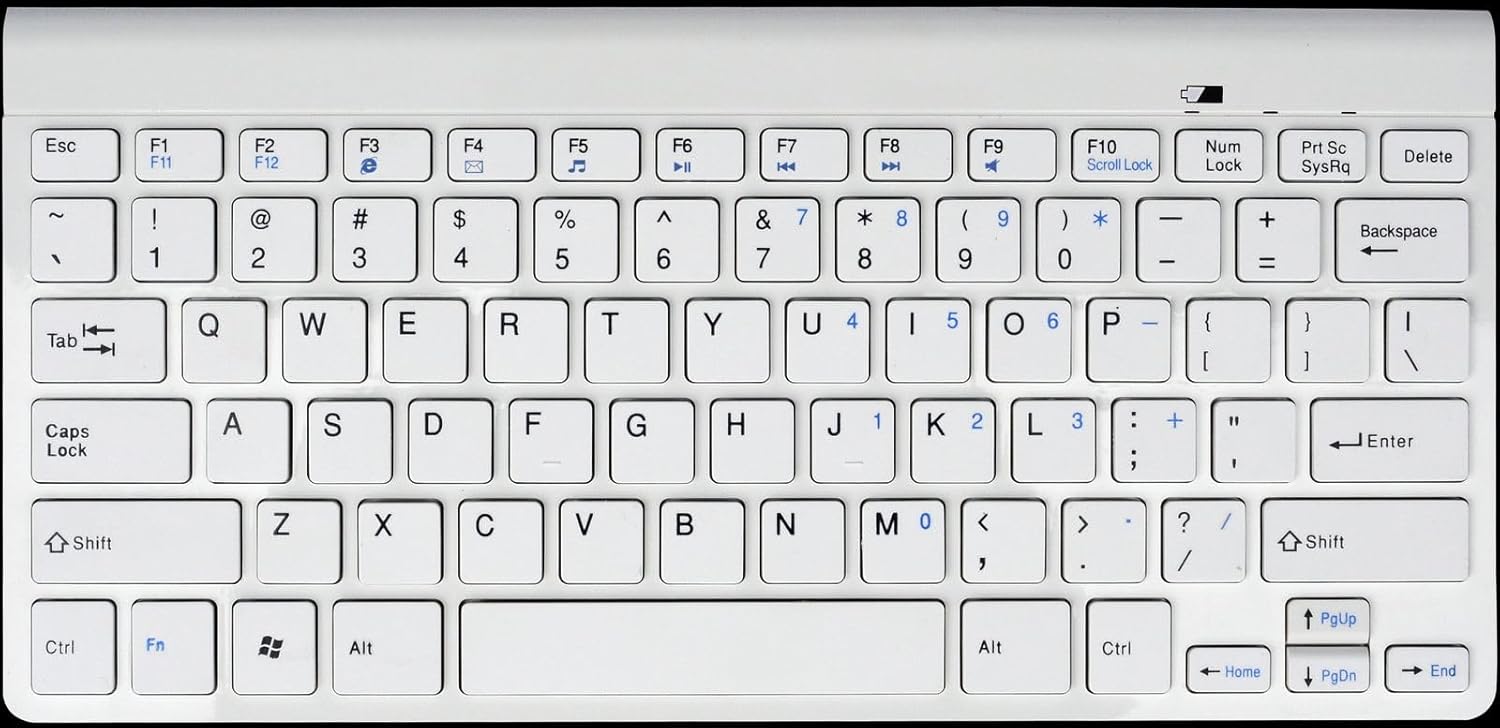
Figur 1: Gembird KB-BT-001-W-DE Slimline Bluetooth Keyboard. This image displays the full keyboard, highlighting its compact design and German QWERTZ key layout, including function keys with multimedia shortcuts and the embedded numeric keypad on the right side.
7. Vedligeholdelse
7.1. Rensning
- Disconnect the keyboard from power and turn it off before cleaning.
- Brug en blød, fnugfri klud lidt dampafsluttes med vand eller en mild rengøringsopløsning.
- Undgå for meget fugt, og sprøjt ikke rengøringsmidler direkte på tastaturet.
- Brug trykluft til støv og snavs mellem tasterne.
7.2. Batteripleje
- If the keyboard uses rechargeable batteries, charge it regularly using the provided USB cable.
- If it uses disposable batteries, replace them when the low battery indicator (if present) illuminates or performance degrades.
- Turn off the keyboard when not in use for extended periods to conserve battery life.
8. Fejlfinding
| Problem | Mulig årsag | Løsning |
|---|---|---|
| Keyboard not connecting/pairing. | Bluetooth is off on device; keyboard not in pairing mode; low battery; too far from device. | Ensure Bluetooth is enabled. Put keyboard in pairing mode. Charge/replace batteries. Move keyboard closer to device (within 10m). Try re-pairing. |
| Taster reagerer ikke eller forsinket input. | Lavt batteri; interferens; uden for rækkevidde. | Charge/replace batteries. Move away from other wireless devices. Ensure keyboard is within range. |
| Incorrect characters typed (e.g., Y and Z swapped). | Device's keyboard layout is set to QWERTY instead of QWERTZ. | Change your device's keyboard input language/layout to German (QWERTZ). |
| Multimedia keys not working. | Fn key not pressed; software incompatibility. | Sørg for at du holder Fn key while pressing the F-key. Update device drivers if applicable. |
9. Specifikationer
| Feature | Detalje |
|---|---|
| Mærke | Gembird |
| Modelnummer | KB-BT-001-W-DE |
| Forbindelsesteknologi | Bluetooth v3.0 |
| Kompatible enheder | PC, smartphone, tablet |
| Tastaturbeskrivelse | Multimedier |
| Antal nøgler | 78 |
| Tastaturlayout | QWERTZ (tysk) |
| Inkluderede komponenter | USB kabel |
| Driftsområde | Op til 10 meter |
| Dimensioner (ca.) | 28.7 x 13.7 x 2 cm (11.3 x 5.4 x 0.8 tommer) |
10. Garanti og support
For warranty information and technical support, please refer to the documentation included with your purchase or visit the official Gembird website. Contact details for support are typically provided in the product packaging or on the manufacturer's webwebsted.
- Fabrikant: Gembird
- Støtte: Telephone support and email support are mentioned in the product features. Please check the included manual or Gembird's official webhjemmeside for aktuelle kontaktoplysninger.