
Sagemcom Sixty
Sagemcom Sixty Cordless Telephone and Answer Machine
Model: Sixty
Mærke: Sagemcom
Produkt overview
The Sagemcom Sixty Cordless Telephone and Answer Machine combines modern technology with a classic design. Its unique aesthetic, smooth finish, and touchscreen functionality make it a distinctive addition to any environment. Designed for user comfort, the Sixty offers a range of features including hands-free mode, extended battery life, and an intuitive interface for easy communication.
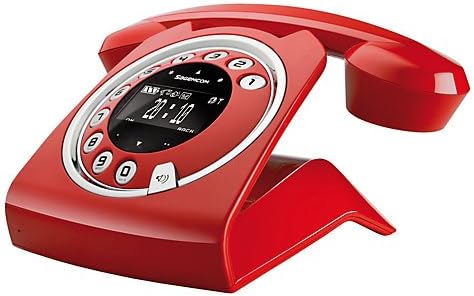
Image: The Sagemcom Sixty Cordless Telephone and Answer Machine in red, showcasing its unique retro-modern design with a circular dial and digital display.

Billede: Side view of the Sagemcom Sixty Cordless Telephone, highlighting its sleek profile and the cradle design.
Opsætningsvejledning
1. Udpakning
Carefully remove all components from the packaging. Ensure you have the base unit, handset, power adapter, and telephone line cord.
2. Tilslutning af baseenheden
- Connect the power adapter to the 'DC IN' port on the back of the base unit and plug the other end into a wall outlet.
- Connect one end of the telephone line cord to the 'LINE' port on the base unit and the other end to your telephone wall jack.
3. Batteriinstallation og opladning
- Åbn batterirummet på håndsættet.
- Isæt de medfølgende genopladelige batterier, og overhold den korrekte polaritet (+ og -).
- Luk batterirummet.
- Place the handset on the base unit. The display will indicate charging. Allow the handset to charge for at least 16 hours before first use to ensure optimal battery performance.
Betjeningsvejledning
Foretage og modtage opkald
- Sådan foretager du et opkald: Løft røret eller tryk på Ring button. Dial the number using the touchscreen keypad.
- Sådan modtager du et opkald: Løft røret eller tryk på Ring knappen, når telefonen ringer.
- Sådan afslutter du et opkald: Placer håndsættet tilbage på baseenheden, eller tryk på Afslut opkald knap.
Brug af berøringsskærmen
The Sixty features a responsive touchscreen for navigation and input. Tap icons or numbers to select functions or dial. Swipe to scroll through lists or menus.
Håndfri tilstand
Under et opkald skal du trykke på Højttaler button to activate hands-free mode. Press it again to return to handset mode.
Håndtering af telefonbog
- Tilføjelse af en kontakt: Navigate to the Phonebook menu, select 'Add New Contact', enter the name and number using the touchscreen, and save. The phonebook can store up to 150 names.
- Søger efter en kontakt: Access the Phonebook and use the search function or scroll through the list.
- Redigering/sletning af en kontakt: Select the desired contact from the Phonebook and choose the 'Edit' or 'Delete' option.
Telefonsvarerfunktioner
The integrated answering machine has a recording capacity of 10 minutes.
- Aktivering/deaktivering: Access the Answering Machine menu to turn it on or off.
- Afspiller beskeder: Select 'Play Messages' from the Answering Machine menu.
- Optagelse af udgående besked: Follow the prompts in the Answering Machine menu to record a personalized outgoing message.
Opretholdelse
Rengøring af din telefon
To clean the phone, wipe it with a soft, damp cloth. Do not use abrasive cleaners or solvents, as these can damage the surface. Ensure the phone is disconnected from power before cleaning.
Batteripleje
- Brug altid de medfølgende genopladelige batterier.
- Hvis telefonen ikke skal bruges i længere tid, skal du fjerne batterierne for at forhindre lækage.
- Bortskaf gamle batterier ansvarligt i henhold til lokale regler.
Fejlfinding
| Problem | Mulig løsning |
|---|---|
| Ingen klartone | Kontroller, om telefonledningen er korrekt tilsluttet til både baseenheden og vægstikket. Sørg for, at strømadapteren er tilsluttet. |
| Håndsættet oplades ikke | Ensure the handset is correctly placed on the base unit. Clean the charging contacts on both the handset and base unit with a dry cloth. Verify the power adapter is working. |
| Dårlig lydkvalitet | Flyt tættere på baseenheden. Kontroller for interferens fra andre elektroniske enheder. Sørg for, at telefonledningen ikke er beskadiget. |
| Skærmen er tom | Check if the handset battery is charged. If not, place it on the base unit to charge. Ensure the power adapter is connected to the base unit. |
| Kan ikke foretage eller modtage opkald | Verify that the telephone line is active. Check all cable connections. Restart the base unit by unplugging and replugging the power adapter. |
Tekniske specifikationer
| Feature | Specifikation |
|---|---|
| Mærke | Sagemcom |
| Model | Tres |
| Farve | Rød |
| Telefontype | Trådløs |
| Telefonens taletid | Op til 10 timer |
| Standby tid | Op til 120 timer |
| Recording Capacity (Answering Machine) | 10 minutter |
| Telefonbogskapacitet | 150 Navne |
| ASIN | B00DX64LPI |
| Første ledige dato | 15. april 2014 |
Garanti og support
For warranty information and customer support, please refer to the documentation included with your purchase or visit the official Sagemcom webwebsted. Gem din købsbevis i tilfælde af garantikrav.
Ask a question about this manual
Ask about setup, troubleshooting, compatibility, parts, safety, or missing instructions. Manuals+ will review the question and use this page’s manual context to help answer it.