
1. Introduktion
This manual provides detailed instructions for the installation, operation, and maintenance of the Bogen TAMB2 Telephone Access Module with PRS2403 Power Supply. Please read this manual thoroughly before attempting to install or operate the unit to ensure proper function and safety.
2. Produktet er slutview
The Bogen TAMB2 Telephone Access Module, paired with the PRS2403 Power Supply, is designed to provide reliable telephone access for paging systems. It offers efficient cooling, supports a wide range of voltages, and features a compact, durable design for seamless integration into your existing setup.
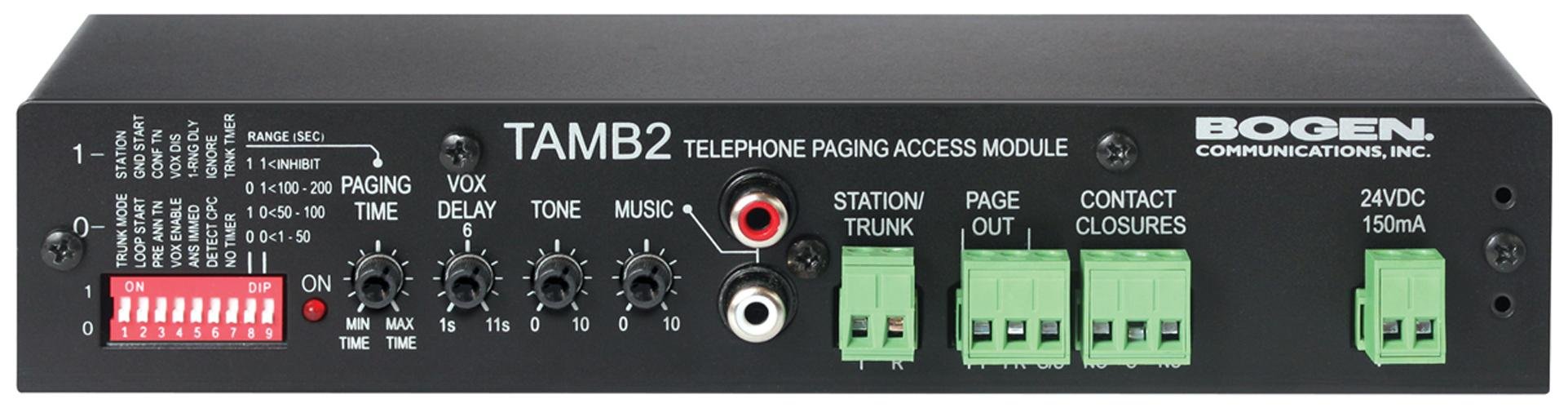
Figure 1: Bogen TAMB2 Telephone Access Module with PRS2403 Power Supply. This image shows the compact design of the module and its accompanying power supply, highlighting the various ports and indicators.
Nøglefunktioner:
- Effektiv køling: Equipped with a high-performance fan to maintain optimal operating temperatures.
- Powerful Supply: Compatible with 120-264 VAC for versatile and reliable power delivery.
- Pladsbesparende design: Compact dimensions (9.54" L x 6.12" W x 2.25" H) for easy placement.
- Nem integration: Features an ATX connector for straightforward installation with compatible telephone systems.
- Holdbar konstruktion: Built with robust materials for long-lasting performance.
3. Sikkerhedsoplysninger
Overhold altid følgende sikkerhedsforanstaltninger for at forhindre personskade og beskadigelse af udstyret:
- Læs alle instruktioner, før du betjener enheden.
- Udsæt ikke enheden for fugt, regn eller ekstreme temperaturer.
- Ensure the power supply is disconnected before making any connections or performing maintenance.
- Only use the provided PRS2403 Power Supply with the TAMB2 module.
- Forsøg ikke selv at åbne eller servicere enheden. Overlad al service til kvalificeret personale.
- Keep the unit away from heat sources and ensure adequate ventilation.
4. Pakkens indhold
Bekræft, at din pakke indeholder følgende varer:
- Bogen TAMB2 Telephone Access Module
- Bogen PRS2403 Power Supply
- Brugervejledning (dette dokument)
- Monteringsudstyr (hvis relevant, tjek emballagen)
5. Opsætning
Follow these steps to properly set up your Bogen TAMB2 Telephone Access Module:
- Pak enheden ud: Carefully remove the TAMB2 module and PRS2403 power supply from their packaging. Inspect for any signs of damage.
- Vælg en placering: Select a dry, well-ventilated location away from direct sunlight, heat sources, and moisture. Ensure there is enough space for proper air circulation around the unit.
- Montering (valgfrit): If mounting is required, use appropriate hardware (not always included) to secure the module in place. Refer to the product dimensions for space planning.
- Tilslut strømforsyningen: Connect the PRS2403 Power Supply to the TAMB2 module using the designated power input port. Do not plug the power supply into a wall outlet yet.
- Connect to Telephone System: Use an appropriate ATX connector cable to link the TAMB2 module to your compatible telephone system. Ensure all connections are secure. The module is designed to interface with analog station ports for paging output.
- Connect to Paging System (if applicable): If integrating with a separate paging amplifier, connect the audio output of the TAMB2 module to the input of your paging amplifier. The module can provide line-level 600 ohm or 8 ohm paging output.
- Anvend strøm: Once all connections are secure, plug the PRS2403 Power Supply into a standard electrical outlet. The unit should power on, and any status indicators should illuminate.
6. Betjeningsvejledning
The Bogen TAMB2 module facilitates telephone access for paging. Once properly installed and powered, its operation is typically integrated with your telephone system's functionality.
- Initiating a Page: From a connected telephone, dial the designated access code or extension configured for the TAMB2 module.
- Making an Announcement: After accessing the module, you will typically hear a confirmation tone. Speak clearly into the telephone handset to make your announcement.
- Ending a Page: Hang up the telephone handset to terminate the paging session.
Note: Specific dialing procedures and features may vary depending on your telephone system's configuration. Consult your telephone system's administrator or manual for detailed instructions on accessing the paging function.
7. Vedligeholdelse
The Bogen TAMB2 module and PRS2403 power supply are designed for reliable, low-maintenance operation. Follow these guidelines for optimal performance:
- Rensning: Disconnect power before cleaning. Use a soft, dry cloth to wipe the exterior surfaces. Do not use liquid cleaners, aerosols, or solvents.
- Ventilation: Ensure that the ventilation openings are not blocked. Periodically check for dust accumulation and gently clean if necessary to maintain efficient cooling.
- Kabelforbindelser: Kontrollér regelmæssigt alle kabelforbindelser for at sikre, at de er fastgjorte og fri for skader.
- Miljøforhold: Operate the unit within its specified environmental conditions (temperature, humidity) to prevent premature failure.
8. Fejlfinding
If you encounter issues with your Bogen TAMB2 module, refer to the following common problems and solutions:
| Problem | Mulig årsag | Løsning |
|---|---|---|
| Ingen strøm/Enheden tænder ikke | Strømforsyning ikke tilsluttet eller defekt; stikkontakt ikke aktiv. | Check power connections. Ensure the power outlet is functional. Test with another outlet if possible. Verify the PRS2403 power supply is working. |
| No audio output during paging | Incorrect connection to telephone or paging system; volume settings too low; faulty cable. | Verify all audio cables are securely connected. Check the input/output settings on your telephone system and paging amplifier. Ensure volume levels are appropriate. Test with a different cable. |
| Distorted or poor audio quality | Improper impedance matching; signal interference; faulty connections. | Ensure the TAMB2 output impedance (600 ohm or 8 ohm) matches the input requirements of your paging amplifier. Check for loose connections or damaged cables. Relocate the unit away from potential sources of electrical interference. |
| Cannot access paging function from telephone | Incorrect telephone system configuration; module not properly connected to telephone system. | Confirm the TAMB2 module is correctly connected to an analog station port. Verify the access code or extension for paging is correctly configured in your telephone system. Consult your telephone system administrator. |
If the problem persists after attempting these solutions, contact Bogen technical support or a qualified service technician.
9. Specifikationer
| Feature | Detalje |
|---|---|
| Mærke | Bogen |
| Modelnavn | TAMB2PS |
| Varemodelnummer | BG-TAMB2PS |
| Kompatible enheder | Telephone systems |
| Connector Type | ATX |
| Formfaktor | ATX |
| Afkølingsmetode | Air (1 fan) |
| Emnedimensioner (LxBxH) | 9.54 x 6.12 x 2.25 tommer |
| Varens vægt | 1.75 pund |
| Antal stik | 1 |
| Strømindgang | 120-264 VAC (via PRS2403 Power Supply) |
| Paging output | Line level 600 ohm or 8 ohm |
10. Garanti og support
Bogen products are designed for durability and reliability. For specific warranty information, please refer to the warranty card included with your product or visit the official Bogen webwebstedet. Behold din købskvittering som købsbevis.
For technical assistance, troubleshooting beyond this manual, or service inquiries, please contact Bogen customer support:
- Webwebsted: www.bogen.com
- Telefon: Refer to the Bogen webwebsted for regionale kontaktnumre.
When contacting support, please have your product model number (TAMB2PS) and serial number (if applicable) ready.