
1. Introduktion
This manual provides comprehensive instructions for the installation, operation, and maintenance of the Supermicro X10SLM+-LN4F motherboard. Designed for server applications, this motherboard features an LGA1150 socket, Intel C224 PCH, DDR3 memory support, and multiple Gigabit Ethernet ports. Please read this manual thoroughly before proceeding with installation to ensure proper setup and optimal performance.
2. Produktet er slutview
The Supermicro X10SLM+-LN4F is a microATX server motherboard built for reliability and performance. Key features include:
- LGA1150 Socket for Intel Xeon E3-1200 v3/v4 and 4th Gen Core i3 processors.
- Intel C224 PCH chipset.
- Four DDR3 DIMM slots supporting up to 64GB ECC/non-ECC UDIMM.
- Multiple SATA3 (6Gbps) ports.
- Integrated quad Gigabit Ethernet ports.
- USB 3.0 and USB 2.0 support.
- VGA output for integrated graphics.
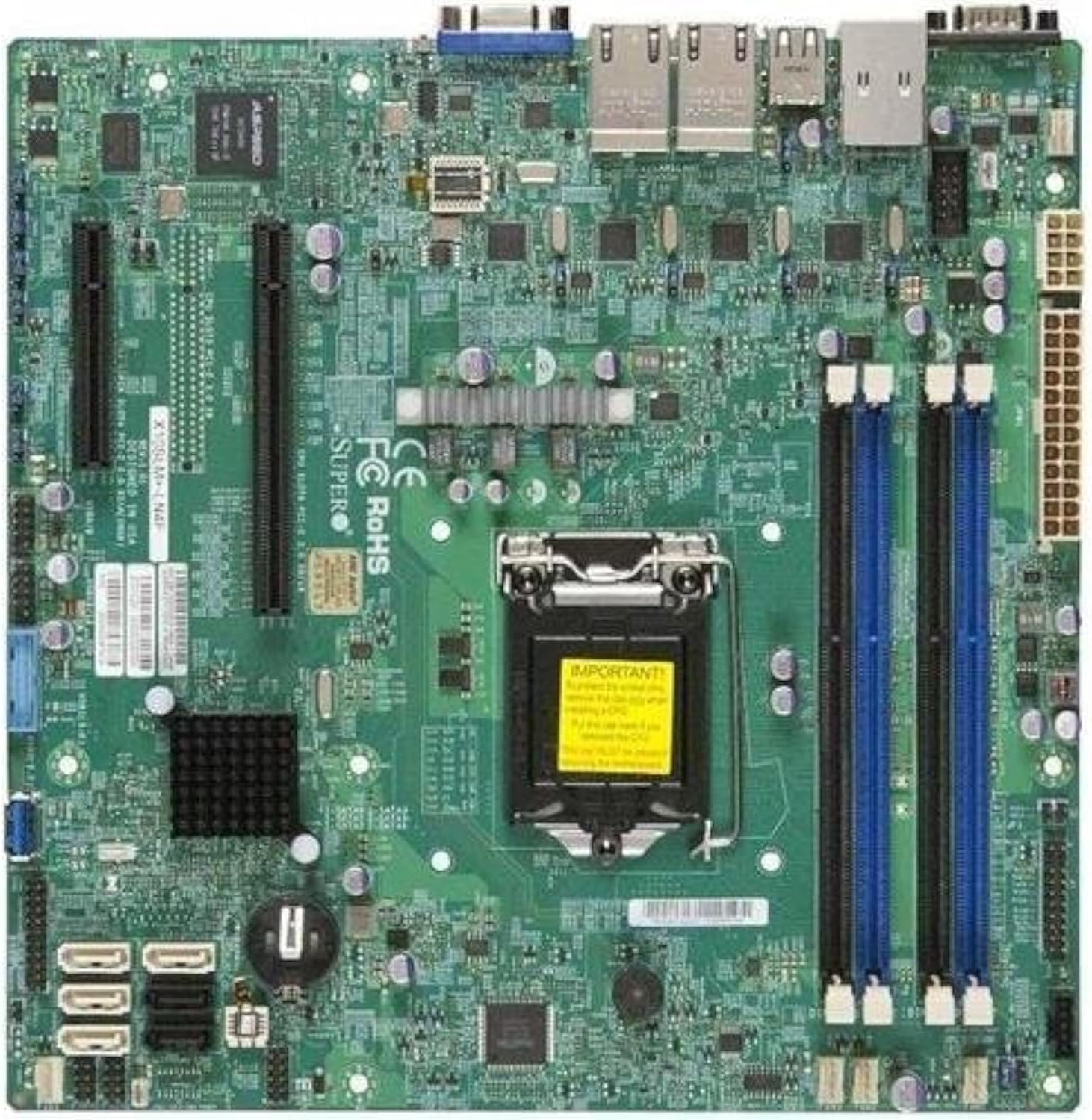
Figur 2.1: Top-down view of the Supermicro X10SLM+-LN4F motherboard, showing the CPU socket, DIMM slots, PCIe slots, and various connectors.

Figur 2.2: Vinklet view of the motherboard, highlighting the layout of components and expansion slots.
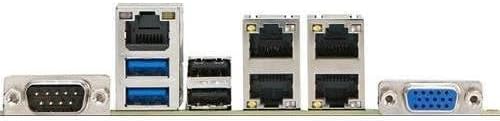
Figur 2.3: Rear I/O panel of the Supermicro X10SLM+-LN4F motherboard, featuring multiple LAN ports, USB ports, and serial ports.
3. Opsætning og installation
Before beginning installation, ensure your system is powered off and disconnected from the power source. Wear an anti-static wrist strap to prevent electrostatic discharge (ESD) damage to components.
3.1. CPU-installation
- Find LGA1150 CPU-sokkelen på bundkortet.
- Tryk forsigtigt ned på belastningshåndtaget, og træk det til siden for at åbne CPU-soklens fastholdelsesramme.
- Juster omhyggeligt det trekantede mærke på CPU'en med det tilsvarende mærke på soklen.
- Sæt CPU'en i soklen uden at tvinge den.
- Luk fastholdelsesrammen, og fastgør den med læssehåndtaget.
- Påfør et tyndt, jævnt lag termisk pasta på CPU'ens integrerede varmefordeler (IHS).
- Installer CPU-køleren i henhold til producentens anvisninger.
3.2. Installation af hukommelse (RAM)
- Locate the four DDR3 DIMM slots. For optimal performance, refer to the motherboard's specific memory population guidelines, typically starting with slots closest to the CPU or specific colored slots for dual-channel configurations.
- Åbn fastholdelsesklemmerne i begge ender af DIMM-stikket.
- Juster hakket på DDR3-hukommelsesmodulet med nøglen i DIMM-stikket.
- Insert the memory module firmly into the slot until the retention clips snap into place.
- Ensure both clips are fully closed and the module is seated correctly.
3.3. Installation af lagerenhed
Connect SATA storage devices (HDDs/SSDs) to the SATA ports on the motherboard using SATA data cables. Connect the power cables from your power supply unit (PSU) to the storage devices.
3.4. Installation af udvidelseskort
This motherboard features PCI Express (PCIe) slots. To install an expansion card:
- Remove the corresponding slot cover from your chassis.
- Align the expansion card with the PCIe slot.
- Tryk godt ned, indtil kortet sidder helt på plads i åbningen.
- Secure the card with a screw or retention clip from your chassis.
3.5. Strømforbindelser
- 24-bens ATX-strømstik: Connect the main 24-pin power cable from your PSU to the ATX power connector on the motherboard.
- 8-pin EPS/CPU Power Connector: Connect the 8-pin (or 4+4 pin) CPU power cable from your PSU to the EPS connector near the CPU socket.
3.6. Frontpanel og bageste I/O-forbindelser
- Frontpanelstik: Connect the power switch, reset switch, power LED, and HDD activity LED cables from your chassis to the corresponding pins on the motherboard's front panel header. Refer to the motherboard's silkscreen labels for correct orientation.
- USB-headere: Connect front panel USB ports to the onboard USB headers.
- Lydoverskrifter: Connect front panel audio jacks to the onboard audio header.
- Bagerste I/O-panel: Connect peripherals such as keyboard, mouse, monitor (via VGA), and network cables (to the Gigabit Ethernet ports) to the rear I/O panel.
4. Betjeningsvejledning
4.1. Initial Power On and BIOS/UEFI Setup
- After all components are installed and connected, connect the power cord to the PSU and turn on the power switch on the PSU.
- Press the power button on your chassis.
- Under selvtesten ved opstart (POST) skal du gentagne gange trykke på DEL or F2 -tasten (eller som angivet på skærmen) for at åbne BIOS/UEFI-opsætningsprogrammet.
- In the BIOS/UEFI, configure essential settings such as date and time, boot order, and enable/disable specific features as required for your operating system and hardware.
- Gem ændringerne, og afslut BIOS/UEFI. Systemet genstarter.
4.2. Installation af operativsystem
To install an operating system (e.g., Windows, Linux, VMware ESXi):
- Insert the operating system installation media (USB drive or DVD) into the system.
- Boot from the installation media (you may need to adjust the boot order in BIOS/UEFI).
- Follow the on-screen prompts to install the operating system on your chosen storage device.
- After installation, install all necessary drivers for the motherboard components (chipset, LAN, VGA, etc.) from the Supermicro website or the provided driver disc.
5. Vedligeholdelse
Regelmæssig vedligeholdelse er med til at sikre lang levetid og stabil drift af dit bundkort og system.
5.1. Rensning
- Rengør bundkortet og systemkomponenterne regelmæssigt med trykluft. Sørg for, at systemet er slukket og frakoblet, før du rengør det.
- Undgå at bruge flydende rengøringsmidler direkte på komponenterne.
- Ensure proper airflow within the chassis by keeping fan vents clear.
5.2. Firmware- og driveropdateringer
- Tjek Supermicro website periodically for updated BIOS/UEFI firmware and drivers for your motherboard model.
- Follow the provided instructions carefully when updating firmware to avoid system instability.
5.3. Miljøhensyn
- Operate the motherboard within recommended temperature and humidity ranges to prevent damage.
- Sørg for tilstrækkelig ventilation i serverkabinettet.
6. Fejlfinding
Dette afsnit indeholder løsninger på almindelige problemer, du kan støde på.
6.1. Ingen strøm / Ingen POST (Power-On Self-Test)
- Verify that the power supply unit (PSU) is connected correctly to the motherboard (24-pin ATX and 8-pin EPS connectors).
- Ensure the PSU is switched on and receiving power from the wall outlet.
- Kontroller, at kablet til strømafbryderen på frontpanelet er korrekt tilsluttet bundkortets header.
- Reseat the CPU, RAM modules, and any expansion cards.
- Prøv at boote med kun de vigtigste komponenter (CPU, én RAM-stick, CPU-køler) for at isolere problemet.
- Listen for beep codes from the system speaker, which can indicate specific hardware failures. Refer to the Supermicro website for beep code interpretations.
6.2. Problemer med skærm
- Ensure the monitor is properly connected to the motherboard's VGA port.
- Kontroller, at skærmen er tændt og indstillet til den korrekte inputkilde.
- If using a discrete graphics card, ensure it is properly seated and connected to power (if required).
6.3. Operativsystemet starter ikke
- Check the boot order in the BIOS/UEFI to ensure the correct storage device is prioritized.
- Verify that the operating system is installed correctly on the storage device.
- Ensure SATA data and power cables are securely connected to the storage device and motherboard.
7. Specifikationer
Below are the technical specifications for the Supermicro X10SLM+-LN4F motherboard:
| Feature | Detalje |
|---|---|
| Mærke | Supermikro |
| Modelnavn | X10SLM+-LN4F-B |
| CPU socket | LGA1150 |
| Chipsættype | Intel C224 |
| RAM-hukommelsesteknologi | DDR3 SDRAM |
| Hukommelseshastighed | 1600 MHz |
| Hukommelseslagringskapacitet | Op til 64 GB |
| Antal USB 2.0-porte | 2 (Bagside I/O) |
| Grafikkort interface | Integrated, PCI |
| Kompatible enheder | Server |
| Platform | Windows 10 |
| Varens vægt | 5.8 pund |
| Produktmål (LxBxH) | 10 x 10 x 2 tommer |
| Dato først tilgængelig | 4. juni 2013 |
Note: Specifications are subject to change without notice. For the most current information, please refer to the official Supermicro product page.
8. Garanti og support
For detailed warranty information, please refer to the warranty card included with your product or visit the official Supermicro website. Technical support is available through Supermicro's customer service channels, including their support portal, email, and phone. Please have your product model number (X10SLM+-LN4F) and serial number ready when contacting support.
For the latest drivers, BIOS updates, and additional documentation, please visit: www.supermicro.com