
Hager XEV103
Hager WITTY Ladestation til Elbil (Model XEV103) Brugermanual
Denne manual indeholder vigtige oplysninger til sikker og effektiv installation, drift og vedligeholdelse af din Hager WITTY ladestation til elbiler.
1. Introduktion
1.1.Overview
Hager WITTY-ladestationen er designet til opladning af elbiler i overensstemmelse med standarderne Mode 3 (IEC 61851-1) og Mode 2. Den understøtter både Type 3- og standardstikforbindelser og tilbyder fleksible opladningsløsninger til forskellige elbiler. Denne enhed fungerer på en 3-faset + neutral, 32A strømforsyning og leverer effekt fra 4 kW til 22 kW.
1.2. Sikkerhedsinstruktioner
- Installationen skal udføres af en kvalificeret elektriker i overensstemmelse med lokale og nationale el-forskrifter.
- Forsøg ikke selv at åbne eller reparere ladestationen. Kontakt kvalificeret servicepersonale.
- Sørg for, at ladestationen er korrekt jordforbundet.
- Brug ikke ladestationen, hvis den er beskadiget eller viser tegn på funktionsfejl.
- Hold børn og uautoriserede personer væk fra ladestationen under drift.
- Undgå at udsætte ladestationen for ekstreme temperaturer, direkte sollys i længere perioder eller ætsende stoffer.
2. Produktbeskrivelse
2.1. Funktioner
- Kompatibel med opladning i tilstand 3 (Type 3) og tilstand 2.
- Fri adgang til drift.
- Effekt: 4 kW til 22 kW.
- Indgang: 3-faset + Nul, 32A.
- Integreret statusindikatorlampe.
2.2. komponenter
Hager WITTY-ladestationen inkluderer typisk:
- Ladestationsenhed
- Monteringsudstyr (skruer, ankre)
- Brugervejledning (dette dokument)

Figur 1: Front view af Hager WITTY-ladestationen med en grøn driftslampe, monteret på en struktureret væg.
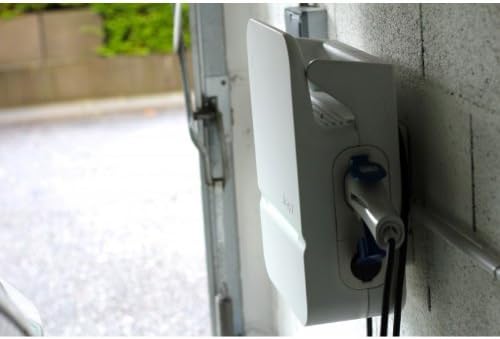
Figur 2: Side view af Hager WITTY-ladestationen, der illustrerer kabelforbindelsespunktet og enhedens fordelefile.
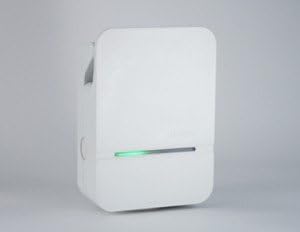
Figur 3: Detaljeret front view af Hager WITTY-ladestationen, med fremhævelse af den integrerede grønne statuslampe.
3. Opsætning
3.1. Installationssted
Vælg et passende sted, der er beskyttet mod direkte stød, for høj fugtighed og ekstreme temperaturer. Sørg for tilstrækkelig ventilation og tilgængelighed til vedligeholdelse.
3.2. Montering
- Marker borepunkterne på væggen ved hjælp af den medfølgende skabelon (hvis relevant) eller ved at måle monteringshullerne på enheden.
- Bor huller og isæt passende vægankre.
- Fastgør ladestationen til væggen med de medfølgende skruer.
3.3. Elektrisk tilslutning
ADVARSEL: El-installation skal udføres af en autoriseret elektriker.
- Sørg for, at hovedstrømforsyningen er afbrudt, før du påbegynder noget elektrisk arbejde.
- Tilslut 3-faset + neutral (3Ph+N) 32A strømforsyningen til de dertil indrettede terminaler inde i ladestationen.
- Sørg for, at der er etableret korrekt jordforbindelse.
- Kontroller, at alle forbindelser er sikre og korrekt tilsluttet i henhold til det ledningsdiagram, der følger med enheden (se den separate installationsvejledning for detaljerede diagrammer).
- Luk ladestationens dæksel ordentligt.
4. Betjening
4.1. Start af en opladning
- Sørg for, at ladestationen er tændt, og at statusindikatorlampen lyser grønt (klar).
- Tilslut ladekablet til din elbils ladeport.
- Tilslut den anden ende af ladekablet til ladestationens stikkontakt (Type 3- eller Mode 2-stik).
- Ladestationen starter automatisk opladningsprocessen. Statusindikatorlampen kan skifte til blå eller blinkende grøn, afhængigt af opladningsstatus.
4.2. Stop af en opladning
- Frakobl først ladekablet fra dit elbil.
- Frakobl ladekablet fra ladestationen.
- Ladestationen vender tilbage til klartilstand (grøn indikatorlampe).
4.3. Statusindikatorer
- Grønt lys: Klar til opladning.
- Blåt lys (eller blinkende grønt): Opladning i gang.
- Rødt lys (eller blinkende rødt): Fejl eller defekt registreret. Se afsnittet Fejlfinding.
- Intet lys: Strømafbrydelse eller systemfejl.
5. Vedligeholdelse
5.1. Rensning
Rengør ladestationens yderside med en blød, tør klud.amp klud. Brug ikke slibende rengøringsmidler, opløsningsmidler eller barske kemikalier. Sørg for, at enheden er slukket, før du rengør den.
5.2. Inspektion
Undersøg ladestationen regelmæssigt for tegn på skader, slid eller løse forbindelser. Kontroller ladekablet for flossning eller beskadigelse. Hvis der findes skader, skal brugen af den ophøre og en kvalificeret tekniker kontaktes.
6. Fejlfinding
| Problem | Mulig årsag | Løsning |
|---|---|---|
| Ingen strøm/Intet lys | Strømforsyning afbrudt; Afbryderen er udløst. | Kontroller strømforsyningen; nulstil afbryderen. Hvis problemet fortsætter, skal du kontakte en kvalificeret elektriker. |
| Rødt indikatorlys | Intern fejl; Overstrøm; Jordfejl. | Frakobl og genstart køretøjet. Hvis fejlen fortsætter, skal du tænde og slukke for enheden. Hvis den stadig lyser rødt, skal du kontakte service. |
| Opladning starter ikke | Kabel ikke korrekt tilsluttet; Køretøjet er ikke klar til opladning; Fejl på ladestationen. | Sørg for, at kablet er korrekt tilsluttet til både køretøjet og ladestationen. Kontroller køretøjets opladningsstatus. Tænd og sluk for ladestationen. |
7. Specifikationer
| Feature | Detalje |
|---|---|
| Model | XEV103 |
| Opladningstilstand | Tilstand 3 (IEC 61851-1), Tilstand 2 |
| Connector Type | Type 3 / Standardstik |
| Input bindtage | 3-faset + Nul |
| Maks. Strøm | 32A |
| Strømudgang | 4 kW til 22 kW |
| Adgang | Fri adgang |
| ASIN | B00CSJUVKA |
8. Garanti og support
For garantioplysninger og teknisk support henvises til den officielle Hager-forhandler. webwebstedet eller kontakt din lokale Hager-forhandler. Gem din købskvittering til garantikrav.
Reservedeles tilgængelighed: Oplysninger ikke tilgængelige.
Ask a question about this manual
Ask about setup, troubleshooting, compatibility, parts, safety, or missing instructions. Manuals+ will review the question and use this page’s manual context to help answer it.