
1. Introduktion
This manual provides instructions for the APEX LD200RM remote control, designed for use with various APEX LCD and LED television models. This remote control offers full functionality for your compatible APEX television, ensuring convenient operation of all features.
Compatible APEX TV Models:
- LD3249
- LD3288, LD3288T, LD3288M
- LD4077, LE4077M
- LD4088
- LD4688
- LE3212, LE3212D
- LE4012
- LE4612
- LE3242
- LE3942
- LE40B12
- LE4243
- LE4643
- LE5043
2. Opsætning
2.1 Batteriinstallation
The APEX LD200RM remote control requires two (2) AA batteries for operation. Follow these steps to install the batteries:
- Find batterirummets dæksel på bagsiden af fjernbetjeningen.
- Tryk ned på tappen, og skub dækslet af.
- Isæt to AA-batterier, og sørg for, at de positive (+) og negative (-) poler er justeret korrekt med markeringerne inde i batterirummet.
- Skub batteridækslet tilbage på plads, indtil det klikker sikkert.
Note: Udskift altid begge batterier på samme tid. Bland ikke gamle og nye batterier eller forskellige typer batterier.
2.2 Førstegangsbrug
The APEX LD200RM remote control is an original replacement and typically does not require any programming or pairing. Once batteries are installed, point the remote control towards your compatible APEX television and begin operation.
3. Betjeningsvejledning
This section details the functions of the buttons on your APEX LD200RM remote control.
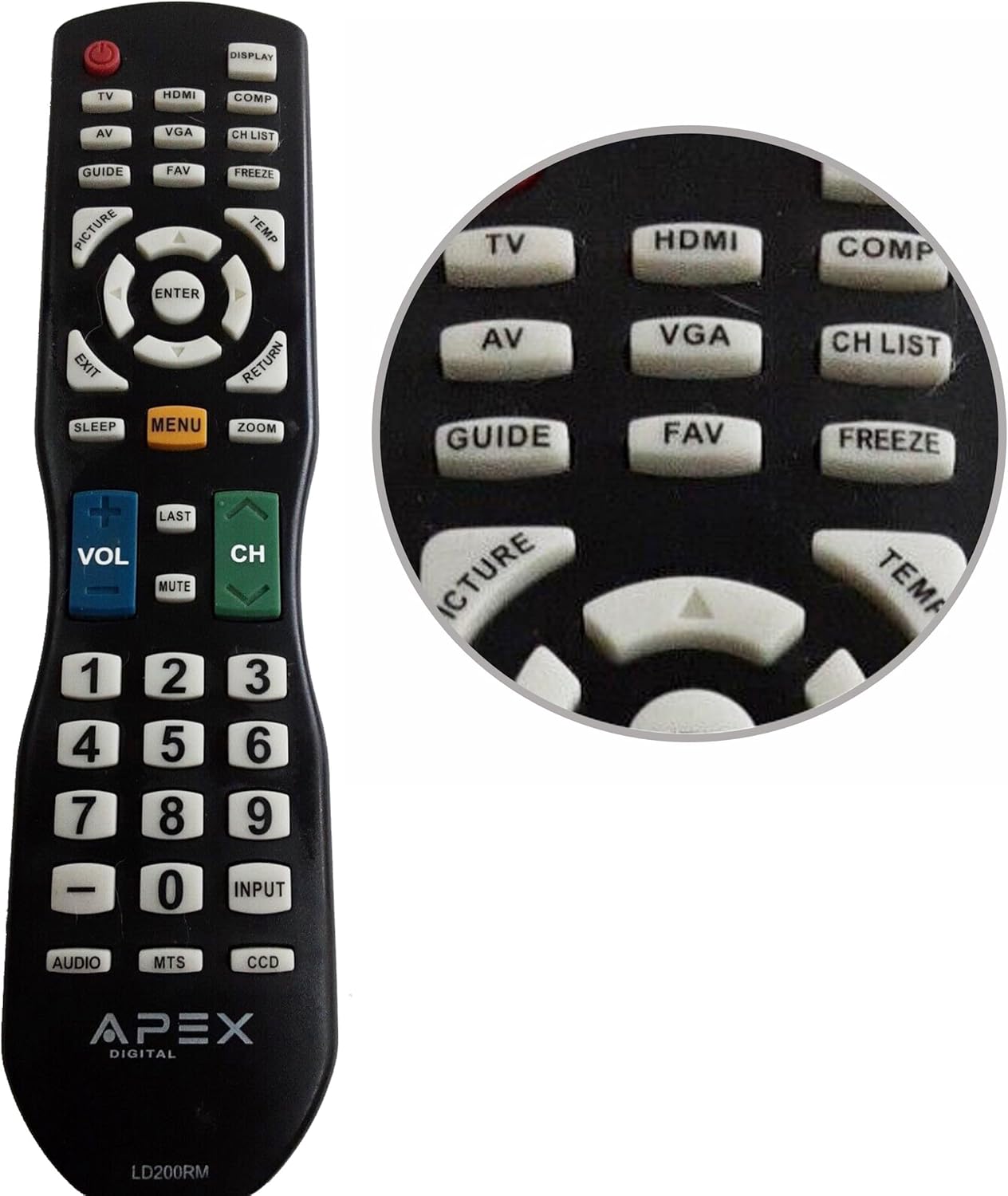
Figure 1: APEX LD200RM Remote Control Layout. This image displays the entire remote control, highlighting the arrangement of its various function buttons, including power, input selection, navigation, volume, channel, and numeric keypad.

Figure 2: Close-up of APEX LD200RM Remote Control Top Buttons. This image provides a detailed view of the upper section of the remote, focusing on buttons such as TV, HDMI, AV, VGA, COMP, CH LIST, DISPLAY, GUIDE, FAV, FREEZE, PICTURE, TEMP, MENU, ENTER, EXIT, RETURN, SLEEP, and ZOOM.
3.1 Power and Input Selection
- POWER (rød knap): Tænder eller slukker for fjernsynet.
- TV: Selects the TV tuner input.
- HDMI: Selects the HDMI input.
- AV: Selects the Audio/Video input.
- VGA: Selects the VGA input.
- COMP: Selects the Component video input.
- SKÆRM: Viser oplysninger på skærmen.
3.2 Channel and Volume Control
- VOL (+/-): Øger eller sænker lydstyrken.
- CH (Op/Ned): Ændrer tv-kanalen op eller ned.
- SIDST: Vender tilbage til det tidligere viewed kanal.
- STUM: Slår fjernsynets lyd fra eller til.
- CH LISTE: Viser kanallisten.
3.3 Menu og navigation
- MENU: Åbner fjernsynets hovedmenu.
- GÅ IND: Confirms a selection within the menu.
- Piletaster (op/ned/venstre/højre): Navigerer gennem menupunkter og justerer indstillinger.
- AFSLUT: Afslutter den aktuelle menu eller skærmvisningen.
- RETURNERING: Vender tilbage til den forrige menu eller skærm.
3.4 Numeric Keypad and Special Functions
- 0-9 (Numeric Buttons): Indtaster kanalnumre direkte.
- INPUT: Blader gennem tilgængelige inputkilder.
- GUIDE: Viser den elektroniske programguide (hvis tilgængelig).
- FAVV: Får adgang til foretrukne kanaler.
- FRYSE: Fryser det aktuelle billede på skærmen.
- BILLEDE: Justerer billedindstillinger.
- MIDLERTIDIG: (Function may vary by model, often related to picture temperature or a specific mode).
- SOVE: Indstiller sleep-timeren.
- ZOOM: Justerer skærmens zoomniveau.
- LYD: Vælger lydtilstande eller spor.
- MTS: Multi-channel Television Sound (stereo/SAP).
- DCC: Closed Captioning Display.
4. Vedligeholdelse
4.1 Udskiftning af batteri
When the remote control's performance degrades or it stops responding, it is likely time to replace the batteries. Refer to Section 2.1 for detailed battery installation instructions. Always use fresh AA batteries.
4.2 Rengøring
Brug en blød, tør klud til at rengøre fjernbetjeningen. Ved genstridigt snavs, tør letampRengør kluden med vand eller et mildt, ikke-slibende rengøringsmiddel. Undgå at bruge skrappe kemikalier eller slibende materialer, da disse kan beskadige fjernbetjeningens overflade eller interne komponenter.
4.3 Opbevaring
Opbevar fjernbetjeningen et køligt, tørt sted væk fra direkte sollys og ekstreme temperaturer. Hvis fjernbetjeningen ikke skal bruges i længere tid, anbefales det at fjerne batterierne for at forhindre lækage og potentiel skade.
5. Fejlfinding
- Fjernbetjeningen reagerer ikke:
- Sørg for, at batterierne er korrekt installeret med den korrekte polaritet (+/-).
- Udskift gamle batterier med nye AA-batterier.
- Check for any obstructions between the remote control and the television's infrared sensor.
- Ensure you are within the effective range of the television's IR receiver.
- Nogle knapper virker ikke:
- Dette kan være tegn på lav batteristrøm. Udskift batterierne.
- Ensure the remote is clean and there is no debris lodged under the buttons.
- Verify that the button function is applicable to your specific TV model. Some functions may not be supported by all compatible TVs.
- Television is not turning on/off:
- Bekræft, at fjernsynet er tilsluttet en fungerende stikkontakt.
- Try using the power button directly on the television to rule out a TV issue.
6. Specifikationer
| Feature | Detalje |
|---|---|
| Modelnummer | LD200RM |
| Mærke | Spids |
| Kompatible enheder | APEX LCD & LED Televisions |
| Strømkilde | 2 x AA batterier (medfølger ikke) |
| Produktdimensioner | 10 x 6 x 2 tommer (cirka) |
| Varens vægt | 3.2 ounce (cirka) |
| Farve | Sort |
| Speciel funktion | Ergonomisk design |
7. Garantioplysninger
This APEX LD200RM remote control typically comes with a 30-day warranty from the date of purchase. This warranty covers manufacturing defects. For specific details regarding warranty claims, returns, or replacements, please refer to your purchase documentation or contact the seller directly.
8. Support
If you encounter issues not covered in this manual or require further assistance, please contact the retailer or the manufacturer's customer support. When contacting support, please have your product model number (LD200RM) and your television model number readily available.