
1. Introduktion
The White-Rodgers 8A18Z-2 is an evaporative cooling control panel designed to manage single-stage evaporative cooling systems. This control panel is intended for use in conjunction with the White-Rodgers 1F51N-619 thermostat. It features an integral transformer for 120 VAC or 240 VAC to 24 VAC operation, separate fan and pump relays, and options for high or low fan speed selection. Its lightweight, weather-resistant plastic case meets relevant code requirements.
2. Sikkerhedsoplysninger
ADVARSEL: Installation and servicing of this control panel must be performed by a qualified technician. Disconnect all power to the unit before installing or servicing to prevent electrical shock or equipment damage.
- Always follow local electrical codes and ordinances.
- Ensure proper grounding of the control panel.
- Do not operate the unit with damaged wiring.
- Hold børn væk fra elektriske komponenter.
- This control panel is designed for evaporative cooling applications only.
3. Pakkens indhold
Kontroller, at alle komponenter er til stede, før installationen påbegyndes:
- White-Rodgers 8A18Z-2 Evaporative Cooling Control Panel
- Installationsvejledning (denne vejledning)
- Note: The White-Rodgers 1F51N-619 thermostat, required for operation, is sold separately.
4. Opsætning og installation
The 8A18Z-2 control panel is designed for wall mounting. Ensure the mounting location is protected from direct weather exposure and allows for proper ventilation.
4.1 Montering af kontrolpanelet
- Select a suitable wall location near the evaporative cooler unit and a power source.
- Åbn dækslet til kontrolpanelet.
- Secure the control panel to the wall using appropriate fasteners through the designated mounting holes.
4.2 Ledningsinstruktioner
The relay panel is removable for easier field wiring. Refer to the wiring diagram provided inside the control panel cover for specific connections. Ensure all connections are secure and comply with local electrical codes.
- Strømforsyning: Connect the 120 VAC or 240 VAC power supply to the integral transformer terminals as indicated.
- Termostatforbindelse: Connect the White-Rodgers 1F51N-619 thermostat to the low voltage terminals (24 VAC) on the control panel.
- Ventilatortilslutninger: Connect the evaporative cooler fan motor wires to the fan relay terminals. Select either high or low fan speed as desired.
- Pumpeforbindelser: Connect the evaporative cooler pump motor wires to the pump relay terminals.
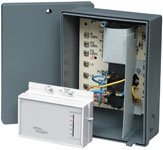
Figure 1: White-Rodgers 8A18Z-2 Evaporative Cooling Control Panel. This image shows the compact, grey plastic enclosure of the control panel, designed for wall mounting and housing the internal relays and transformer for evaporative cooler operation.
5. Betjeningsvejledning
Once properly installed and wired, the 8A18Z-2 control panel operates in conjunction with the connected 1F51N-619 non-programmable thermostat.
- Tænd: After installation, restore power to the control panel.
- Termostatstyring: Use the connected 1F51N-619 thermostat to set the desired temperature and operating mode (e.g., Cool, Fan Only).
- Valg af blæserhastighed: The control panel allows for selection between high and low fan speeds. This setting is typically configured during installation via wiring connections or jumpers on the relay board. Consult the wiring diagram for details.
- Evaporative Cooling Cycle: When the thermostat calls for cooling, the control panel will activate the pump to saturate the cooler pads and then activate the fan to circulate cooled air.
6. Vedligeholdelse
The White-Rodgers 8A18Z-2 control panel requires minimal maintenance. Regular inspection is recommended to ensure optimal performance.
- Årlig inspektion: Annually, or before the cooling season, inspect the control panel for any signs of wear, damage, or loose connections.
- Rensning: Keep the exterior of the control panel clean and free of dust and debris. Use a soft, dry cloth. Do not use abrasive cleaners or solvents.
- Ledningskontrol: Kontrollér regelmæssigt alle ledningsforbindelser for at sikre, at de er tætte og fri for korrosion.
7. Fejlfinding
Before troubleshooting, ensure all power to the unit is disconnected.
| Problem | Mulig årsag | Løsning |
|---|---|---|
| No power to control panel or thermostat |
|
|
| Ventilator kører ikke |
|
|
| Pumpen kører ikke |
|
|
Hvis problemerne fortsætter efter at have forsøgt disse løsninger, skal du kontakte en kvalificeret HVAC-tekniker.
8. Specifikationer
| Model | 8A18Z-2 |
| Type | Evaporative Cooling Control Panel |
| Kompatibilitet | Designed for use with White-Rodgers 1F51N-619 thermostat |
| Input bindtage | 120 VAC eller 240 VAC |
| Udgang Voltage (Thermostat) | 24 VAC |
| Combined Relay Loads (Full Load) | 16.0 A ved 120 VAC, 8.0 A ved 240 VAC |
| Combined Relay Loads (Locked Rotor) | 96.0 A ved 120 VAC, 48.0 A ved 240 VAC |
| Fan Relay (Full Load) | 12.0 A ved 120 VAC, 6.0 A ved 240 VAC |
| Fan Relay (Locked Rotor) | 72.0 A ved 120 VAC, 36.0 A ved 240 VAC |
| Pump Relay (Full Load) | 10.0 A ved 120 VAC, 5.0 A ved 240 VAC |
| Pump Relay (Locked Rotor) | 60.0 A ved 120 VAC, 30.0 A ved 240 VAC |
| Materiale | Weather-resistant plastic case |
| Farve | Grå |
| Monteringstype | Vægmontering |
| Varens vægt | 8 pund (ca. 3.6 kg) |
9. Garanti og support
For warranty information and technical support, please contact White-Rodgers customer service or visit their official webwebsted. Gem din købskvittering for garantikrav.
White-Rodgers Contact Information:
- Webwebsted: www.emerson.com/en-us/automation/commercial-residential-solutions/white-rodgers
- Refer to product packaging or the White-Rodgers webwebstedet for aktuelle kontaktnumre og supporttider.