
1. Produktet er slutview
The DUALSHOCK 4 Wireless Controller is designed for the PlayStation 4 system, offering an enhanced gaming experience with precise controls and innovative features.
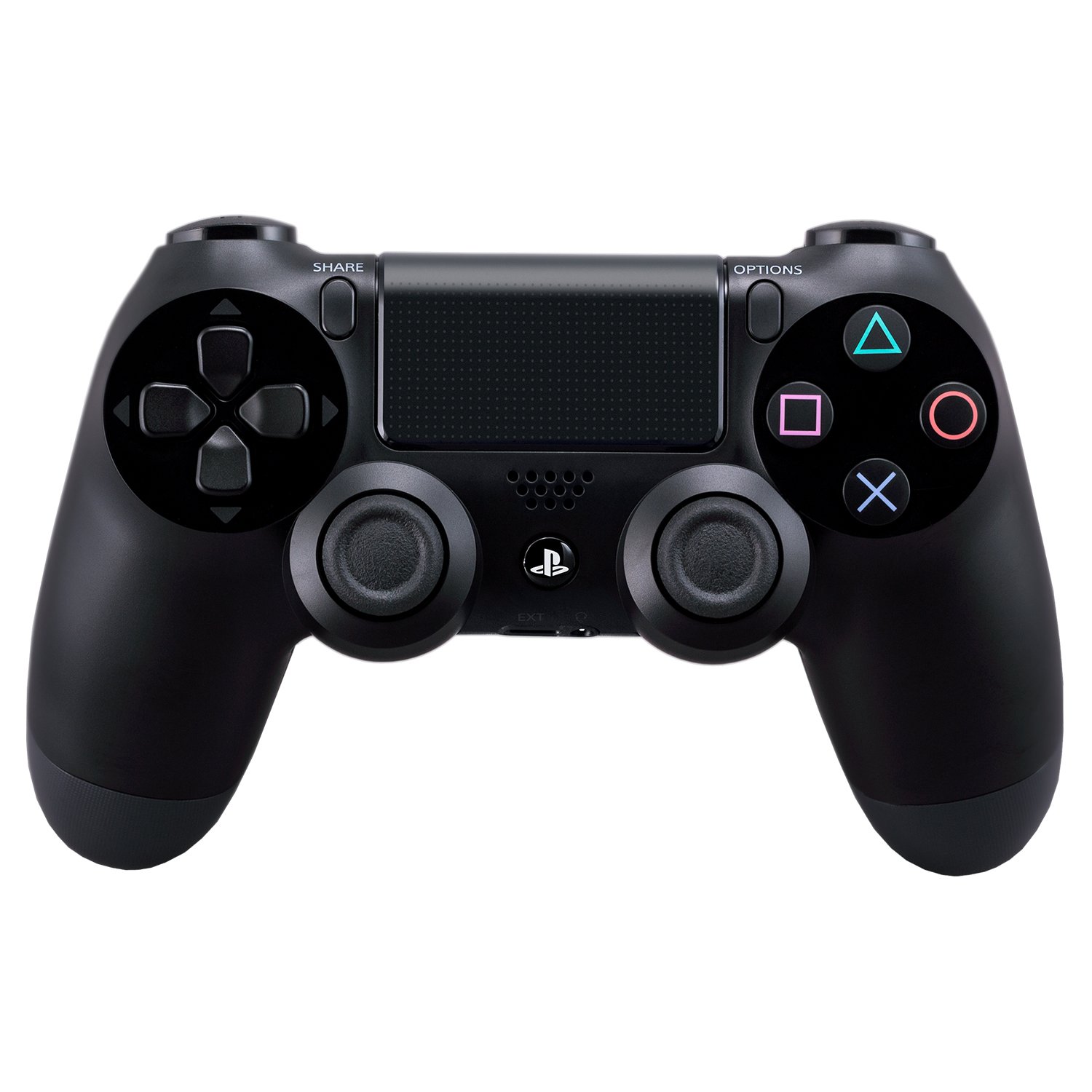
Front view of the DUALSHOCK 4 Wireless Controller, showcasing the analog sticks, D-pad, action buttons, touch pad, and PlayStation button.
Nøglefunktioner:
- Præcisionskontrol: Enhanced analog sticks and trigger buttons provide absolute control for all games.
- Delingsfunktioner: The Share button allows for easy uploading of gameplay videos and screenshots, or live-streaming.
- Nye måder at spille på: Features like the touch pad, integrated light bar, and built-in speaker offer immersive interaction.
- Personlig lyd: A 3.5mm audio jack provides a private audio solution for gamers.
- Effektiv opladning: Rechargeable via the PlayStation 4 system (even on standby) or any standard micro-USB charger.
2. Opsætning
Initial Pairing with PlayStation 4:
- Connect the DUALSHOCK 4 controller to your PlayStation 4 system using a micro-USB cable.
- Tryk på PlayStation-knappen (PS-knappen), der er placeret i midten af controlleren.
- The controller will automatically pair with your system. Once paired, you can disconnect the USB cable for wireless use.
Opladning af controlleren:
The DUALSHOCK 4 controller contains a built-in rechargeable battery. To charge:
- Connect the controller to your PlayStation 4 system using a micro-USB cable. The system can charge the controller even when in standby mode.
- Alternatively, use a standard micro-USB charger (not included with all models) to charge the controller via a wall outlet.
The light bar on the controller will slowly blink orange while charging and turn off when fully charged.
3. Betjeningsvejledning
Grundlæggende kontroller:
- Analoge pinde: Use for precise movement and camera control.
- D-Pad (retningspad): Til menu navigation og specifikke handlinger i spillet.
- Handlingsknapper (Trekant, Cirkel, Kryds, Firkant): Udfør forskellige handlinger i spillet.
- Shoulder Buttons (L1, R1) & Trigger Buttons (L2, R2): Used for aiming, firing, and other contextual actions.

Vinklet view of the DUALSHOCK 4 Wireless Controller, highlighting the shoulder buttons (L1, R1, L2, R2) and the light bar.
Særlige funktioner:
- Del knap: Press to access sharing options, including uploading screenshots and video clips, or starting a live broadcast.
- Touch Pad: A multi-touch, clickable surface that offers new gameplay possibilities and navigation.
- Integreret lysbjælke: Changes color to reflect in-game actions, player health, or to identify players in multiplayer.
- Indbygget højttaler: Giver yderligere lydsignaler direkte fra controlleren, hvilket forbedrer fordybelsen.
- 3.5 mm lydstik: Tilslut et headset til privat lyd- og stemmechat.
Officielle produktvideoer:
PS4 Dualshock 4 Controller Tech
Denne video giver en overview of the technical aspects and features of the DUALSHOCK 4 Controller.
DualShock 4 Controllers
This video demonstrates various DUALSHOCK 4 Controllers, highlighting their design and functionality.
4. Vedligeholdelse
Batteripleje:
- Avoid fully depleting the battery frequently to prolong its lifespan.
- Oplad controlleren regelmæssigt, selvom den ikke er i konstant brug.
- The controller uses a lithium-ion battery. Do not attempt to replace it yourself. Contact PlayStation support for battery service.
Rensning:
- Use a soft, dry cloth to clean the controller.
- Undgå at bruge skrappe kemikalier eller slibende materialer.
5. Fejlfinding
Controlleren opretter ikke forbindelse/parrer ikke:
- Sørg for, at controlleren er opladet.
- Connect the controller directly to the PS4 with a USB cable and press the PS button to re-establish connection.
- If issues persist, try resetting the controller: Locate the small reset button on the back of the controller (near the L2 shoulder button). Use a thin object (like a straightened paperclip) to press and hold the button for 3-5 seconds. Then, reconnect the controller via USB.
Kort batterilevetid:
- Reduce the brightness of the light bar in the PS4 settings.
- Disable the built-in speaker if not needed.
- Sørg for, at controlleren er fuldt opladet før brug.
6. Specifikationer
| Feature | Detalje |
|---|---|
| Modelnummer | 10037 |
| ASIN | B00BGA9X9W |
| Produktdimensioner | 2.5 x 6.75 x 7.25 tommer |
| Varens vægt | 11.8 ounce |
| Fabrikant | Sony PlayStation |
| Batterier | 2 AAA batteries required (internal rechargeable battery, likely refers to initial setup or older model info) |
| Forbindelse | Wireless (Bluetooth), Micro-USB |
| Lydudgang | Built-in speaker, 3.5mm stereo headset jack |
7. Garanti og support
Garantioplysninger:
This PlayStation DUALSHOCK 4 Wireless Controller comes with a standard manufacturer's warranty. Please refer to the warranty card included in the original packaging or visit the official PlayStation webwebsted for detaljerede vilkår og betingelser.
Kundesupport:
For technical assistance, troubleshooting, or service inquiries, please contact PlayStation Customer Support:
- Webwebsted: Besøg playstation.com/support
- Telefon: Check the PlayStation support webwebsted for regionale kontaktnumre.