
Indledning
This manual provides detailed instructions for the proper setup, operation, maintenance, and troubleshooting of your Baseus One-Handed Gaming Keyboard GK01. Please read this manual thoroughly before using the product to ensure optimal performance and longevity.
Produkt overview
The Baseus One-Handed Gaming Keyboard GK01 is a compact, mechanical keyboard designed specifically for gaming. It features a 35-key QWERTY layout, single-color backlighting, and a wired USB connection for reliable performance.
Nøglefunktioner
- One-handed gaming keyboard with 35 QWERTY layout keys, designed for PC gaming.
- Mechanical keys with single-color backlight for enhanced visibility.
- USB connection with wired power source for reliable connectivity.
- Compact design with plastic carbon fiber material structure.

Figure 1: Close-up of Baseus GK01 mechanical key switch. The keyboard features mechanical key switches designed for precise and responsive input, ensuring no key conflicts during rapid presses.

Figure 2: One-handed operation. Optimized 35-key layout for efficient one-handed gaming, integrating commonly used keys for simplified in-game operation.
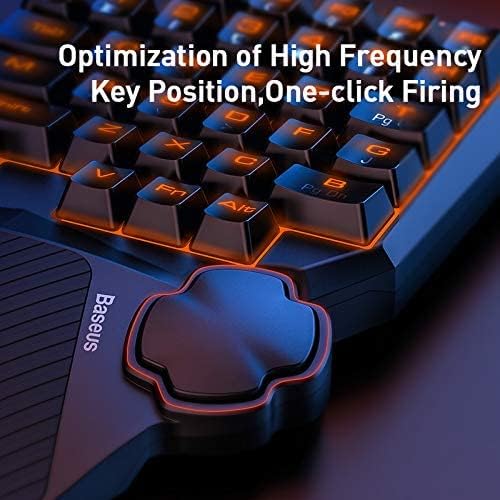
Figure 3: Key position optimization. The keyboard's design optimizes high-frequency key positions for quick access and features a dedicated thumb control for actions like 'one-click firing'.
Opsætning
Pakkens indhold
- 1 x Baseus One-Handed Gaming Keyboard GK01
Systemkrav
- Compatible with computers.
- Tilgængelig USB-port.
Forbindelse
- Pak tastaturet ud af emballagen.
- Connect the USB cable of the keyboard to an available USB port on your computer.
- Tastaturet er plug-and-play og burde automatisk blive genkendt af dit operativsystem. Der kræves typisk ingen yderligere drivere.
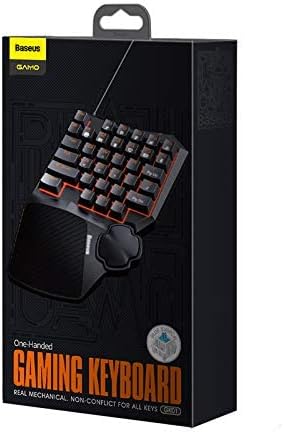
Figure 4: Product packaging. The product comes in a compact box, clearly labeled with the brand 'Baseus GAMO One-Handed Gaming Keyboard GK01'.
Betjeningsvejledning
Grundlæggende betjening
The Baseus GK01 keyboard is designed for intuitive one-handed gaming. The 35 keys are arranged in a QWERTY layout, providing essential controls for most PC games.
Baggrundslys kontrol
The keyboard features a single-color backlight. Specific controls for adjusting backlight brightness or modes are typically integrated into the keyboard's function keys. Refer to the keycap legends for any dedicated backlight control keys (e.g., Fn + a specific key).

Figure 5: Backlit keyboard layout. The keyboard features a vibrant single-color backlight powered by 34 LED beads, providing enhanced visibility in low-light conditions.
Nøglefunktioner
- QWERTY-layout: Standard key arrangement for familiar gaming controls.
- 35 nøgler: Optimized number of keys for essential in-game actions.
- Mekaniske kontakter: Provide tactile feedback and quick response times.
- Ergonomisk design: Features a wave-shape key profile and a balance bar design for the thumb rest to enhance comfort during prolonged use.

Figure 6: Wave shape key design. The keys are designed with a wave shape and professionally optimized profile to reduce hand fatigue during extended gaming sessions.
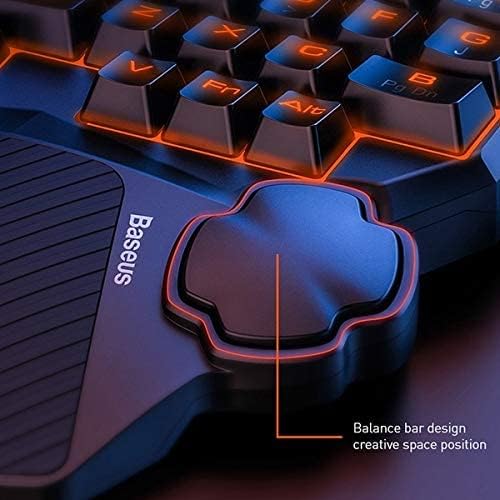
Figure 7: Thumb rest balance bar design. The integrated thumb rest features a balance bar design, providing comfortable support and a creative space position for enhanced control during gameplay.
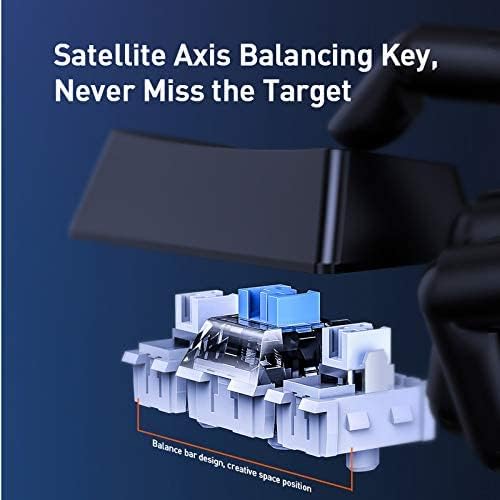
Figure 8: Satellite axis balancing key. Equipped with a satellite axis balancing key design, ensuring stable and consistent key presses, particularly for larger keys like the spacebar.
Opretholdelse
Rengøring og pleje
- Frakobl tastaturet fra computeren, før du rengør det.
- Brug en blød, tør klud til at tørre tastaturets overflade af.
- Til genstridigt snavs, en let damp cloth with mild soap can be used, ensuring no liquid enters the key switches or internal components.
- Brug ikke skrappe kemikalier, slibende rengøringsmidler eller opløsningsmidler.
- Brug trykluft til at fjerne støv og snavs mellem tasterne.
- The keyboard is not water-resistant; avoid exposure to liquids.
Fejlfinding
| Spørgsmål | Mulig årsag | Løsning |
|---|---|---|
| Tastaturet reagerer ikke | Løs USB-forbindelse, defekt USB-port, systemfejl. | Ensure USB cable is securely connected. Try a different USB port. Restart your computer. |
| Baggrundslys virker ikke | Backlight turned off, system error. | Check if there's a dedicated key combination (e.g., Fn + key) to toggle or adjust the backlight. Restart your computer. |
| Tasterne er klæbrige eller reagerer ikke | Dirt or debris under keycaps, faulty switch. | Clean the keyboard using compressed air. If a specific key is consistently faulty, contact customer support. |
Specifikationer
| Feature | Detalje |
|---|---|
| Mærkenavn | Baseus |
| Modelnummer | A0002086 |
| Modelnavn | GMGK01-01 |
| Kompatible enheder | Computer |
| Forbindelsesteknologi | USB (kablet) |
| Tastaturbeskrivelse | Spil |
| Anbefalede anvendelser | Spil |
| Særlige funktioner | Baggrundsbelyst |
| Farve | Sort |
| Understøttelse af baggrundsbelysningsfarver | Enkelt farve |
| Stil | Moderne |
| Materiale | Plastic (Carbon Fiber/Carbon Infused) |
| Switch Type | Mekanisk |
| Tastaturlayout | QWERTY tastatur |
| Håndorientering | One-handed design |
| Antal knapper | 35 |
| Vandmodstandsniveau | Ikke vandafvisende |
| Antal nøgler | 35 |
| Primary Theme | Spil |
| Inkluderede komponenter | Enhåndstastatur |
| Antal enheder | 1 tæller |
| Fabrikant | Baseus |
| Varenummer | A0002086 |
| Varens vægt | 10 gram |
Garanti og support
Garantioplysninger
This product carries a manufacturer's warranty for 1 year from the date of purchase. This warranty covers manufacturing defects under normal use conditions.
Kundesupport
For warranty claims, technical assistance, or further inquiries, please contact the manufacturer or their authorized agent. You may also contact Amazon customer service for additional details regarding your purchase.