
1. Introduktion
This manual provides detailed instructions for the safe and effective installation, operation, and maintenance of the ICM Controls ICM280C OEM Furnace Control Board. This board is designed as a direct replacement for specific Goodman furnace models, ensuring proper control of the furnace's fan and other critical functions. Please read this manual thoroughly before proceeding with installation or operation.
2. Sikkerhedsoplysninger
ADVARSEL: Forkert installation, justering, ændring, service eller vedligeholdelse kan forårsage skade på ejendom, personskade eller død. Læs disse instruktioner grundigt, før du installerer eller servicerer dette udstyr.
- Always disconnect all power to the furnace unit before installing or servicing the control board. Failure to do so can result in electrical shock, fire, or death.
- Installation og service skal udføres af en kvalificeret installatør eller et servicefirma.
- Sørg for, at alle ledningsforbindelser er sikre og overholder lokale og nationale elektriske forskrifter.
- Do not operate the furnace with damaged wiring or components.
- Brug passende personlige værnemidler (PPE) såsom sikkerhedsbriller og handsker under installationen.
3. Produktet er slutview
The ICM Controls ICM280C is an Original Equipment Manufacturer (OEM) replacement control board specifically designed for Goodman furnace systems. It manages the operational sequence of the furnace, including ignition, fan control, and safety monitoring. This board ensures reliable and efficient performance of your heating system.
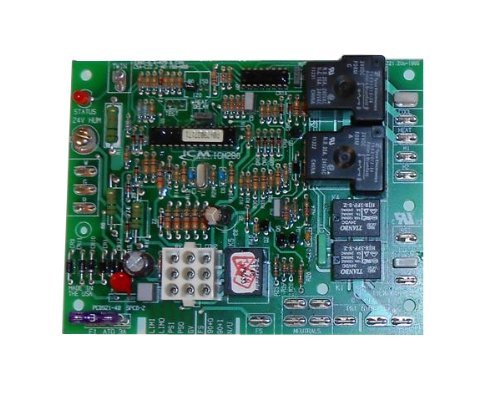
Figure 1: ICM Controls ICM280C OEM Furnace Control Board. This image shows the front view of the control board with various terminals and components.
4. Opsætning og installation
This section outlines the steps for safely replacing your existing furnace control board with the ICM Controls ICM280C.
4.1. Kontrol før installation
- Verify that the ICM280C board is the correct replacement for your specific Goodman furnace model. Refer to your furnace's documentation.
- Gather necessary tools: screwdriver set, wire strippers, multimeter (optional for diagnostics), and safety glasses.
- Take clear photographs of the existing wiring connections on your old control board before disconnecting anything. This will serve as a crucial reference during re-installation.
4.2. Installationsprocedure
- Afbryd strømmen: Locate the main power switch for your furnace and turn it OFF. Additionally, turn off the circuit breaker supplying power to the furnace at your electrical panel. Verify power is off using a multimeter if available.
- Adgangskontroltavle: Open the furnace access panel(s) to expose the existing control board.
- Afbryd ledninger: Carefully disconnect all wires from the old control board. Refer to your photographs taken in step 4.1. Ensure each wire is noted for its original connection point.
- Fjern gammelt bræt: Skru eller klips det gamle styrekort af dets monteringsbeslag.
- Installer nyt kort: Position the ICM Controls ICM280C board in the same location as the old board and secure it using the original screws or clips.
- Tilslut ledningerne igen: Carefully reconnect all wires to the corresponding terminals on the new ICM280C board. Use your photographs as a guide. Double-check every connection for accuracy and tightness.
- Close Access Panels: Once all wiring is secure and verified, close and secure the furnace access panel(s).
- Gendan strøm: Turn on the circuit breaker for the furnace, then turn on the main power switch for the furnace unit.
5. Betjeningsvejledning
After successful installation and power restoration, the ICM Controls ICM280C board will initiate the furnace's normal operating sequence. The board is designed to automatically manage the furnace's functions based on thermostat calls for heat or fan operation.
- Indledende opstart: Upon first power-up, the board will perform a self-diagnostic check. Refer to your furnace's specific manual for expected diagnostic LED patterns (if applicable) during this phase.
- Normal drift: When the thermostat calls for heat, the control board will sequence the ignition process, monitor flame presence, and activate the circulating fan at the appropriate time. When the thermostat calls for fan-only operation, the board will activate the fan.
- Sikkerhedsfunktioner: The board continuously monitors various safety sensors within the furnace. If a fault is detected (e.g., overheating, flame failure), the board will shut down the furnace and typically display a diagnostic code via an LED.
6. Vedligeholdelse
The ICM Controls ICM280C Furnace Control Board is a sealed electronic component and generally requires no routine maintenance. However, it is recommended to:
- Ensure the furnace area remains clean and free of dust and debris, which can accumulate on electronic components over time.
- During annual furnace servicing by a qualified technician, the control board and its connections should be visually inspected for any signs of wear, corrosion, or damage.
- Forsøg ikke at rengøre pladen med væsker eller slibende materialer.
7. Fejlfinding
If your furnace is not operating correctly after installing the ICM280C board, consider the following troubleshooting steps. Always disconnect power before inspecting internal components.
- Ingen strøm til ovnen:
- Kontroller om ovnens strømafbryder er tændt.
- Check if the circuit breaker for the furnace is tripped.
- Verify all main power connections to the control board are secure.
- Furnace Not Igniting / No Heat:
- Sørg for, at termostaten er indstillet til "Varme", og at temperaturen er over den omgivende rumtemperatur.
- Check for diagnostic fault codes displayed by an LED on the control board. Refer to your furnace's specific manual for the meaning of these codes.
- Verify gas supply is on.
- Ventilatoren fungerer ikke korrekt:
- If the fan runs continuously, check the thermostat setting (e.g., "Fan ON" instead of "Auto").
- If the fan does not run when it should, check for diagnostic codes.
- Ensure all fan motor wiring connections to the control board are secure.
- Generel fejlfunktion: If the board displays a persistent fault code or the furnace exhibits unusual behavior, it may indicate a more complex issue. In such cases, it is strongly recommended to contact a qualified HVAC technician for diagnosis and repair.
8. Specifikationer
| Varenummer | ICM:280-C |
| Model | ICM280C |
| Kompatibilitet | OEM replacement for Goodman furnace control boards |
| ASIN | B009PAX89G |
| Vare Pakke Antal | 1 |
| Dato først tilgængelig | 30. oktober 2012 |
9. Garanti og support
For specific warranty information regarding the ICM Controls ICM280C OEM Furnace Control Board, please refer to the documentation provided with your purchase or contact ICM Controls directly. Warranty terms typically cover manufacturing defects for a specified period.
For technical support or further assistance, please contact the retailer from whom the product was purchased or visit the official ICM Controls website for their customer support resources.