
beyerdynamic 721360
Beyerdynamic Stegos TB Wireless Boundary Microphone User Manual
Model: 721360
Indledning
This manual provides comprehensive instructions for the setup, operation, and maintenance of your Beyerdynamic Stegos TB Wireless Boundary Microphone. Please read this manual thoroughly before using the device to ensure optimal performance and longevity.
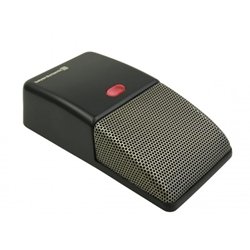
Image: Beyerdynamic Stegos TB Wireless Boundary Microphone. This image displays the compact, black wireless boundary microphone, designed for discreet placement on surfaces like conference tables.
Vigtige sikkerhedsinstruktioner
- Udsæt ikke enheden for vand eller overdreven fugt.
- Undgå ekstreme temperaturer.
- Forsøg ikke at åbne eller ændre enheden. Overlad al service til kvalificeret personale.
- Brug kun de angivne strømkilder og tilbehør.
- Opbevares utilgængeligt for børn.
Pakkens indhold
Bekræft at alle varer er til stede i pakken:
- Beyerdynamic Stegos TB Wireless Boundary Microphone
- USB-opladerkabel (Micro USB)
- Brugervejledning (dette dokument)
Opsætning
1. Opladning af mikrofonen
- Connect the Micro USB end of the charging cable to the microphone's charging port.
- Connect the standard USB end of the cable to a powered USB port (e.g., computer, USB wall adapter).
- The LED indicator on the microphone will show charging status.
- Når det er fuldt opladet, skal du frakoble ladekablet.
2. Tilslutning til en enhed
The Stegos TB microphone connects wirelessly to compatible devices, typically personal computers, for video conferencing applications.
- Sørg for, at mikrofonen er opladet og tændt.
- Activate Bluetooth on your personal computer or compatible device.
- Put the microphone into pairing mode (refer to the device's specific button combination, usually holding a power/pairing button). The LED indicator will typically flash to indicate pairing mode.
- On your computer, search for available Bluetooth devices. Select "Beyerdynamic Stegos TB" from the list.
- Once paired, the LED indicator on the microphone will show a solid light, indicating a successful connection.
- In your computer's sound settings or video conferencing software, select the "Beyerdynamic Stegos TB" as the input audio device.
Betjeningsvejledning
Tænd/sluk
- To power on: Press and hold the power button for approximately 3 seconds. The LED indicator will illuminate.
- To power off: Press and hold the power button for approximately 3 seconds. The LED indicator will turn off.
Mute-funktion
The microphone features a mute function for privacy during calls.
- To mute: Press the mute button once. The LED indicator may change color or flash to indicate mute status.
- To unmute: Press the mute button again. The LED indicator will return to its normal operating state.
Placering for optimal ydeevne
For best audio pickup, place the Stegos TB microphone on a flat surface in the center of the participants. Its omnidirectional polar pattern ensures 360-degree sound capture.
Opretholdelse
Rensning
- Wipe the microphone's exterior with a soft, dry, or slightly damp klæde.
- Brug ikke skrappe kemikalier, opløsningsmidler eller slibende rengøringsmidler.
- Ensure no liquid enters the microphone grille or ports.
Opbevaring
When not in use for extended periods, store the microphone in a cool, dry place, away from direct sunlight and extreme temperatures. It is recommended to fully charge the battery before long-term storage and recharge it every few months to maintain battery health.
Fejlfinding
| Problem | Mulig årsag | Løsning |
|---|---|---|
| Mikrofonen tændes ikke. | Lavt eller afladet batteri. | Charge the microphone using the provided USB cable. |
| Kan ikke oprette trådløs forbindelse. | Bluetooth is off on the device; microphone not in pairing mode; out of range. | Ensure Bluetooth is enabled. Put microphone into pairing mode. Move microphone closer to the device. |
| No audio input from microphone. | Microphone is muted; incorrect audio input selected on computer/software. | Unmute the microphone. Select "Beyerdynamic Stegos TB" as the input device in your system settings or application. |
| Dårlig lydkvalitet. | Microphone too far from speaker; environmental noise; interference. | Place microphone closer to speakers. Reduce background noise. Ensure no obstructions between microphone and receiving device. |
Specifikationer
- Mærke: Beyerdynamisk
- Model: Stegos TB (721360)
- Forbindelse teknologi: Wireless (USB for charging)
- Connector Type: Micro USB (til opladning)
- Speciel funktion: Trådløs
- Kompatible enheder: Personlig computer
- Farve: Sort
- Polar mønster: Omnidirektionel
- Strømkilde: Batteridrevet
- Anbefalede anvendelser: Videokonference
Garantioplysninger
Beyerdynamic products are covered by a limited warranty. For specific warranty terms and conditions, please refer to the warranty card included with your product or visit the official Beyerdynamic webwebsted. Gem din købsbevis til garantikrav.
Note: Warranty details are subject to change and may vary by region.
Support og kontakt
For further assistance, technical support, or service inquiries, please contact Beyerdynamic customer support through their official webwebstedet eller kontaktoplysningerne på din produktemballage.
Officiel Webwebsted: www.beyerdynamic.com
Hav venligst modelnummeret (721360) og serienummeret klar, når du kontakter support.
Ask a question about this manual
Ask about setup, troubleshooting, compatibility, parts, safety, or missing instructions. Manuals+ will review the question and use this page’s manual context to help answer it.