
1. Produktet er slutview
The Electrohome Archer Vinyl Record Player (EANOS300) is a 1960s-inspired 3-in-1 suitcase turntable stereo system designed for portability and versatile audio playback. It features built-in speakers and supports vinyl records, MP3s via USB, and auxiliary input for smartphones, tablets, and MP3 players.
- Bærbart design: Suitcase-style for easy transport.
- Afspilning af flere formater: Plays 7, 10, or 12-inch vinyl records at 33 1/3, 45 & 78 RPM. Also plays MP3s via USB and 3.5mm auxiliary input.
- Integreret lyd: Built-in stereo speakers with full-range sound, housed in an all-wood acoustic cabinet.
- Quality Stylus: Conical-shaped sapphire tipped ceramic needle for enhanced audio performance.
- Privat lytning: Headphone jack for personal audio experience.

Image: The Electrohome Archer Vinyl Record Player (EANOS300) shown open with a vinyl record placed on the turntable, ready for playback. The internal lid displays the 'Electrohome' logo.
2. Opsætning
- Pakker ud: Tag forsigtigt pladespilleren ud af emballagen.
- Strømtilslutning: Connect the provided power adapter to the DC 12V 1500mA port on the rear of the unit and plug it into a wall outlet.
- Fjern transportskruen: Locate and carefully remove any transit screws securing the turntable platter. Refer to the diagram for exact location.
- Placering: Placer enheden på en stabil, plan overflade væk fra direkte sollys, varmekilder eller for meget støv.

Billede: Bagside view of the Electrohome Archer Vinyl Record Player, highlighting the AUX IN, USB/PHONO switch, Headphone jack, and DC 12V 1500mA power input ports.
3. Betjeningsvejledning
3.1 Afspilning af vinylplader
- Tænd: Drej lydstyrkeknappen med uret for at tænde enheden.
- Vælg tilstand: Set the function switch to 'USB/PHONO'.
- Vælg hastighed: Choose the appropriate speed (33 1/3, 45, or 78 RPM) using the speed selector switch.
- Stedrekord: Carefully place a vinyl record on the turntable platter. For 45 RPM records, use the included adapter.
- Løft tonearm: Løft forsigtigt tonearmen ved hjælp af cue-håndtaget.
- Position pennen: Flyt tonearmen hen over det ønskede spor på pladen.
- Nederste tonearm: Slowly lower the tonearm using the cueing lever. The record will begin to play.
- Juster lydstyrken: Use the volume knob to set the desired listening level.
- Auto-stop: The turntable will automatically stop spinning when the record finishes. To stop playback manually, lift the tonearm and return it to its rest.
3.2 USB-afspilning
- Indsæt USB: Indsæt et USB-flashdrev, der indeholder MP3 files i USB-porten.
- Vælg tilstand: Set the function switch to 'USB/PHONO'. The unit will automatically detect and play MP3 files.
- Styr afspilning: Use the playback control buttons (Play/Pause, Skip Forward, Skip Backward) located near the USB port to manage your music.
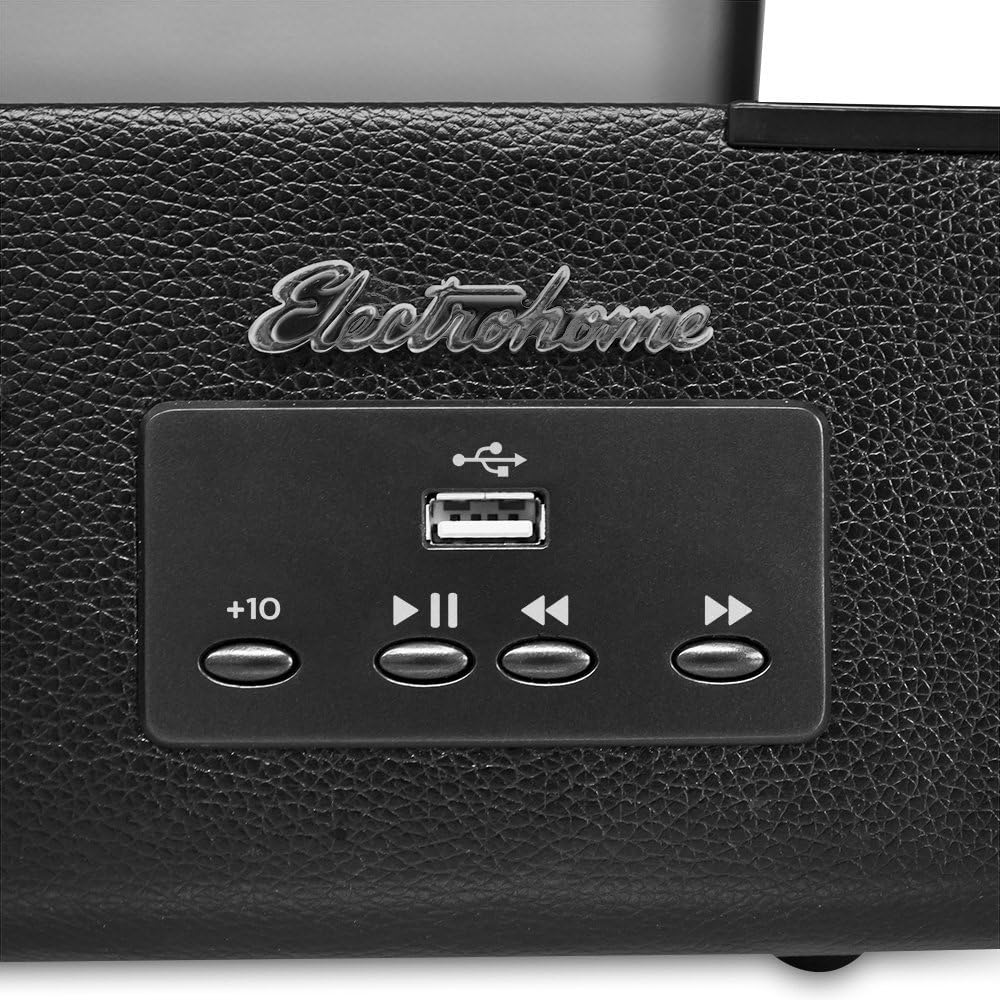
Billede: Et nærbillede view of the control panel on the Electrohome Archer Vinyl Record Player, showing the USB port and playback control buttons.
3.3 AUX-indgang
- Tilslut enhed: Connect an external audio device (e.g., smartphone, tablet) to the AUX IN port using a 3.5mm audio cable (not included).
- Vælg tilstand: Set the function switch to 'AUX IN'.
- Afspil musik: Start playback on your external device. The audio will play through the record player's speakers.
3.4 Brug af hovedtelefoner
For private listening, plug your headphones into the headphone jack located on the rear of the unit. The built-in speakers will mute automatically.
Video: An official demonstration of the Electrohome Archer Vinyl Record Player (EANOS300) in use, showcasing its features and sound quality while playing a vinyl record.
4. Vedligeholdelse
4.1 Udskiftning af pen
The ceramic stylus is designed for durability but will eventually wear out. Replace the stylus when you notice a decrease in sound quality or increased skipping. Refer to the video below for guidance on replacing the stylus.

Billede: Et nærbillede view of the conical-shaped sapphire tipped ceramic stylus on the tonearm of the Electrohome Archer Vinyl Record Player.
Video: A detailed guide on how to safely change the stylus on the Electrohome Archer Vinyl Record Player.
4.2 Rengøring
- Skab: Tør ydersiden af med en blød, tør klud. Undgå slibende rengøringsmidler.
- Stylus: Use a soft brush to gently clean the stylus, brushing from back to front.
- Optegnelser: Keep your records clean using a dedicated record cleaning brush and solution to prevent dust buildup and improve sound quality.
5. Fejlfinding
- Ingen strøm: Ensure the power adapter is securely connected to both the unit and a working electrical outlet.
- Ingen lyd: Check that the volume is turned up. Verify the correct input mode (USB/PHONO or AUX IN) is selected. If using headphones, ensure they are fully plugged in.
- Springer over poster: Ensure the record player is on a stable, level surface. Clean the record and check the stylus for wear or damage.
- Dårlig lydkvalitet: Clean the stylus and record. Ensure the stylus is properly seated.
6. Specifikationer
| Feature | Detalje |
|---|---|
| Mærke | Electrohome |
| Modelnummer | EANOS300 |
| Speciel funktion | Transportabel |
| Materiale | Plast, træ |
| Varens vægt | 0.37 pund |
| Stil | Vintage, Retro Chic |
| Farve | Black Textured PVC |
| Kompatible enheder | Headphone, MP3 Player, Speaker, Tablet |
| Motortype | DC motor |
| Signalformat | Analog |
| Strømkilde | Elektrisk med ledning |
| Forbindelsesteknologi | Kablet |
| UPC | 871363022233, 115970907164, 182682403185, 151903534502, 163120830213, 132017591292 |
7. Garanti og support
For warranty information and customer support, please refer to the documentation included with your product or visit the official Electrohome webwebsted. Gem din købskvittering for garantikrav.