
1. Introduktion
The iBall Dhwani 5.1 Multimedia Speaker system is designed to provide a rich and immersive audio experience. Featuring a 5.1 channel configuration with a powerful subwoofer and four satellite speakers, this system delivers surround sound quality for various multimedia applications. Its wooden cabinet construction enhances sound depth and clarity. The system offers versatile connectivity options including USB, SD/MMC card slots, AUX (2.1CH Stereo), and 5.1 channel input, along with a built-in FM radio.
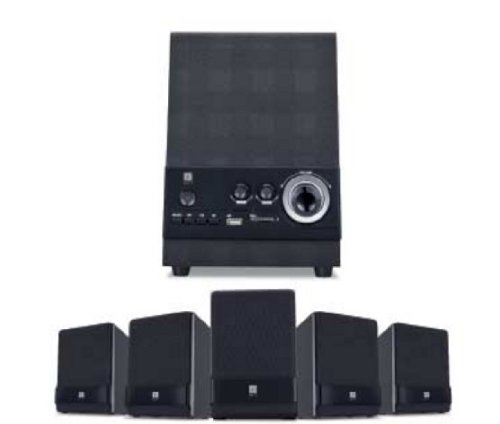
Figure 1: iBall Dhwani 5.1 Multimedia Speaker System
2. Opsætningsvejledning
Follow these steps to set up your iBall Dhwani 5.1 Multimedia Speaker system:
- Udpakning: Carefully remove all components from the packaging. Ensure you have one subwoofer and four satellite speakers.
- Højttalerplacering:
- Place the subwoofer on the floor, preferably near a wall or corner for optimal bass response.
- Position the four satellite speakers around your listening area. For a true surround sound experience, place two satellites at the front (left and right of your display) and two at the rear (left and right behind your listening position). Ensure wires are not stretched or obstructed.
- Tilslutning af satellithøjttalere: Connect each satellite speaker to the corresponding output ports on the rear of the subwoofer unit. Ensure a secure connection for each speaker.
- Tilslutning af lydkilde:
- For 5.1 Channel Input: Use the provided 5.1 audio cables to connect the subwoofer to your 5.1 channel sound card or DVD player. Match the color-coded plugs to the corresponding jacks (e.g., Front L/R, Rear L/R, Center/Sub).
- For AUX (2.1CH Stereo) Input: Use a 3.5mm stereo audio cable to connect the subwoofer's AUX input to the audio output of your PC, laptop, smartphone, or other audio device.
- Strømtilslutning: Plug the power cord from the subwoofer into a standard AC power outlet.
- Første gang tændt: Turn on the power switch located on the subwoofer unit. The system should power on, indicated by an LED light.
3. Betjeningsvejledning
This section details how to operate your iBall Dhwani 5.1 speaker system.
3.1 Tænd/sluk
Locate the power switch on the subwoofer unit. Flip the switch to the 'ON' position to power on the speakers. Flip it to 'OFF' to power down.
3.2 Valg af indgangskilde
Use the 'MODE' button on the front panel of the subwoofer or the remote control to cycle through available input sources:
- 5.1 CH: For true 5.1 surround sound from compatible devices.
- AUX (2.1 CH Stereo): For stereo audio input from PCs, laptops, mobile phones, etc.
- USB: Til afspilning af lyd files from a USB pen drive.
- SD/MMC: Til afspilning af lyd files from an SD or MMC memory card.
- FM: For listening to the built-in FM radio.
3.3 Lydstyrkekontrol
Adjust the master volume using the main volume knob on the subwoofer's front panel or the volume buttons on the remote control. Individual channel volume adjustments (e.g., bass, center, surround) may also be available via the remote control.
3.4 USB/SD/MMC Playback
Insert a USB pen drive or an SD/MMC card into the respective slot on the subwoofer. The system will automatically switch to USB/SD mode and begin playing compatible audio files. Use the playback controls (Play/Pause, Next, Previous) on the subwoofer or remote control.
3.5 FM-radiofunktion
- Switch the input mode to 'FM'.
- Press the 'SCAN' button (if available) to automatically scan and save available FM stations.
- Use the 'NEXT' and 'PREVIOUS' buttons to navigate through the saved stations.
- Træk FM-antennen ud (hvis relevant) for bedre modtagelse.
4. Vedligeholdelse
Proper care and maintenance will ensure the longevity and optimal performance of your speaker system.
- Rensning: Use a soft, dry cloth to wipe the surfaces of the speakers and subwoofer. Do not use liquid cleaners, aerosols, or abrasive materials, as these can damage the wooden finish and electronic components.
- Fjernelse af støv: Regularly dust the speaker grilles and vents to prevent accumulation, which can affect sound quality and internal cooling.
- Placering: Undgå at placere højttalerne i direkte sollys, i nærheden af varmekilder eller i områder med høj luftfugtighed. Sørg for tilstrækkelig ventilation omkring subwooferen.
- Kabelstyring: Ensure all cables are securely connected and not pinched or tangled. Avoid placing heavy objects on cables.
- Sluk, når den ikke er i brug: For extended periods of inactivity, it is recommended to power off the speaker system and unplug it from the power outlet.
5. Fejlfinding
If you encounter issues with your iBall Dhwani 5.1 speaker system, refer to the following common problems and solutions:
| Problem | Mulig årsag | Løsning |
|---|---|---|
| Ingen lyd fra højttalere. |
|
|
| Forvrænget eller uklar lyd. |
|
|
| USB/SD-kort afspiller ikke. |
|
|
| FM-radiomodtagelsen er dårlig. |
|
|
6. Specifikationer
| Modelnavn | Dhwani 5.1 |
| Type | Multimedie højttalersystem |
| Kanalkonfiguration | 5.1 |
| Total Power Output (RMS) | 23 W |
| Frequency Response (Satellite) | 40 til 20000 Hz |
| Signal-støjforhold | 75 dB |
| Satellite Driver | 3-inch full-range |
| Forbindelse | 5.1 Channel Input, AUX (2.1CH Stereo), USB, SD/MMC |
| Yderligere funktioner | Built-in FM Radio, Full Volume Controls, Magnetically Shielded Satellites |
| Pakkedimensioner | 40.6 x 39.4 x 21 cm |
| Varens vægt | 4.46 kg |
7. Garanti og support
For warranty information and customer support, please refer to the warranty card included with your product or visit the official iBall webwebsted. Behold din købskvittering som købsbevis i tilfælde af garantikrav.
For technical assistance or service inquiries, please contact iBall customer support through their official channels.