
Produkt overview
The Targus Presenter AMP09AP is a multimedia presentation remote designed for ease of use during presentations. It features a laser pointer for highlighting content, backlit buttons for low-light environments, and an ergonomic design for comfortable handling. This remote also offers cursor control for remote program access and volume adjustment for media. Its wireless technology provides a range of up to 50 feet, and the USB receiver conveniently stores within the presenter.
Opsætningsvejledning
1. Udpakning
Carefully remove the Targus Presenter AMP09AP and its components from the packaging. The box should contain:
- One Targus Presentation Remote
- One USB Receiver
2. Batteriinstallation
The Targus Presenter AMP09AP requires batteries (not included). Use alkaline batteries for optimal performance.
- Find batterirummet på bagsiden af præsentatoren.
- Åbn batterirummets dæksel.
- Isæt de nødvendige batterier, og sørg for at polariteten (+/-) vender korrekt.
- Luk batterirummets dæksel forsvarligt.
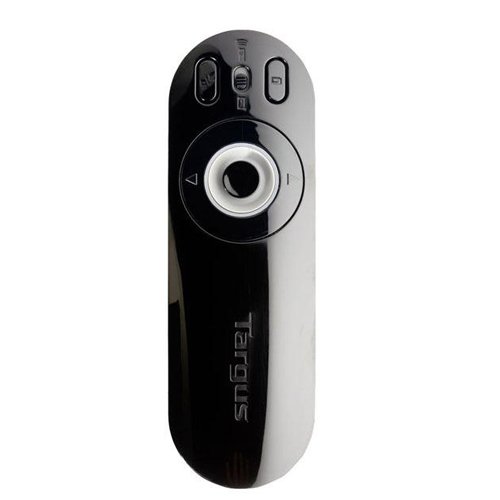
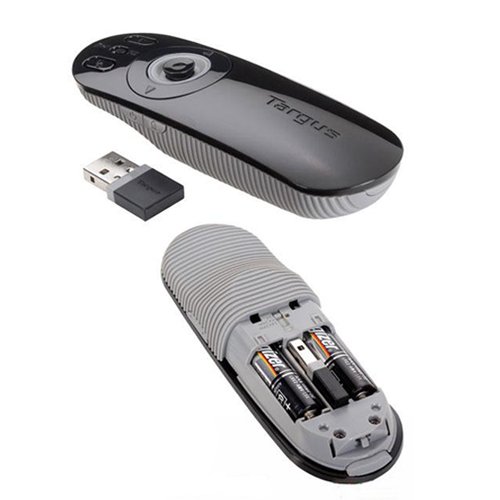
Image: The Targus Presenter AMP09AP, its USB receiver, and the open battery compartment revealing two AAA batteries.
3. Tilslutning af USB-modtageren
- Remove the USB receiver from its storage slot within the presenter.
- Sæt USB-modtageren i en ledig USB-port på din computer.
- Computeren burde automatisk registrere og installere de nødvendige drivere.
Fjernbetjeningen er nu klar til brug.
Betjeningsvejledning
Præsentationstilstand
The presenter's simplistic layout allows for easy navigation during presentations.
Billede: Top view of the Targus Presenter AMP09AP, highlighting the laser pointer button, slide navigation buttons, and the mode switch.
- Laserpointer: Press and hold the dedicated laser button to activate the laser pointer for highlighting content.
- Næste slide: Press the forward arrow button to advance to the next slide.
- Forrige slide: Press the backward arrow button to return to the previous slide.
- Baggrundsbelyste knapper: Buttons are backlit for visibility in dimly lit rooms.
Cursor Control Mode
The presenter features cursor control for remote access to programs and media functions.
- Activating Cursor Control: Use the mode switch (located at the top right of the remote) to toggle between presentation and cursor control modes.
- Moving Cursor: Use the central circular button (joystick/directional pad) to move the mouse cursor on the screen.
- Klik: Press the center of the circular button to perform a left-click action.
- Lydstyrkekontrol: Adjust the volume for music and videos remotely using the designated volume controls (if available on your specific model).
Wireless Range
The wireless technology allows operation up to 50 feet (approximately 15 meters) from the computer, providing flexibility during presentations.
Opretholdelse
- Rensning: Tør præsentatoren af med en blød, tør klud. Undgå at bruge skrappe kemikalier eller slibende rengøringsmidler.
- Udskiftning af batteri: Replace batteries when the indicator light (if present) signals low power, or when performance degrades. Ensure correct polarity during replacement.
- Opbevaring: When not in use, store the USB receiver inside the presenter's dedicated slot to prevent loss. Store the presenter in a cool, dry place.
Fejlfinding
| Problem | Mulig årsag | Løsning |
|---|---|---|
| Oplægsholder svarer ikke | Lavt eller dødt batteri | Udskift batterierne med nye alkaliske batterier. |
| Oplægsholder svarer ikke | USB-modtageren er ikke tilsluttet korrekt | Sørg for, at USB-modtageren er korrekt tilsluttet en fungerende USB-port på din computer. Prøv en anden USB-port. |
| Oplægsholder svarer ikke | Uden for rækkevidde | Move closer to the computer (within 50 feet / 15 meters). |
| Laserpointer virker ikke | Lavt batteri | Udskift batterierne. |
| Cursor control erratic or not working | Interference or mode not activated | Ensure no obstructions between presenter and receiver. Check if cursor control mode is active using the mode switch. |
Specifikationer
| Feature | Detalje |
|---|---|
| Mærke | Targus |
| Modelnummer | AMP09AP-51 |
| Farve | Sort og Grå |
| Dimensioner (LxBxH) | 12.1 x 3.8 x 2.5 cm |
| Varens vægt | 140 g |
| Forbindelsesteknologi | Trådløs |
| Wireless Range | Op til ca. 15 meter (50 fod) |
| Batteritype | Alkalisk (ikke inkluderet) |
| Inkluderede komponenter | Presentation Remote, USB Receiver |
| Særlige funktioner | Ergonomic design, Laser pointer, Cursor control, Backlit buttons |
Garanti og support
For warranty information and technical support, please refer to the documentation provided with your purchase or visit the official Targus webwebsted. Gem din købsbevis til garantikrav.