
Indledning
The Eton American Red Cross FRX2 is a versatile, multi-powered emergency weather radio designed to keep you informed and connected during emergencies. It features AM/FM and NOAA weather band reception, multiple charging options including solar and hand turbine, an LED flashlight, and a USB port for charging small devices. This manual provides detailed instructions for the proper setup, operation, and maintenance of your FRX2 radio.

Figure 1: Eton American Red Cross FRX2 Emergency Weather Radio
Sikkerhedsoplysninger
- Udsæt ikke enheden for ekstreme temperaturer, direkte sollys i længere perioder eller høj luftfugtighed.
- Hold enheden væk fra vand og andre væsker.
- Do not attempt to disassemble or modify the radio. This will void the warranty and may cause damage or injury.
- Use only the specified charging methods (USB, solar, hand crank).
- Ensure the hand turbine crank is fully retracted when not in use to prevent damage.
- Bortskaf batterier i henhold til lokale regler.
Produkt overview
Familiarize yourself with the various components and controls of your FRX2 radio.
Frontpanel

Figur 2: Betjeningselementer på frontpanelet
- Indstillingsskive: Used to select AM, FM, or Weather Band frequencies.
- Lydstyrkekontrol: Justerer lydudgangsniveauet.
- Båndvælger: Switches between AM, FM, and Weather Band (WB) modes.
- LED-indikator: Shows charging status and alert status.
Side and Back Panels

Figure 3: Side Panel with Solar Panel
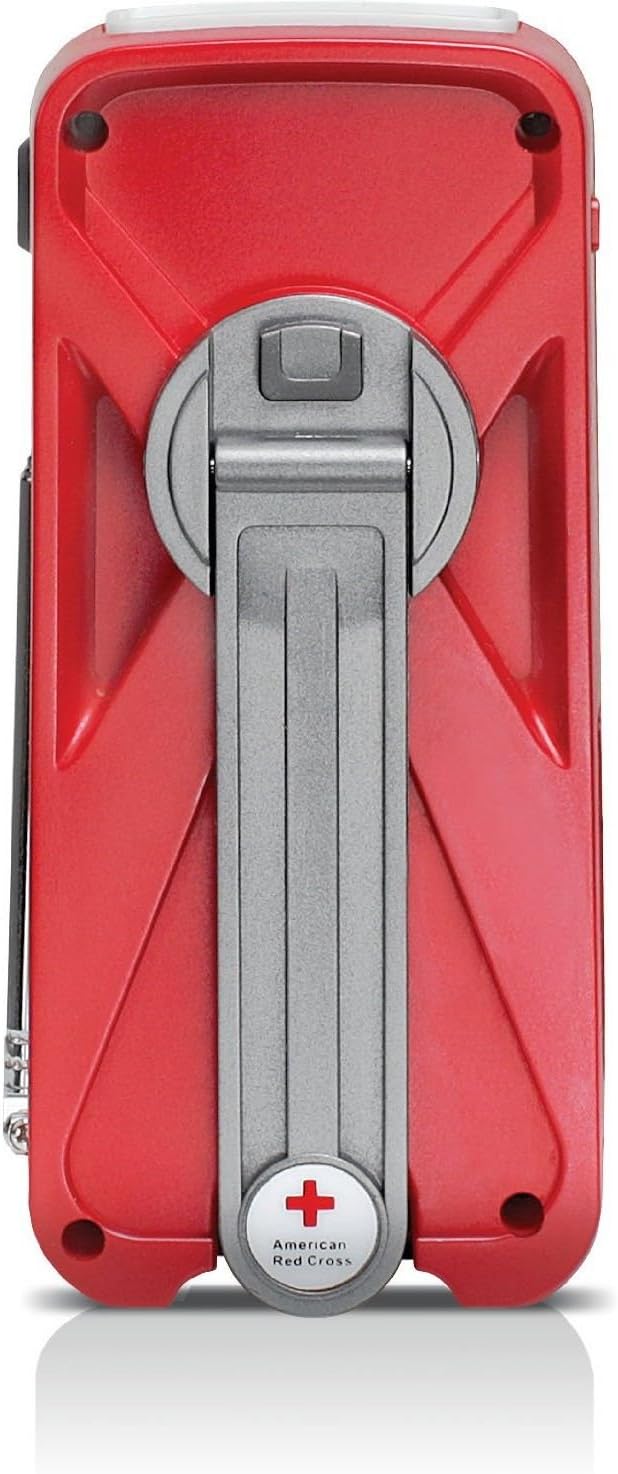
Figure 4: Back Panel with Hand Turbine Crank
- Solpanel: Located on the top/side for solar charging.
- Hand Turbine Crank: Fold-out crank on the back for manual power generation.
- Teleskopantenne: Udtrækkelig antenne for forbedret radiomodtagelse.
- Lommelygte: Integreret LED-lommelygte.
Porte og stik
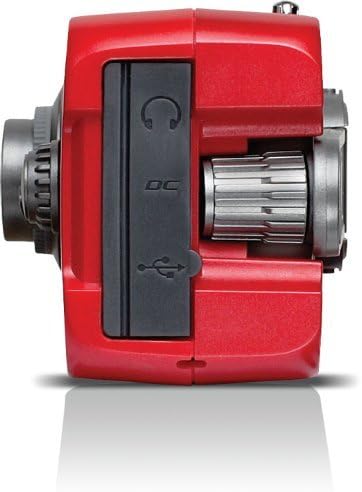
Figure 5: Top Panel Ports
- Mini-USB DC Input: For charging the internal battery via an AC adapter (not included) or computer USB port.
- USB-udgang: Til opladning af eksterne enheder som smartphones.
- Hovedtelefonstik: Til privat lytning.
Opsætning
Indledende opladning
Before first use, fully charge the internal battery using one of the following methods:
- USB-opladning: Connect the supplied USB cable to the radio's Mini-USB DC input and to a powered USB port (e.g., computer, USB wall adapter). The charging indicator LED will illuminate.
- Solopladning: Place the radio with the solar panel facing direct sunlight. The solar panel charges the internal battery. This method is slower and best for maintaining charge or trickle charging.
- Hand Turbine Charging: Unfold the hand turbine crank and rotate it clockwise or counter-clockwise for 1-2 minutes. This provides power for immediate use or a quick boost to the internal battery.
Batterioplysninger
The FRX2 is powered by a built-in 1000mAh rechargeable internal battery. This battery is designed for long-term use and is not user-replaceable. For optimal performance, ensure the battery is regularly charged.
Betjeningsvejledning
Tænd/sluk
Drej på Lydstyrkekontrol knob clockwise to turn the radio on. Rotate it counter-clockwise until it clicks to turn the radio off.
Radio Tuning (AM/FM/Weather Band)
- Træk teleskopantennen ud for optimal modtagelse.
- Brug Båndvælger switch to choose between AM, FM, or WB (Weather Band).
- Drej på Indstillingsskive to find your desired station. The tuning indicator LED will light up when a strong signal is received.
- Juster Lydstyrkekontrol til et behageligt lytteniveau.
NOAA Weather Alert Function
In WB mode, the radio can receive NOAA weather alerts. When an alert is broadcast, the radio will automatically switch from standby to the alert broadcast. Ensure the radio is in WB mode to receive these alerts.
Betjening af lommelygte
Press the flashlight button to cycle through different modes: On, SOS (flashing), and Off. The flashlight provides illumination during power outages or in dark environments.
Smartphone Charging (Dump Charge)
The FRX2 can provide a 'dump charge' to small USB-powered devices like smartphones. This means it will transfer its stored battery power to the connected device. It is not designed for a full charge but can provide enough power for emergency communication.

Figure 6: Charging a Smartphone
- Ensure the FRX2's internal battery has sufficient charge.
- Connect your smartphone's USB charging cable to the FRX2's USB output port.
- The radio will begin transferring power to your device.
Opretholdelse
- Rensning: Tør radioen af med en blød, damp klæde. Brug ikke slibende rengøringsmidler eller opløsningsmidler.
- Opbevaring: Store the radio in a cool, dry place when not in use. For long-term storage, ensure the internal battery is charged every 3-6 months to maintain its lifespan.
- Antenne: Håndter teleskopantennen forsigtigt for at undgå at den bøjer eller knækker. Træk den ind, når den ikke er i brug.
Fejlfinding
| Problem | Mulig årsag | Løsning |
|---|---|---|
| No power/Radio not turning on | Det interne batteri er afladet. | Charge the radio using USB, solar, or hand turbine. |
| Dårlig radiomodtagelse | Antennen er ikke strakt ud, svagt signal eller interferens. | Træk teleskopantennen helt ud. Prøv at flytte radioen. |
| Smartphone oplader ikke | Radio battery too low, incorrect cable, or device incompatibility. | Ensure radio is sufficiently charged. Use the correct USB cable. Note that the FRX2 provides a 'dump charge' and may not fully charge all devices. |
| Hand crank is stiff or not charging | Mechanism obstruction or internal issue. | Ensure the crank moves freely. If issues persist, contact customer support. |
Specifikationer
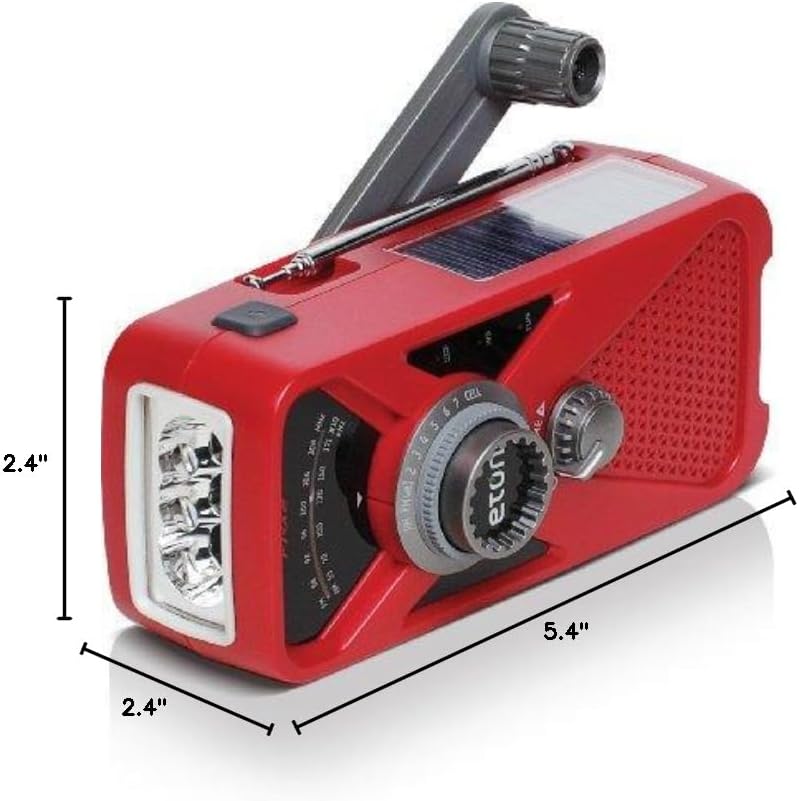
Figur 7: Produktmål
- Model: ARCFRX2WXR
- Dimensioner (L x B x H): 5.4 cm x 2.4 cm x 2.4 cm
- Vægt: 0.56 lbs
- Radiobånd: AM, FM, NOAA vejrbånd
- Strømkilder: Internal Rechargeable Battery (1000mAh), Solar Panel, Hand Turbine, Mini-USB DC Input
- Produktion: USB (til opladning af eksterne enheder)
- Funktioner: LED Flashlight, Headphone Jack
Garantioplysninger
Eton products are designed for reliability and performance. For specific warranty details, please refer to the warranty card included with your product or visit the official Eton webwebsted. Gem din købsbevis til garantikrav.
Støtte
If you have any questions or require assistance with your Eton American Red Cross FRX2 radio, please contact Eton Customer Support:
- Webwebsted: www.etoncorp.com
- E-mail: Der henvises til webwebsted for kontaktformular eller e-mailadresse.
- Telefon: Der henvises til webwebsted for aktuelle supporttelefonnumre.