
Cen-Tech CT-750-12
Cen-Tech 750W Continuous/1500W Peak Power Inverter User Manual
Model: CT-750-12 | Brand: Cen-Tech
1. Introduktion
This manual provides essential information for the safe and efficient operation of your Cen-Tech 750W Continuous/1500W Peak Power Inverter. This device converts 12V DC battery power into 115V AC household power, allowing you to operate various electronics and small appliances from your vehicle or other 12V power sources. Please read this manual thoroughly before installation and use, and retain it for future reference.
2. Vigtige sikkerhedsoplysninger
ADVARSEL: Failure to follow these instructions may result in electric shock, fire, serious injury, or death. Always exercise extreme caution when working with electrical equipment.
- Fare for elektrisk stød: Åbn ikke inverteren casing. There are no user-serviceable parts inside. Contact qualified service personnel for repairs.
- Brandfare: Do not operate the inverter near flammable materials, gases, or vapors. Ensure adequate ventilation around the inverter.
- Korrekt ventilation: The inverter generates heat during operation. Ensure it is placed in a well-ventilated area, away from direct sunlight or heat sources.
- Korrekt polaritet: Always connect the inverter to a 12V DC battery with the correct polarity (red to positive, black to negative). Incorrect connection can damage the inverter and battery.
- Overbelastningsbeskyttelse: Do not exceed the inverter's continuous power rating (750W) or peak power rating (1500W). Overloading can cause damage and fire.
- Fugteksponering: Do not expose the inverter to rain, moisture, or water. This can cause electric shock or damage.
- Børn og kæledyr: Hold inverteren utilgængeligt for børn og kæledyr.
- Medicinsk udstyr: This inverter is not designed for use with life-support systems or other medical devices.
3. Produktfunktioner
The Cen-Tech 750W Power Inverter is designed for reliable performance and includes the following key features:
- Kontinuerlig effekt: Provides up to 750 watts of continuous power.
- Spidseffekt: Capable of handling up to 1500 watts for starting products with high surge requirements.
- Modified Sine Wave Output: Efficiently converts 12V DC to 115V AC with up to 87% efficiency.
- Flere udtag: Features two 115V AC power outlets for connecting various devices.
- USB opladningsport: Includes a 5V/500mA USB port for charging compatible devices.
- Omfattende beskyttelse: Built-in safeguards against low/high voltage, low/high temperatures, low/high currents, short circuits, and overloads.
- Nem forbindelse: Comes with heavy-duty input cables equipped with alligator clips for direct battery connection.
- Statusindikator: An LED indicator light provides operational status.
4. Pakkens indhold
Tjek venligst pakken for følgende varer:
- Cen-Tech 750W Continuous/1500W Peak Power Inverter
- Heavy-duty input cables with alligator clips
- Brugervejledning (dette dokument)
5. Opsætning og installation
Follow these steps to properly set up your power inverter:
- Vælg en placering: Select a dry, well-ventilated area for the inverter. Ensure it is away from direct sunlight, heat sources, and flammable materials. The inverter should be placed on a stable, flat surface.
- Klargør batteriet: Ensure the 12V DC battery is fully charged and in good condition. Turn off any loads connected to the battery.
- Connect Input Cables:
- Tilslut RØD alligator clip cable to the POSITIV (+) terminal of the 12V battery.
- Tilslut SORT alligator clip cable to the NEGATIV (-) terminal of the 12V battery.
VIGTIG: Ensure connections are secure and correct polarity is observed to prevent damage to the inverter or battery. A loose connection can cause overheating.
- Tænd: Once the battery connections are secure, turn on the inverter using its power switch (if applicable). The LED indicator light should illuminate.
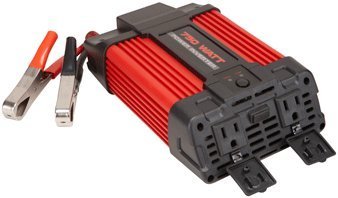
Image 1: Cen-Tech 750W Power Inverter connected to a 12V battery using the provided alligator clips. The image shows the compact design and the input/output ports.
6. Betjeningsvejledning
After successful setup, you can begin using your power inverter:
- Tænd for inverteren: Ensure the inverter's power switch is in the "ON" position. The LED indicator should confirm it is powered.
- Tilslut AC-enheder: Plug your 115V AC devices into the inverter's AC outlets. Ensure the total wattage of all connected devices does not exceed 750 watts continuously or 1500 watts peak.
- Tilslut USB-enheder: For charging USB-powered devices, plug them into the 5V/500mA USB port.
- Overvåg batteriniveau: Keep an eye on your 12V battery's charge level. Prolonged use can drain the battery. The inverter has low voltage protection and will shut down if the battery voltage falder for lavt.
- Sluk: When finished, first disconnect all AC and USB devices from the inverter. Then, turn off the inverter's power switch. Finally, disconnect the alligator clips from the battery, starting with the black (negative) clip, then the red (positive) clip.
Note: Some sensitive electronic devices may not operate correctly with a modified sine wave inverter. Consult your device's manufacturer for compatibility if issues arise.
7. Vedligeholdelse
Regelmæssig vedligeholdelse sikrer optimal ydeevne og levetid for din inverter:
- Rensning: Keep the inverter clean and free of dust and debris. Use a dry cloth to wipe the exterior. Do not use liquid cleaners.
- Ventilation: Periodically check that the ventilation openings are not blocked. Clear any obstructions to ensure proper airflow.
- Kabelforbindelser: Regularly inspect the input cables and alligator clips for any signs of wear, damage, or corrosion. Ensure connections remain tight and secure.
- Opbevaring: When not in use for extended periods, store the inverter in a cool, dry place, away from direct sunlight and extreme temperatures. Disconnect it completely from the battery.
8. Fejlfinding
Hvis du støder på problemer med din inverter, kan du se følgende almindelige problemer og løsninger:
| Problem | Mulig årsag | Løsning |
|---|---|---|
| Ingen strømudgang / Inverteren tænder ikke |
|
|
| Inverteren lukker uventet ned |
|
|
| AC devices not working correctly |
|
|
9. Specifikationer
| Feature | Detalje |
|---|---|
| Modelnummer | CT-750-12 |
| Kontinuerlig kraft | 750 watt |
| Peak Power | 1500 watt |
| Input bindtage | 12V DC |
| Udgang Voltage | 115V AC |
| Output bølgeform | Modificeret sinusbølge |
| Effektivitet | Op til 87 % |
| AC-stikkontakter | 2 |
| USB-port | 5V / 500mA |
| Beskyttelsesfunktioner | Lav/Høj Voltage, Low/High Temperature, Low/High Current, Short Circuit, Overload |
| Varens vægt | 2.11 pund |
| Dimensioner (ca.) | Ikke specificeret i de angivne data |
10. Garanti og support
Information regarding product warranty and customer support was not provided in the available product data. For warranty details or technical assistance, please refer to the product packaging or contact the manufacturer directly.
Ask a question about this manual
Ask about setup, troubleshooting, compatibility, parts, safety, or missing instructions. Manuals+ will review the question and use this page’s manual context to help answer it.