
Indledning
Thank you for choosing the Tele System TS6512HD Digital Terrestrial Receiver. This device allows you to receive digital terrestrial television broadcasts and offers additional features such as multimedia playback via USB and recording capabilities. This manual provides essential information for the safe and efficient use of your receiver, including setup, operation, maintenance, and troubleshooting.
Vigtige sikkerhedsoplysninger
- Strømforsyning: Brug kun den angivne strømadapter. Sørg for, at lydstyrkentage matcher din lokale strømforsyning.
- Ventilation: Do not block ventilation openings. Place the receiver on a stable, flat surface with adequate space around it for proper airflow.
- Vand og fugt: Do not expose the receiver to rain, moisture, or liquids. Do not place objects filled with liquids, such as vases, on the receiver.
- Varmekilder: Keep the receiver away from heat sources such as radiators, heat registers, stoves, or other heat-producing appliances.
- Rensning: Unplug the receiver from the power outlet before cleaning. Use a soft, dry cloth. Do not use liquid or aerosol cleaners.
- Service: Forsøg ikke selv at servicere dette produkt. Overlad al service til kvalificeret servicepersonale.
- Lyn: Unplug the receiver during lightning storms or when unused for long periods.
Pakkens indhold
Markér venligst feltet for følgende elementer:
- Tele System TS6512HD Digital Terrestrial Receiver
- Fjernbetjening
- Strømadapter
- Brugervejledning (dette dokument)
Opsætningsvejledning
1. Tilslutning af modtageren
- Tilslut til tv:
- For optimal picture quality, connect an HDMI cable (not included) from the receiver's HDMI OUT port to an available HDMI IN port on your television.
- Alternatively, if your TV does not have an HDMI port, connect a SCART cable (not included) from the receiver's SCART port to the SCART IN port on your television.
- Tilslut antenne: Connect your terrestrial antenna cable to the ANT IN port on the back of the receiver.
- Tilslut strøm: Plug the power adapter into the DC IN port on the receiver, then plug the adapter into a wall outlet.
- Indsæt batterier: Åbn batterirummet på fjernbetjeningen, og isæt to AAA-batterier (medfølger ikke), og sørg for at polerne vender korrekt.
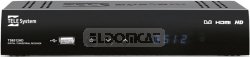
Figur 1: Forside view of the Tele System TS6512HD receiver, showing its compact design and essential indicators.
2. First-Time Installation
- Turn on your TV and select the correct input source (HDMI or SCART) corresponding to where you connected the receiver.
- Power on the Tele System TS6512HD receiver.
- The first-time installation wizard should appear on your TV screen. Follow the on-screen prompts to select your language, country, and initiate an automatic channel scan.
- Når scanningen er færdig, gemmer receiveren de fundne kanaler, og du kan begynde at se tv.
Betjeningsvejledning
Grundlæggende fjernbetjeningsfunktioner
- MAGT: Turns the receiver on or off (standby mode).
- CH +/-: Skifter kanaler op eller ned.
- VOL +/-: Justerer lydstyrken.
- STUM: Slår lyden fra eller til.
- MENU: Giver adgang til hovedmenuen for indstillinger og funktioner.
- AFSLUT: Afslutter den aktuelle menu eller skærmvisningen.
- OK: Bekræfter valg i menuer.
- Piletaster (op/ned/venstre/højre): Navigerer gennem menuer og muligheder.
- INFO: Viser aktuelle kanaloplysninger.
- EPG: Giver adgang til den elektroniske programguide.
Kanalnavigation
Brug CH +/- buttons to browse channels sequentially. To directly enter a channel number, use the numeric keypad on the remote control.
Brug af hovedmenuen
Tryk på MENU button to access the receiver's main menu. Here you can configure various settings, including:
- Kanalsøgning: Rescan for channels or perform a manual search.
- Systemindstillinger: Adjust language, time, parental control, and other system preferences.
- Billedindstillinger: Configure aspect ratio, resolution, and other display options.
- Lydindstillinger: Adjust audio output preferences.
- USB: Access multimedia files from a connected USB device or manage recordings.
Recording TV Programs (PVR Function)
The TS6512HD receiver supports recording of TV programs to an external USB storage device (e.g., USB flash drive or external hard drive, not included). Ensure your USB device is formatted correctly (FAT32 or NTFS) and has sufficient free space.
- Connect a compatible USB storage device to the USB port on the receiver.
- For at optage med det samme skal du trykke på REC button on the remote control while watching a program. Press STOP for at afslutte optagelsen.
- To schedule a recording, use the EPG (Electronic Program Guide) to select a program and follow the on-screen prompts to set a timer recording. Alternatively, access the Timer settings via the main menu.
- Recorded programs can be accessed and played back through the "USB" section in the main menu.
Multimedia Playback via USB
The receiver can play various multimedia files (video, audio, photos) from a connected USB storage device.
- Connect a USB storage device containing your multimedia files til USB-porten.
- Tryk på MENU button, navigate to the "USB" section, and select "Multimedia" or "Player".
- Gennemse dine files og tryk på OK at spille.
- Note: The receiver supports specific file formats (e.g., H.264, MPEG2, MPEG4 for video; AAC+, LC-AAC for audio). Compatibility with all file types is not guaranteed.
Opretholdelse
Rensning
To clean the receiver, first unplug it from the power outlet. Use a soft, dry, lint-free cloth to wipe the exterior surfaces. Do not use liquid cleaners, abrasive pads, or chemical solvents, as these can damage the finish or internal components.
Softwareopdateringer
Periodically, Tele System may release software updates to improve performance or add new features. Check the manufacturer's website for available updates and instructions on how to install them via USB.
Fejlfinding
| Problem | Mulig årsag | Løsning |
|---|---|---|
| No power / Receiver does not turn on. | Power cable not connected properly; Power outlet not working; Faulty power adapter. | Check power cable connection. Try a different power outlet. Ensure the power adapter is working. |
| Intet billede eller lyd. | Incorrect TV input selected; HDMI/SCART cable loose or faulty; Antenna not connected or signal too weak. | Select the correct TV input source. Check HDMI/SCART cable connections. Ensure antenna is connected and try rescanning channels. |
| Fjernbetjening virker ikke. | Batterierne er døde eller isat forkert; Blokering mellem fjernbetjening og modtager; Fjernbetjeningssensor blokeret. | Replace batteries, ensuring correct polarity. Remove any obstructions. Ensure the remote sensor on the receiver is clear. |
| Poor picture quality / Pixelation. | Weak antenna signal; Antenna alignment issue; Interference. | Check antenna connection and alignment. Consider using a signal amplifier if signal is consistently weak. |
| Cannot record to USB device. | USB device not connected; USB device not formatted correctly; Insufficient storage space; USB device incompatible. | Ensure USB device is connected. Format the USB device to FAT32 or NTFS. Check available space. Try a different USB device. |
Tekniske specifikationer
| Modelnavn | TS6512HD |
| Modelnummer | 21005197 |
| Mærke | Tele System |
| Tuner type | Terrestrial, DVB |
| Video opløsning | 1920 x 810 pixel |
| video codecs | H.264, MPEG2, MPEG4 |
| Lyd-codecs | AAC+, LC-AAC |
| Samlet USB-porte | 1 |
| Total HDMI-porte | 1 |
| Kompatible enheder | Television |
| Farve | Sort |
| Dimensioner (pakke) | 24 x 23.4 x 5.2 cm |
| Vægt (pakke) | 421.84 g |
| GTIN (EAN/UPC) | 08024427014350 |
Garanti og support
The Tele System TS6512HD receiver comes with a standard manufacturer's warranty. For specific warranty terms and conditions, please refer to the warranty card included with your product or visit the official Tele System website. For technical support, troubleshooting assistance beyond this manual, or service inquiries, please contact Tele System customer support through their official channels.