
1. Introduktion
Thank you for choosing the Ultrak Heat Index Solar Powered Stopwatch, Model 830. This device is designed for precise timing and environmental monitoring, offering features such as temperature, humidity, heat index, and dew point calculations. It is ideal for athletes, coaches, and outdoor enthusiasts who require accurate data in various conditions. This manual provides detailed instructions to help you maximize the functionality and lifespan of your stopwatch.
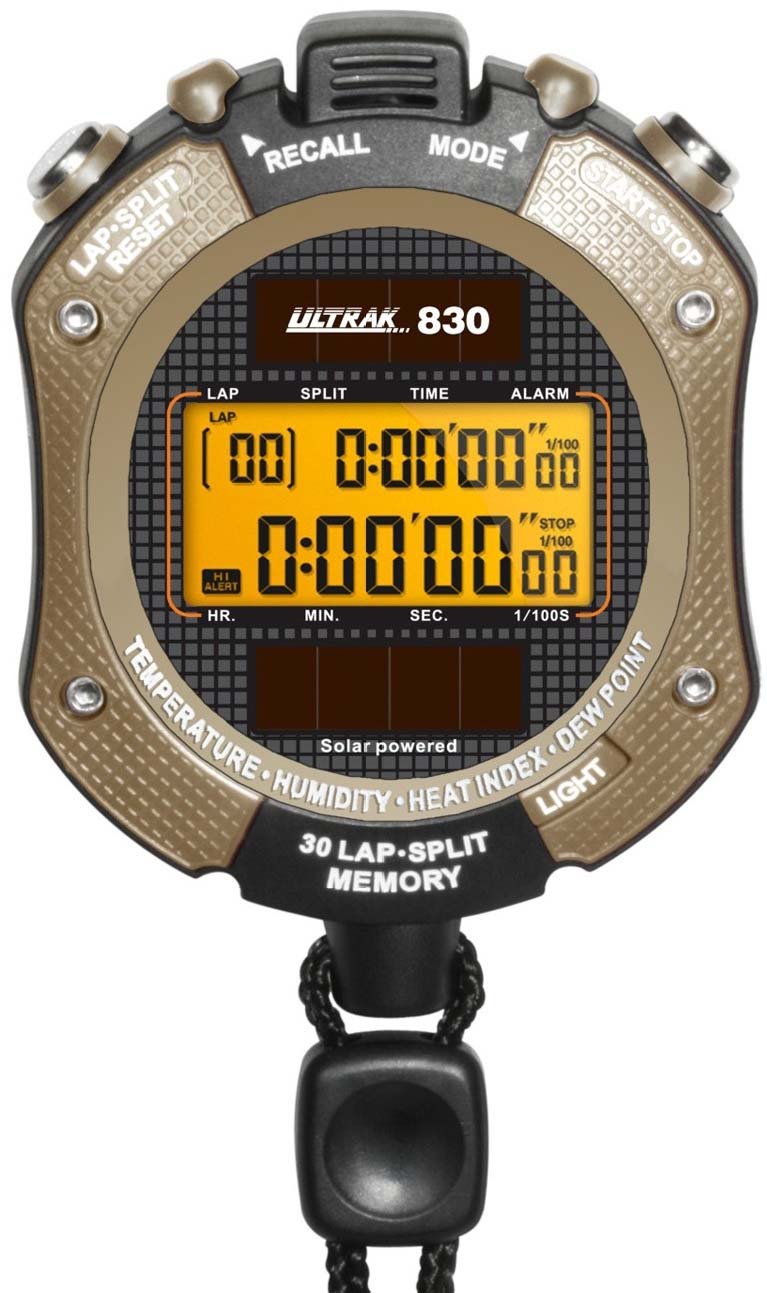
Figur 1: Front view of the Ultrak Heat Index Solar Powered Stopwatch, displaying its digital screen and control buttons.
2. Nøglefunktioner
- Accurate calculation of temperature, humidity, heat index, and dew point.
- 30 dual split recallable memory for tracking multiple laps or splits.
- Measures time up to 10 hours with 1/100 second resolution.
- Presettable countdown timer with an auto-repeat function.
- Displays time, calendar, and features an alarm function.
- LED-baggrundsbelysning for synlighed under svagt lys.
- Solar-powered with a back-up lithium battery for continuous operation.
- Water-resistant design for use in various environments.
3. Opsætning og første brug
3.1 Tænd
The Ultrak 830 is solar-powered. Ensure the solar panel on the front of the stopwatch is exposed to light for initial power-up. A built-in lithium battery provides backup power.
3.2 Indstilling af tid og dato
- I tidstilstand skal du trykke på og holde MODE knappen, indtil displayet blinker.
- Brug START/STOP knappen til at justere det blinkende ciffer (timer, minutter, sekunder, år, måned, dag).
- Tryk på LAP/NULSTIL knappen for at gå til næste indstilling.
- Når alle indstillinger er korrekte, skal du trykke på MODE knappen for at forlade indstillingstilstanden.
3.3 Aktivering af baggrundsbelysning
Tryk på LYS button (usually located on the side or top) to illuminate the display for a few seconds in low-light conditions.
4. Betjeningsvejledning
4.1 Stopursfunktion
- Fra tidstilstand skal du trykke på MODE button repeatedly until "STOPWATCH" or a similar indicator appears.
- Trykke START/STOP for at begynde timingen.
- Trykke LAP/NULSTIL to record a lap/split time while the stopwatch continues running. The display will momentarily show the lap time.
- Trykke START/STOP igen for at sætte stopuret på pause.
- Trykke LAP/NULSTIL while paused to reset the stopwatch to zero.
4.2 Recalling Memory
The stopwatch can store up to 30 dual split times. After stopping the stopwatch, press the HUKOMMELSE button (or a designated button, refer to on-device labels) to scroll through recorded lap and split times.
4.3 Nedtællingstimer
- Navigate to the "TIMER" mode using the MODE knap.
- Tryk og hold LAP/NULSTIL for at gå ind i indstillingstilstand.
- Bruge START/STOP to adjust the hours, minutes, and seconds. Use LAP/NULSTIL for at flytte mellem cifre.
- Trykke MODE for at bekræfte indstillingen.
- Trykke START/STOP for at starte nedtællingen. Der lyder en alarm, når timeren når nul.
- To activate auto-repeat, ensure this option is enabled in the timer setting mode (if available).
4.4 Heat Index and Environmental Readings
In the dedicated "HEAT INDEX" or "ENVIRONMENT" mode (accessed via the MODE button), the stopwatch will display current temperature, humidity, heat index, and dew point. Allow a few moments for the sensors to stabilize and provide accurate readings, especially after moving to a new environment.
4.5 Alarmfunktion
- Go to "ALARM" mode using the MODE knap.
- Tryk og hold LAP/NULSTIL for at gå ind i alarmindstillingstilstand.
- Juster alarmtidspunktet ved hjælp af START/STOP and move between digits with LAP/NULSTIL.
- Trykke MODE for at bekræfte.
- Toggle the alarm ON/OFF using START/STOP i alarmtilstand (ikke indstillingstilstand).
5. Vedligeholdelse
- Rensning: Tør stopuret af med en blød kludamp klæde. Brug ikke skrappe kemikalier eller slibende rengøringsmidler.
- Opbevaring: Opbevares køligt og tørt, beskyttet mod direkte sollys, når den ikke er i brug i længere perioder.
- Vandtæthed: The stopwatch is water-resistant, but not waterproof. Avoid submerging it in water or exposing it to high-pressure water jets.
- Batteri: The solar panel charges the internal battery. Ensure regular exposure to light to maintain optimal battery life. No user-replaceable battery is required under normal operation.
6. Fejlfinding
| Problem | Mulig årsag | Løsning |
|---|---|---|
| Skærmen er tom eller svag. | Insufficient light exposure for solar charging. | Expose the solar panel to bright light for several hours. |
| Forkert tidspunkt/dato. | Time/date not set correctly or reset after power loss. | Refer to Section 3.2 "Setting Time and Date" to adjust. |
| Stopwatch not responding. | Midlertidig softwarefejl. | Attempt a soft reset by pressing all buttons simultaneously for a few seconds (if applicable, consult specific model instructions if available). If not, allow battery to fully drain and recharge. |
| Inaccurate environmental readings. | Sensor obstruction or not enough time for stabilization. | Ensure sensors are clean and unobstructed. Allow 5-10 minutes for readings to stabilize after moving to a new environment. |
7. Specifikationer
- Model: Ultrak 830
- Timing Resolution: 1/100 sekund
- Maximum Timing Capacity: 10 timer
- Hukommelse: 30 dual split recallable memory
- Miljøsensorer: Temperature, Humidity, Heat Index, Dew Point
- Strømkilde: Solar powered with lithium backup battery
- Vise: Digital with LED backlight
- Vandtæthed: Yes (splash resistant, not submersible)
- GTIN (UPC): 743223008308
8. Garanti og support
Ultrak products are manufactured to high-quality standards. For specific warranty information, please refer to the warranty card included with your purchase or visit the official Ultrak webwebsted.
For technical support, troubleshooting assistance beyond this manual, or to inquire about replacement parts, please contact Ultrak customer service through their official webwebstedet eller de kontaktoplysninger, der følger med din produktemballage.