
Indledning
This manual provides essential instructions for setting up, operating, and maintaining your Canon PowerShot ELPH 310 HS digital camera. Please read this manual thoroughly to ensure proper use and to maximize your camera's performance.
Hvad er der i æsken
Ved udpakning skal du kontrollere, at alle følgende dele er inkluderet:
- Canon PowerShot ELPH 310 HS Camera
- Batteripakke NB-4L
- Battery Charger CB-2LV
- Håndledsrem
- USB kabel
- CD-ROM (Software/Drivers)
Opsætning
1. Opladning af batteriet
Insert the Battery Pack NB-4L into the Battery Charger CB-2LV. Plug the charger into a power outlet. The charging indicator light will show the charging status. Once fully charged, remove the battery.
2. Isætning af batteri og hukommelseskort
Open the battery/card compartment cover on the camera. Insert the charged battery pack, ensuring correct orientation. Insert a compatible SD/SDHC/SDXC memory card into the card slot until it clicks into place. Close the compartment cover securely.

Billede: Forside view of the Canon PowerShot ELPH 310 HS digital camera, showcasing its silver finish and lens.
Betjening af kameraet
1. Tænd/sluk
Tryk på ON/OFF button located on the top or side of the camera to power it on or off. The lens will extend when powered on.
2. Grundlæggende fotografering
- Fokusering: Gently press the shutter button halfway down to focus. The camera will emit a beep and display a green frame when focus is achieved.
- Tag et billede: Tryk udløserknappen helt ned for at tage billedet.
- Zoom: Brug zoomknappen omkring udløserknappen til at justere den optiske zoom (8x).
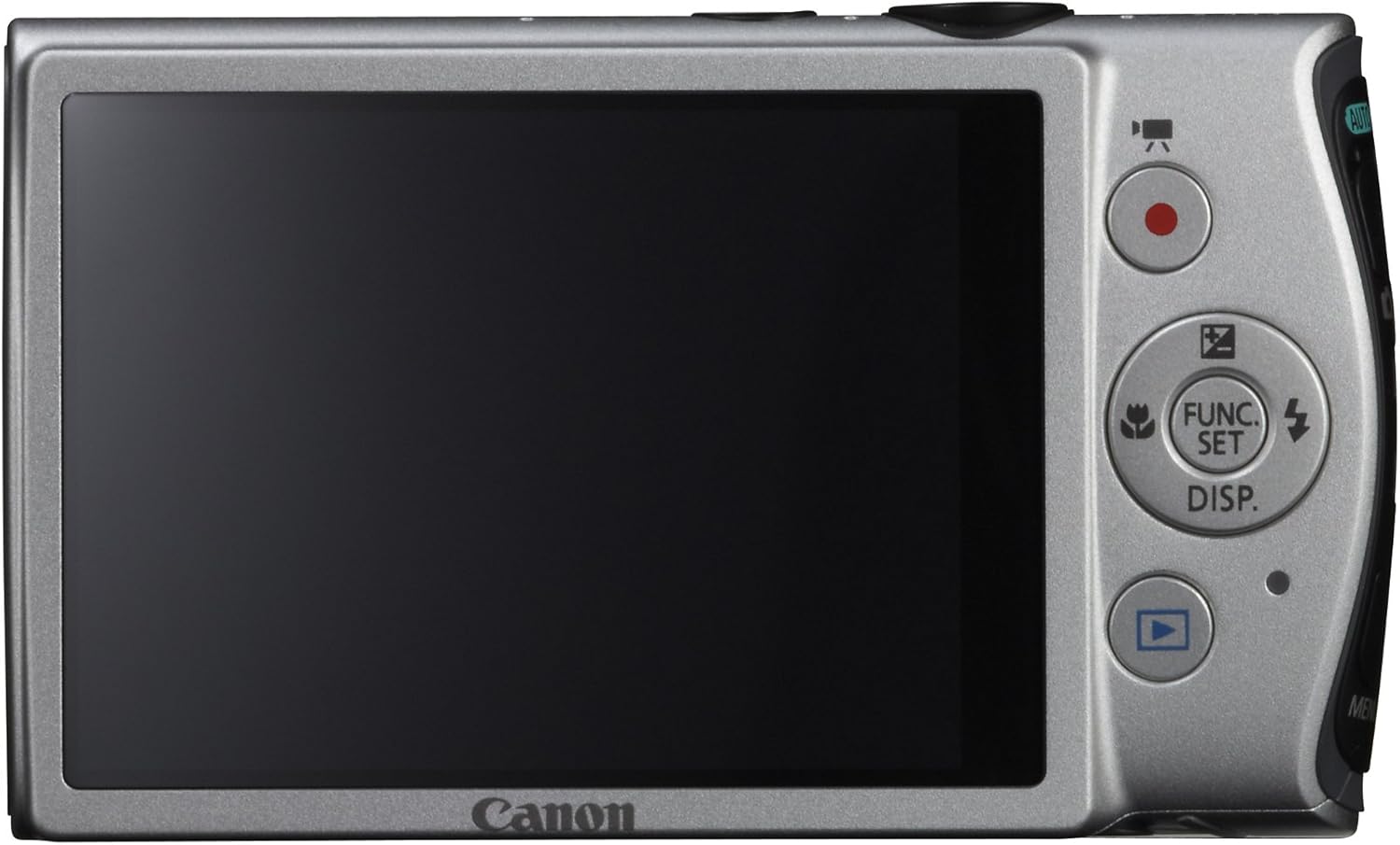
Billede: Bagside view of the Canon PowerShot ELPH 310 HS, displaying the 3.0-inch LCD screen and various control buttons for navigation and function selection.
3. Optagetilstande
The PowerShot ELPH 310 HS offers various shooting modes to suit different situations. Use the mode dial or menu to select:
- Smart AUTO: Automatically detects scenes and applies optimal settings for point-and-shoot simplicity.
- Program (P): Allows for automatic aperture/shutter speed selection based on conditions, with some user control.
- Movie Digest: Records a short video clip before each still image, combining them into a daily video.
- High-Speed Burst: Captures rapid action at approximately 8.7 frames per second.
- Super Slow Motion Movie: Records video at high frame rates (up to 240 fps) for slow-motion playback.
- Specielle scenetilstande: Includes options like Handheld Night Scene, Portrait, Beach, Snow, Fireworks, Fisheye Effect, Miniature Effect, Toy Camera Effect, and more for specific photographic effects.
4. Videooptagelse
To record videos, press the dedicated movie button. The camera supports Full HD 1080p video at 24 fps and 720p HD video at 30 fps. The iFrame movie format is also supported for easier editing.
5. Image Stabilization (Intelligent IS)
The camera features Intelligent IS, which automatically selects the best shake correction method for your shooting situation. This includes modes for stills (Normal, Panning, Macro, Tripod) and videos (Dynamic, Powered, Macro, Tripod) to ensure steady images and footage.
Opretholdelse
1. Rengøring af kameraet
- Linse: Brug en blød, fnugfri klud, der er specielt designet til kameraobjektiver. Undgå at berøre objektivet direkte med fingrene.
- LCD skærm: Wipe gently with a soft, dry cloth. Do not use abrasive cleaners.
- Kamerahus: Use a soft, dry cloth to wipe away dust and smudges.
2. Batteripleje
- Opbevar batterierne på et køligt, tørt sted, når de ikke er i brug.
- Undgå at aflade batteriet helt ofte for at forlænge dets levetid.
- Udsæt ikke batterier for ekstreme temperaturer.
3. Opbevaring
Fjern batteriet og hukommelseskortet, når du opbevarer kameraet i længere tid. Opbevar kameraet et tørt og støvfrit sted, helst i en kamerataske eller etui.
Fejlfinding
| Problem | Mulig årsag/løsning |
|---|---|
| Kameraet tænder ikke. | Battery may be depleted or incorrectly inserted. Ensure battery is charged and inserted correctly. |
| Billeder er slørede. | Camera shake, subject movement, or incorrect focus. Ensure proper grip, use Intelligent IS, or check focus settings. |
| Fejl på hukommelseskort. | Hukommelseskortet er muligvis fuldt, beskadiget eller inkompatibelt. Prøv at formatere kortet (dette vil slette alle data), eller brug et andet kort. |
| Blitzen går ikke ud. | Flash may be set to OFF or Red-Eye Reduction mode. Check flash settings in the menu. |
| Kan ikke optage video. | Memory card may be full or too slow. Ensure sufficient space and use a high-speed memory card. |
Specifikationer
| Feature | Detalje |
|---|---|
| Modelnavn | Canon PowerShot ELPH 310 HS |
| Billedsensor | 12.1 megapixel CMOS |
| Billedprocessor | DIGIC 4 |
| Optisk zoom | 8x |
| Linse | 28 mm vidvinkel (35 mm ækvivalent: 28-224 mm) |
| Billedstabilisering | Optisk (Intelligent IS) |
| Videooptagelse | Full HD 1080p (24 fps), HD 720p (30 fps) |
| LCD skærm | 3.0-inch PureColor LCD (461,000 dots) |
| Lagermedier | SD-, SDHC-, SDXC-hukommelseskort |
| Forbindelse | HDMI, USB |
| Batteri | NB-4L litium-ion-batteripakke |
| Vægt | Approx. 0.31 Pounds (including battery and memory card) |
Garanti og support
For warranty information and technical support, please refer to the documentation included with your product or visit the official Canon webwebsted. Behold din købskvittering som købsbevis i tilfælde af garantikrav.
Canon-support Webwebsted: www.usa.canon.com/support