
1. Introduktion
Denne manual indeholder vigtige oplysninger til sikker og effektiv installation, betjening og vedligeholdelse af din Airflow iCon ECO 15 emhætte. Læs venligst disse instruktioner grundigt inden installation, og gem dem til senere brug. Airflow iCon ECO 15 er en stilfuld, kompakt og energieffektiv emhætte.file Ventilator designet til diskret ventilation i forskellige husholdningsapplikationer.
2. Sikkerhedsoplysninger
Vigtige sikkerhedsinstruktioner:
- Sørg for, at strømforsyningen er afbrudt før installation, vedligeholdelse eller service.
- Installationen skal udføres af en kvalificeret elektriker i overensstemmelse med nationale elforskrifter og lokale bygningsreglementer.
- Dette apparat er ikke beregnet til brug af personer (inklusive børn) med nedsatte fysiske, sensoriske eller mentale evner, eller mangel på erfaring og viden, medmindre de har fået opsyn eller instruktion i brugen af apparatet af en person, der er ansvarlig for deres sikkerhed.
- Børn skal være under opsyn for at sikre, at de ikke leger med apparatet.
- Installer ikke ventilatoren direkte over et brusebad eller badekar, medmindre den er beskyttet af en passende indkapsling.
- Sørg for, at luftindtag og udstødningsventiler ikke er blokerede.
- Ventilatoren må ikke tilsluttes en skorstenskanal eller andre apparaters aftrækskanal.
3. Produktet er slutview
Airflow iCon ECO 15 er en 100 mm (4 tommer) aksial emhætte med et intelligent irislukkerdesign for effektiv og støjsvag drift. Dens lavenergiforbrugfile Æstetikken integreres problemfrit i moderne interiører.
3.1 Nøglefunktioner
- Iris-lukkerteknologi: Intelligent, prisvindende design med en forsinket lukker, der åbner og lukker i op til 2 minutter. Dette undgår unødvendig betjening af hensyn til energieffektivitet og forhindrer uønsket tilbageslag.
- Lav Profile Design: Diskret og æstetisk behageligasing.
- Modulær alsidighed: Kompatibel med forskellige kontrolmoduler (sælges separat) for forbedret funktionalitet.
- Stille drift: Designet til lave støjniveauer.


4. Specifikationer
| Specifikation | Værdi |
|---|---|
| Mærke | Luftstrøm |
| Modelnummer | iCON ECO 15 |
| Fan type | Aksial |
| Luftstrøm (m³/t / l/s) | 69/19 |
| Monteringsposition | Væg / Loft |
| Lydtryk @ 3m (dB(A)) | 28.8 |
| Effekt (W) | 9.4 |
| Kanaldiameter (mm) | 100 |
| Forsyning Voltage | 230 V / 1 fase / 50 Hz |
| Ingress Protection Rating | IPX4 |
| Maks. omgivende temperatur (°C) | 40 |
| Vægt (kg) | 0.74 |
| Dimensioner H x B x D (mm) | 197 x 197 x 108.5 |


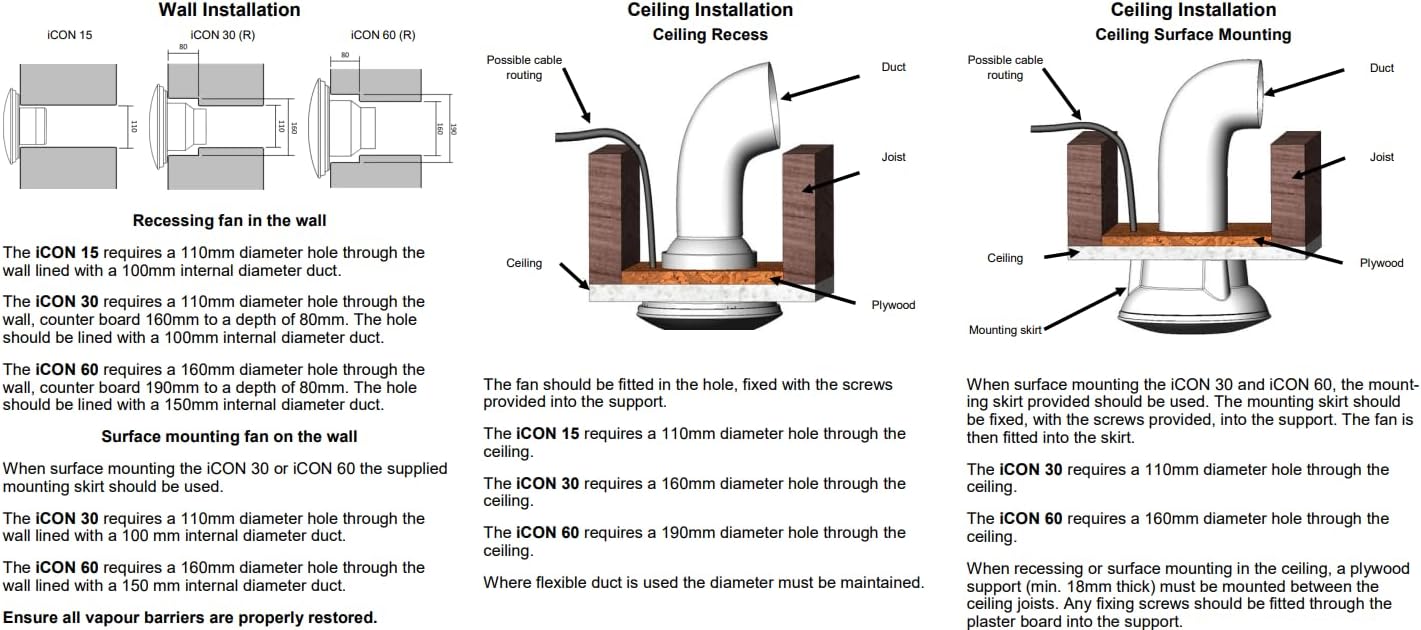
5. Installation
Airflow iCon ECO 15-ventilatoren er designet til installation i vægge eller lofter. Sørg altid for, at strømforsyningen er afbrudt, før installationsarbejdet påbegyndes.
5.1 Generelle retningslinjer for installation
- Ventilatoren kræver et hul med en diameter på 110 mm til installation.
- Ved væginstallationer skal hullet fores med en kanal med en indvendig diameter på 100 mm.
- Ved brug af fleksible kanaler skal det sikres, at diameteren opretholdes under hele strækningen.
- Sørg for, at alle dampspærrer er korrekt gendannet efter installationen.
5.2 Væginstallation (indbygget ventilator)
iCon 15 kræver et hul med en diameter på 110 mm gennem væggen. Dette hul skal fores med en kanal med en indvendig diameter på 100 mm.
5.3 Loftmontering (fordybning)
Ventilatoren skal monteres i hullet og fastgøres med de medfølgende skruer i støttestrukturen. iCon 15 kræver et hul med en diameter på 110 mm gennem loftet.
5.4 Loftsinstallation (overflademontering)
Ved overflademontering monteres ventilatoren i monteringsskørtet (hvis medfølger). iCon 15 kræver et hul med en diameter på 110 mm gennem loftet. Ved indbygning eller overflademontering i loftet skal der monteres en krydsfinerstøtte (min. 18 mm tyk) mellem loftsbjælkerne. Eventuelle fastgørelsesskruer skal monteres gennem gipspladen og ind i denne støtte.


6. Betjeningsvejledning
Airflow iCon ECO 15 fungerer automatisk baseret på dens intelligente irislukkerteknologi. Når den aktiveres (f.eks. af en lyskontakt eller et valgfrit styremodul), åbner irislukkeren sig langsomt, og ventilatoren begynder at udsuge luft. Ved deaktivering fortsætter ventilatoren med at køre i en indstillet periode (hvis et timermodul er installeret), før lukkeren langsomt lukker sig og forhindrer tilbageslag.
6.1 Kontrolmoduler (sælges separat)
iCon ECO 15 er designet til at blive opgraderet med forskellige udskiftelige kontrolmoduler, der kan monteres på samme enhed, for at imødekomme specifikke ventilationsbehov. Disse moduler tilbyder funktioner som:
- Grundlæggende skift: Enkel tænd/sluk-betjening.
- Forsinket start: Ventilatoren starter efter en forsinkelse.
- Fugtighedssensor: Aktiveres baseret på rummets luftfugtighedsniveau.
- Bevægelsessensor: Aktiveres ved registrering af bevægelse.
- Træksnor: Manuel aktivering via en træksnor.
- Opfriskning af værelse: Periodisk ventilation.
- SELV: Safety Extra Low Voltage.
- Timer: Ventilatoren kører i en indstillet periode efter aktivering.
- To hastigheder: Giver mulighed for valg mellem to ventilatorhastigheder.
- Variabel hastighed: Justerbar ventilatorhastighed.
Se instruktionerne til det specifikke styremodul for detaljerede betjeningsprocedurer.

7. Vedligeholdelse
Regelmæssig rengøring og vedligeholdelse vil sikre din Airflow iCon ECO 15 emhættes lange levetid og optimale ydeevne.
- Afbryd strømmen: Sørg altid for, at strømforsyningen til ventilatoren er afbrudt, før du udfører vedligeholdelse.
- Rengøring af låget: Frontdækslet kan forsigtigt tørres af med enamp klud og mildt rengøringsmiddel. Undgå slibende rengøringsmidler.
- Rengøring af ventilatorbladene: Fjern forsigtigt frontdækslet (se installationsvejledningen for afmontering). Rengør forsigtigt ventilatorbladene og de indvendige overflader med en blød børste eller et stykke børste.amp Sørg for, at der ikke trænger fugt ind i de elektriske komponenter.
- Genmontering: Når den er ren og tør, skal du samle ventilatordækslet igen og sørge for, at det sidder ordentligt fast.
- Frekvens: Rengøring bør udføres med jævne mellemrum, afhængigt af miljø og brug, typisk hver 3.-6. måned.
8. Fejlfinding
Hvis du oplever problemer med din Airflow iCon ECO 15-blæser, kan du følge disse almindelige fejlfindingstrin:
| Problem | Mulig årsag | Løsning |
|---|---|---|
| Ventilatoren fungerer ikke. | Ingen strømforsyning; defekt ledningsføring; fejl i ventilatormotor; problem med styremodul. | Kontroller strømforsyningen ved afbryderen og sikringsboksen. Kontroller ledningsforbindelserne (af en kvalificeret elektriker). Hvis der anvendes et styremodul, skal dets funktionalitet kontrolleres. |
| Blæseren larmer. | Blokering i kanal eller ventilatorblade; løs montering; slidte lejer. | Afbryd strømmen, og inspicer ventilatorblade og kanaler for blokeringer. Sørg for, at ventilatoren er sikkert monteret. Hvis støjen fortsætter, kan det være nødvendigt med en professionel inspektion. |
| Dårlig ekstraktionsevne. | Tilstoppede kanaler; snavsede ventilatorblade; forkert ventilatorstørrelse til rummet. | Rengør ventilatorblade og kontroller kanalerne for blokeringer. Sørg for, at kanalerne er korrekt installeret og ikke er for lange eller begrænsende. |
| Irislukkeren åbner/lukker ikke. | Blokering; motorfejl; problem med styremodul. | Afbryd strømmen, og kontroller for eventuelle fysiske forhindringer omkring lukkemekanismen. Hvis du bruger et kontrolmodul, skal du kontrollere dets funktion. |
Ved problemer, der ikke er nævnt her, eller hvis løsningerne ikke løser problemet, bedes du kontakte Airflows kundesupport eller en kvalificeret tekniker.
9. Garantioplysninger
Airflow Developments Ltd garanterer iCon-ventilatoren 3 år fra købsdatoen mod defekte materialer eller fabrikationsfejl. Denne garanti gælder for enheder, der er installeret og brugt i Storbritannien.
Du kan registrere din garanti online for yderligere information på www.airflow.com.
Garantien dækker kun ventilatoren og inkluderer ikke geninstallation, hvis det er nødvendigt. I tilfælde af defekte dele forbeholder Airflow Developments Ltd sig retten til at reparere eller udskifte enheden efter eget skøn uden beregning, forudsat at:
- Den er installeret og brugt i overensstemmelse med monterings- og ledningsføringsvejledningen, der følger med hver enhed.
- Den har ikke været tilsluttet en uegnet strømforsyning.
- Den har ikke været udsat for misbrug, forsømmelse eller beskadigelse.
- Den er ikke blevet modificeret eller repareret af nogen person, der ikke er autoriseret af Airflow Developments Ltd.
- Den er installeret i overensstemmelse med de seneste bygningsreglementer og IET-ledningsføringsregler af en person, der er anerkendt som en kompetent installatør (f.eks. NICEIC Ventilation Scheme).
Airflow Developments Ltd er ikke ansvarlig for tab, personskade eller anden følgeskade, der opstår som følge af fejl i udstyret, bortset fra at intet i denne betingelse skal fortolkes som en udelukkelse eller begrænsning af ansvar for uagtsomhed.
Denne garanti påvirker ikke nogen lovmæssige eller andre forbrugerrettigheder.
For detaljerede standardgarantivilkår og -betingelser, besøg venligst Airflow webwebstedet eller kontakt kundeservice.

10. Support og kontakt
For yderligere assistance, ofte stillede spørgsmål (FAQ) og installationshjælp, besøg venligst Airflow Knowledge Base:
airflow.com/nyttige-links/vidensbase-faqs


