
InFocus IN126
Brugervejledning til InFocus IN126 DLP projektor
Model: IN126 | Brand: InFocus
1. Produktet er slutview
The InFocus IN126 is a DLP projector designed for various projection needs, offering high brightness and a clear image. This manual provides essential information for the proper setup, operation, and maintenance of your projector.
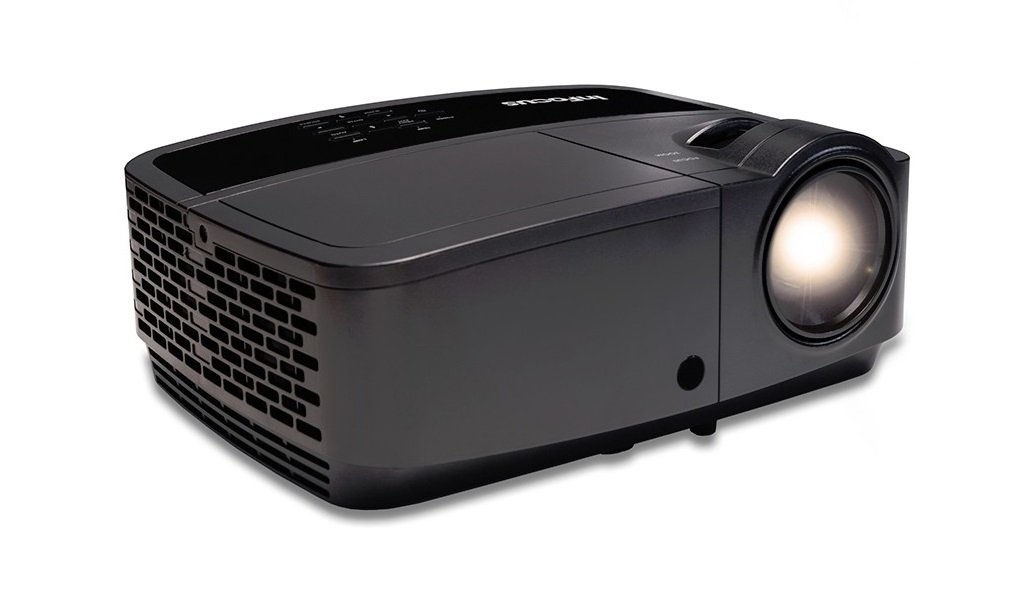
Billede 1.1: Forside view of the InFocus IN126 DLP Projector.
Nøglefunktioner:
- High brightness of up to 3200 lumens for clear images in various lighting conditions.
- High 3000:1 contrast ratio for sharp detail.
- Compact and portable design, weighing approximately 4.8 lbs. (2.17 kg).
- 3D-Ready capability for immersive viewing oplevelser.
- HDMI connectivity for versatile input options.
2. Opsætning og installation
2.1 Udpakning
Carefully remove the projector and all accessories from the packaging. Verify that all components are present according to the packing list.
2.2 Projektorplacering
Place the projector on a stable, flat surface or mount it securely. Ensure adequate ventilation around the projector to prevent overheating. Position the projector at an appropriate distance from the screen to achieve the desired image size.
2.3 Tilslutning af enheder
Connect your video source (e.g., laptop, gaming console) to the projector using an HDMI cable. Ensure the cable is securely plugged into both the source device and the projector's HDMI input port.

Image 2.1: An InFocus projector set up for a business presentation, demonstrating typical usage.
2.4 Tænd/sluk
- For at tænde: Connect the power cord to the projector and a power outlet. Press the power button on the projector or remote control. The power indicator light will illuminate.
- For at slukke: Press the power button twice. The projector will enter a cooling cycle before completely shutting down. Do not unplug the projector during the cooling cycle.
2.5 Billedjustering
- Fokus: Drej fokusringen på objektivet, indtil billedet er skarpt og klart.
- Keystone-korrektion: Use the keystone adjustment feature (usually found in the projector's menu or via dedicated buttons) to correct trapezoidal image distortion if the projector is not perfectly perpendicular to the screen.
3. Betjening af projektoren
3.1 Valg af indgangskilde
Press the 'Source' or 'Input' button on the remote control or projector control panel to cycle through available input sources (e.g., HDMI, VGA). Select the input corresponding to your connected device.
3.2 Menunavigation
Use the arrow buttons on the remote or control panel to navigate the on-screen display (OSD) menu. Press 'Enter' or 'OK' to confirm selections and 'Menu' or 'Exit' to go back or close the menu.
3.3 Billedjusteringer
Within the OSD menu, you can adjust various picture settings:
- Lysstyrke: Justerer billedets samlede lysstyrke eller mørkhed.
- Kontrast: Styrer forskellen mellem de lyseste og mørkeste dele af billedet.
- Farve: Justerer farvernes intensitet.
- Aspektforhold: Vælger visningsformatet (f.eks. 4:3, 16:9).
3.4 Lydindstillinger
If your projector has built-in speakers or is connected to an external audio system, you can adjust the volume and other audio settings through the OSD menu.
3.5 3D-betjening
The IN126 projector is 3D-Ready. To view 3D content, you will need compatible 3D glasses, a 3D-enabled source device, and 3D content. Refer to your 3D glasses and source device manuals for specific instructions on enabling 3D mode.
4. Vedligeholdelse
4.1 Rengøring af linsen
Brug en blød, fnugfri klud, der er specielt designet til optiske linser, til forsigtigt at tørre projektorlinsen af. Undgå at bruge slibende rengøringsmidler eller overdreven kraft, da dette kan ridse linsen.
4.2 Rengøring af projektoren Casing
Tør projektorens yderside afasing med en blød, damp klæde. Brug ikke skrappe kemikalier eller opløsningsmidler.
4.3 Vedligeholdelse af luftfilter
Regularly check and clean the air filter to ensure proper airflow and prevent overheating. Refer to the full product manual for instructions on locating and cleaning or replacing the air filter.
4.4 Lamp Udskiftning
Projektoren lamp has an estimated operating life of up to 20,000 hours. When the lamp reaches the end of its life, a warning message may appear, or the image brightness may significantly decrease. Refer to the full product manual for detailed instructions on safe lamp replacement. Always use genuine InFocus replacement lamps.
5. Fejlfinding
This section addresses common issues you might encounter with your InFocus IN126 projector.
5.1 Intet billede på skærmen
- Sørg for, at projektoren er tændt, og at strømindikatorlampen lyser konstant.
- Check all cable connections (HDMI, power) are secure.
- Kontroller, at den korrekte inputkilde er valgt på projektoren.
- Confirm the source device (laptop, etc.) is powered on and outputting a signal.
5.2 Billedet er forvrænget eller sløret
- Juster fokusringen på objektivet.
- Use keystone correction to fix trapezoidal distortion.
- Ensure the projector is placed on a stable surface and is not vibrating.
- Check the resolution settings of your source device; ensure it is compatible with the projector's native resolution (1280 x 720).
5.3 Ingen lyd
- Øg lydstyrken på både projektoren og kildeenheden.
- Hvis du bruger eksterne højttalere, skal du sørge for, at de er korrekt tilsluttet og tændt.
- Kontroller lydindstillingerne i projektorens OSD-menu.
5.4 Overophedning af projektor
- Ensure there is sufficient space around the projector for ventilation.
- Clean the air filter to remove any dust buildup.
- Bloker ikke ventilationsåbningerne.
6. Specifikationer
The following table outlines the key technical specifications for the InFocus IN126 DLP Projector:
| Feature | Specifikation |
|---|---|
| Mærke | InFokus |
| Modelnavn | IN126 DLP |
| Display Type | DLP |
| Indfødt opløsning | 1280 x 720 |
| Maksimal skærmopløsning | 1920 x 1080 |
| Lysstyrke | 3200 lumens (ANSI) |
| Kontrastforhold | 3000:1 |
| Lyskildens levetid | 20000 timer |
| Lamp Wattage | 230 watt |
| Forbindelsesteknologi | HDMI |
| Speciel funktion | 3D-klar |
| Formfaktor | Transportabel |
| Monteringstype | Bordplademontering |
| Varens vægt | 4.85 pund (2.2 kg) |
| Ekstern testcertificering | UL, c-UL, FCC, CE |
7. Garantioplysninger
The InFocus IN126 DLP Projector comes with a limited manufacturer's warranty. For specific details regarding warranty coverage, duration, and terms, please refer to the warranty card included with your product or visit the official InFocus webwebsted. Gem din købsbevis til garantikrav.
8. Kundesupport
For further assistance, technical support, or to inquire about replacement parts, please visit the official InFocus support website or contact their customer service department. Contact information can typically be found on the InFocus website or in the documentation included with your projector.
Ask a question about this manual
Ask about setup, troubleshooting, compatibility, parts, safety, or missing instructions. Manuals+ will review the question and use this page’s manual context to help answer it.