
Sanus CAPC01-B1
Sanus CAPC01-B1 Rack Mounted Power Conditioner User Manual
Model: CAPC01-B1
Indledning
This manual provides essential information for the proper installation, operation, and maintenance of your Sanus CAPC01-B1 Rack Mounted Power Conditioner. Please read these instructions thoroughly before use to ensure optimal performance and safety.
The Sanus CAPC01-B1 is designed to protect your rack equipment and provide clean power. It features adjustable, dual pull-out LED lights for illuminating rack equipment, 11 protected outlets, and EMI/RFI noise filtration.
Vigtige sikkerhedsoplysninger
- Læs alle instruktioner: Before operating the unit, read and understand all safety and operating instructions.
- Gem instruktionerne: Gem denne vejledning til fremtidig reference.
- Vær opmærksom på advarsler: Følg alle advarsler på produktet og i betjeningsvejledningen.
- Unplug during storms: Tag stikket ud af enheden under tordenvejr, eller når den ikke skal bruges i længere perioder.
- Undgå væsker: Do not expose the unit to dripping or splashing liquids. Do not place objects filled with liquids on the unit.
- Korrekt ventilation: Sørg for tilstrækkelig ventilation. Bloker ikke ventilationsåbningerne.
- Strømkilde: Connect only to a grounded AC power outlet with the specified voltage.
- Service: Forsøg ikke selv at servicere dette produkt. Overlad al service til kvalificeret servicepersonale.
Produkt overview
The Sanus CAPC01-B1 is a rack-mounted power conditioner designed to provide clean, protected power to your audio/video equipment. Key features include:
- Adjustable, dual pull-out LED lights for illuminating rack equipment.
- 11 fast-acting 2,400-joule protected outlets.
- Multi-Mode LED panel indicating voltage, amperage, and power consumption.
- EMI/RFI noise filtration, reducing noise up to 30 dB for superior signal quality.
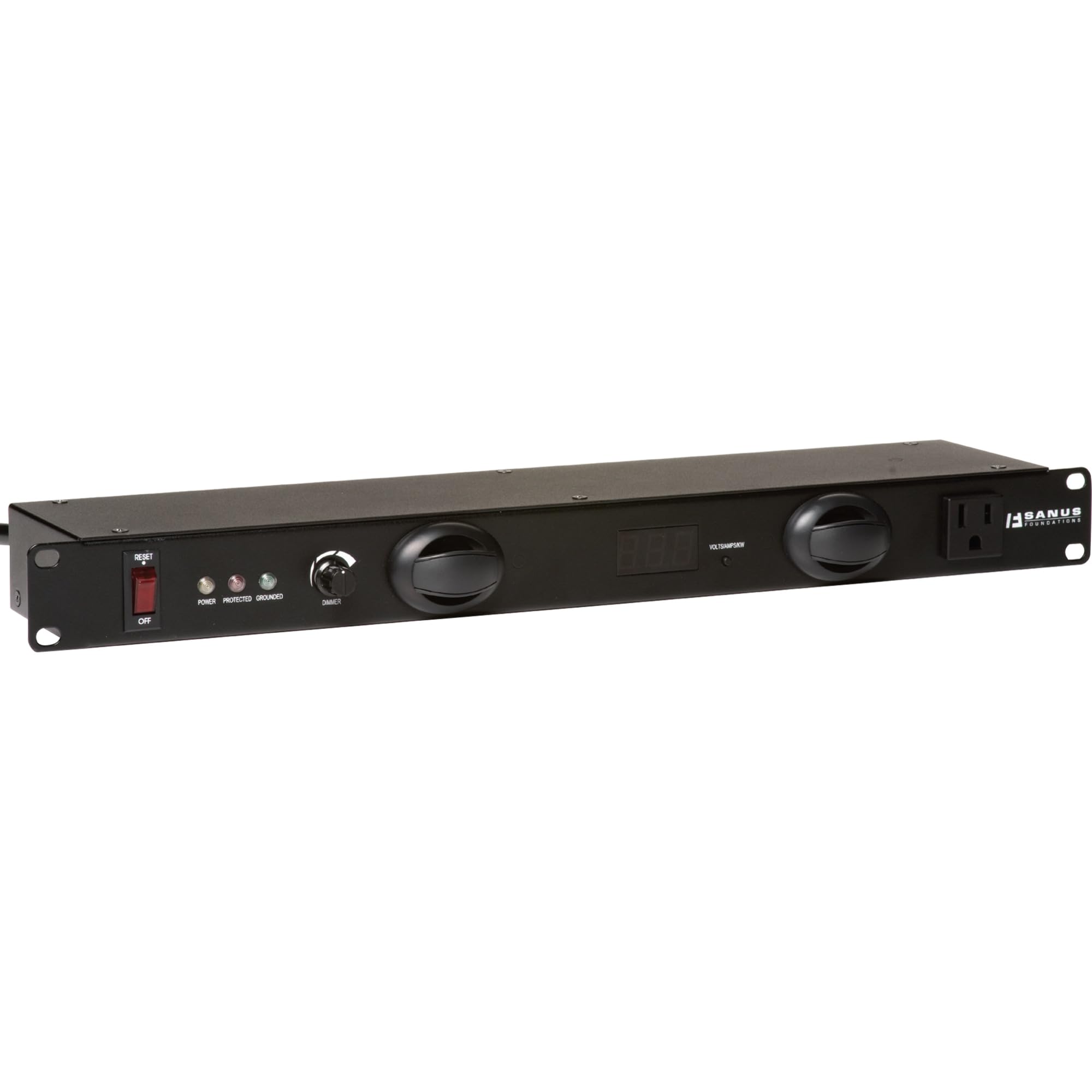
Figur 1: Forside view of the Sanus CAPC01-B1 Rack Mounted Power Conditioner, showing the LED lights and display.
Opsætning og installation
Pakkens indhold
Bekræft at alle komponenter er til stede:
- Sanus CAPC01-B1 Power Conditioner
- Rack montering hardware
- Brugervejledning (dette dokument)
Monteringsvejledning
- Ensure the rack is stable and properly grounded.
- Align the mounting ears of the CAPC01-B1 with the rack rails.
- Secure the unit to the rack using the provided rack mounting hardware. Ensure all screws are tightened securely.
- Allow adequate space for ventilation around the unit.
Tilslutning af udstyr
- With the power conditioner turned OFF, plug your audio/video equipment into the protected outlets on the rear of the CAPC01-B1.
- Ensure all equipment is properly seated in the outlets.
- Plug the power conditioner's main power cord into a grounded AC wall outlet.
Betjeningsvejledning
Tænd/sluk
- To power on the unit, press the main power switch located on the front panel. The LED display will illuminate.
- To power off, press the main power switch again.
Brug af LED-lys
- The CAPC01-B1 features dual pull-out LED lights. Gently pull out the lights from the front panel.
- Rotate the lights to adjust their direction.
- Use the dimmer knob on the front panel to adjust the brightness of the LED lights.
- Push the lights back into the unit when not in use.
Monitoring with the Multi-Mode LED Panel
The front panel LED display provides real-time information:
- Voltage: Viser den indgående AC-volumentage.
- Ampalder: Shows the total current draw of connected equipment.
- Strømforbrug: Indicates the total power being consumed.
Regularly monitor these readings to ensure your equipment is operating within safe parameters.
Opretholdelse
Rensning
- Tag altid stikket ud af stikkontakten før rengøring.
- Brug en blød, tør klud til at tørre de udvendige overflader af.
- Do not use liquid cleaners, aerosol cleaners, or strong chemicals, as they may damage the finish or internal components.
Ventilation
- Ensure that the ventilation openings on the unit are not blocked by dust or other obstructions.
- Periodically check for dust buildup and gently clean if necessary.
Fejlfinding
| Problem | Mulig årsag | Løsning |
|---|---|---|
| Enheden tænder ikke. | No power from wall outlet; main power switch off; internal fuse tripped. | Check wall outlet with another device. Ensure main power switch is ON. If unit has a resettable breaker, press it. If not, contact support. |
| Tilsluttet udstyr modtager ikke strøm. | Equipment not plugged in correctly; power conditioner not on; surge protection tripped. | Verify equipment is securely plugged into outlets. Ensure power conditioner is ON. Check for a surge protection reset button (if applicable) or power cycle the unit. |
| LED-lysene virker ikke. | Lights not pulled out; dimmer knob set to minimum; internal issue. | Gently pull out the LED lights. Adjust the dimmer knob. If still not working, contact support. |
| Display shows unusual readings. | Overload; faulty sensor. | Reduce the load by unplugging some equipment. If readings persist, contact support. |
Specifikationer
- Model: CAPC01-B1
- Udsalgssteder: 11 protected outlets
- Overspændingsbeskyttelse: 2,400 Joule
- Noise Filtration: EMI/RFI up to 30 dB
- Dimensioner: 20.5 x 8 x 2.6 tommer (52.07 x 20.32 x 6.6 cm)
- Vægt: 6.55 pund (2.97 kg)
- Fabrikant: Tjernlund Products – Audio
- Dato først tilgængelig: 31. marts 2011
Garanti og support
For warranty information and technical support, please refer to the documentation provided with your purchase or visit the official Sanus webForsøg ikke at reparere enheden selv, da dette kan ugyldiggøre din garanti.
Kontaktoplysninger: Please visit the Sanus official webwebstedet for de mest opdaterede supportkontaktoplysninger.
Ask a question about this manual
Ask about setup, troubleshooting, compatibility, parts, safety, or missing instructions. Manuals+ will review the question and use this page’s manual context to help answer it.