
1. Introduktion
This manual provides essential information for the proper setup, operation, and maintenance of your Cisco Scientific Atlanta IPN330HD Internet Set Top Box. Please read this manual thoroughly before using the device.
2. Sikkerhedsoplysninger
- Sørg for, at enheden er placeret på en stabil, flad overflade.
- Udsæt ikke enheden for vand eller overdreven fugt.
- Undgå at blokere ventilationsåbningerne for at forhindre overophedning.
- Brug kun den strømadapter, der fulgte med enheden.
- Frakobl strømkablet under tordenvejr eller når apparatet ikke bruges i længere perioder.
3. Pakkens indhold
Bekræft at alle varer er til stede i pakken:
- Cisco Scientific Atlanta IPN330HD Set Top Box
- Strømadapter
- Fjernbetjening (hvis inkluderet)
- HDMI-kabel (hvis inkluderet)
Note: Specific cable inclusions may vary.
4. Produktet er slutview
The IPN330HD is an Internet Protocol Set Top Box designed for digital television services. It features various connectivity options for integration with your home entertainment system.
4.1 Frontpanel
The front panel typically includes status indicators and an IR receiver for the remote control.
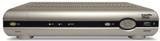
Billede: Forside view of the Cisco Scientific Atlanta IPN330HD Set Top Box. This image displays the device's front panel, which typically features power indicators and an infrared receiver for remote control commands.
4.2 Bagpaneltilslutninger
The rear panel provides all necessary ports for connecting the set top box to your television and network.
- HDMI udgang: For high-definition video and audio connection to a compatible TV.
- Komponentvideoudgang (YPbPr): For high-definition video connection to older TVs.
- Coaxial (RF) Output: For standard definition video and audio connection.
- Composite Video Output (RCA): For standard definition video connection.
- S-videoudgang: For enhanced standard definition video connection.
- Audio Outputs (RCA L/R): For analog stereo audio.
- Ethernet-port: For network connection (if applicable for your service).
- Strømindgang: Til tilslutning af strømadapteren.
5. Opsætning
Follow these steps to connect your IPN330HD Set Top Box:
- Position the Set Top Box: Place the device on a flat, stable surface near your television, ensuring adequate ventilation.
- Tilslut til tv:
- For best quality, connect an HDMI cable from the HDMI udgang on the set top box to an HDMI-indgang på dit tv.
- Alternatively, use Component, S-Video, Coaxial, or Composite cables based on your TV's available inputs.
- Connect to Network (if required): If your service provider requires an Ethernet connection, connect an Ethernet cable from the Ethernet-port on the set top box to your home network router or wall jack.
- Tilslut strøm: Sæt strømadapteren i Strømindgang on the set top box, then plug the other end into a wall outlet.
- Tænd: Turn on your television and select the correct input source (e.g., HDMI 1, Video 2) that corresponds to your set top box connection. The set top box should power on automatically or can be turned on using the remote control.
- Service Activation: Vigtig: This unit requires activation from your service provider. It will not function out of the box without proper activation. Contact your service provider to register and activate the device.
6. Betjeningsvejledning
Once activated by your service provider, you can begin using your IPN330HD Set Top Box.
- Tænd/sluk: Use the power button on the remote control or the front panel to turn the device on or off.
- Kanalnavigation: Use the CH+/CH- buttons or the number pad on your remote control to change channels.
- Lydstyrkekontrol: Use the VOL+/VOL- buttons on your remote control to adjust the audio volume.
- Menuadgang: Press the "Menu" button on your remote to access on-screen guides, settings, and other features provided by your service provider.
- Interaktive funktioner: Explore interactive features and on-demand content as offered by your service provider.
7. Vedligeholdelse
- Rensning: Use a soft, dry cloth to clean the exterior of the set top box. Do not use liquid cleaners or aerosols.
- Ventilation: Sørg for, at ventilationsåbningerne ikke er blokerede for at forhindre overophedning.
- Firmwareopdateringer: Firmware updates are typically managed by your service provider. Do not attempt manual updates unless instructed.
8. Fejlfinding
Hvis du støder på problemer, kan du bruge følgende almindelige løsninger:
| Problem | Mulig løsning |
|---|---|
| Intet billede/lyd |
|
| Device Not Working Out of Box | This device requires activation by your service provider. Contact them to register the unit and enable service. It will not function without this step. |
| Fjernbetjeningen reagerer ikke |
|
| Freezing Picture/Signal Loss |
|
9. Specifikationer
| Feature | Detalje |
|---|---|
| Modelnummer | IPN330HD |
| Fabrikant | Cisco (Scientific Atlanta) |
| Forbindelse | HDMI, Component, Coaxial, Composite, S-Video outputs |
| Produkttype | Internet Protocol Set Top Box |
| Først tilgængelig | 11. oktober 2010 |
10. Important Notes on Activation
Please be aware that the Cisco Scientific Atlanta IPN330HD Set Top Box is designed to work with specific service providers and requires activation. This unit will not function as a standalone device or "out of the box" without being provisioned and activated by your digital TV service provider. Technical support for activation and service-related issues must be obtained directly from your service provider.
11. Garanti og support
Specific warranty details for this product are typically provided by your service provider at the time of service activation or purchase. For technical support, service-related inquiries, or warranty claims, please contact your digital TV service provider directly. The manufacturer does not provide direct technical support for end-users of this device.