
Indledning
The GIGABYTE GM-M7600 is a wireless precision optical mouse designed for comfortable and reliable use. This manual provides instructions for setting up, operating, maintaining, and troubleshooting your device.
Pakkens indhold
Kontroller venligst pakkens indhold for at sikre, at alle varer er til stede:
- GIGABYTE GM-M7600 Wireless Optical Mouse
- Portable Nano USB Receiver
- 2 x AAA batterier
Opsætning
1. Installation af batterier
The GM-M7600 mouse requires two AAA batteries for operation. The batteries are included in the package.
- Find batteridækslet på undersiden af musen.
- Skub eller løft forsigtigt dækslet for at åbne rummet.
- Insert the two AAA batteries, ensuring the positive (+) and negative (-) terminals align correctly with the markings inside the compartment.
- Luk batterirummets dæksel forsvarligt.
2. Tilslutning af USB-modtageren
The mouse connects to your computer via a portable Nano USB receiver.
- Locate the Nano USB receiver. It may be stored inside the mouse's battery compartment or packaged separately.
- Plug the Nano USB receiver into an available USB port on your computer (Laptop or Personal Computer).
- Your operating system (e.g., Windows XP, Linux) should automatically detect and install the necessary drivers. This process may take a few moments.
- Når driverne er installeret, er musen klar til brug.
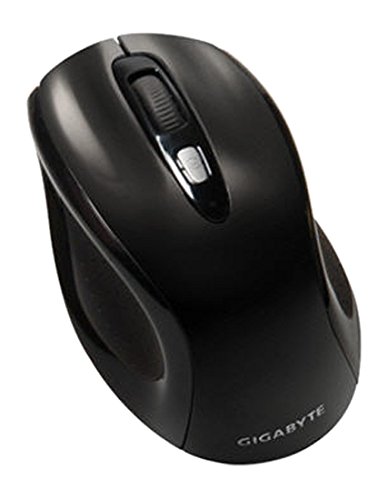
Figur 1: GIGABYTE GM-M7600 Wireless Optical Mouse. This image displays the ergonomic design of the mouse, highlighting its form factor and the location of its buttons. The Nano USB receiver is typically stored within the mouse or connected to a computer's USB port.
Betjeningsvejledning
1. Tænd/sluk
The mouse typically has a power switch on its underside. Slide the switch to the 'ON' position to activate the mouse. Slide it to 'OFF' when not in use to conserve battery life.
2. Justering af DPI (følsomhed)
The GM-M7600 features an adjustable DPI switch, allowing you to change the mouse sensitivity between 800 DPI and 1600 DPI. This switch is usually located near the scroll wheel. Press the DPI button to toggle between the two sensitivity settings.
3. Grundlæggende musefunktioner
- Venstre klik: Primær knap til valg af elementer, åbning files, og interaktion med software.
- Højreklik: Sekundær knap til adgang til kontekstmenuer og yderligere muligheder.
- Scrollhjul: Bruges til at scrolle gennem dokumenter og web sider. Den kan også fungere som en midterste klikknap.
Opretholdelse
1. Rensning
For at opretholde optimal ydeevne og udseende:
- Disconnect the mouse from your computer and turn off the power switch.
- Brug en blød, fnugfri klud lidt damprengøres med vand eller en mild rengøringsopløsning til at tørre musens overflade af.
- Undgå at bruge skrappe kemikalier, slibende rengøringsmidler eller at sprøjte væsker direkte på musen.
- Clean the optical sensor area on the underside of the mouse with a dry cotton swab to remove any dust or debris.
2. Udskiftning af batteri
When the mouse performance degrades or it stops responding, it may be time to replace the batteries.
- Sluk musen ved hjælp af tænd/sluk-knappen.
- Open the battery compartment as described in the 'Installing Batteries' section.
- Fjern de gamle AAA-batterier.
- Isæt to nye AAA-batterier, og overhold den korrekte polaritet (+/-).
- Close the battery compartment and turn the mouse back on.
Fejlfinding
If you encounter issues with your GIGABYTE GM-M7600 mouse, try the following solutions:
- Musen svarer ikke:
- Sørg for, at musen er tændt.
- Kontroller, om batterierne er korrekt installeret og har tilstrækkelig opladning. Udskift om nødvendigt.
- Ensure the Nano USB receiver is securely plugged into a working USB port on your computer. Try a different USB port.
- Genstart din computer.
- Uregelmæssig markørbevægelse:
- Rengør den optiske sensor på undersiden af musen.
- Sørg for at bruge musen på en passende overflade. Undgå meget reflekterende eller gennemsigtige overflader.
- Check for any wireless interference. Move the mouse closer to the receiver or away from other wireless devices.
- DPI switch not working:
- Sørg for, at musen er tændt og tilsluttet.
- Tryk DPI-knappen fast.
Specifikationer
| Modelnavn | GM-M7600 |
| Mærke | GIGABYTE |
| Forbindelsesteknologi | 2.4GHz Radio Frequency Wireless |
| Bevægelsesdetektion | Optisk |
| Justerbar DPI | 800 / 1600 DPI |
| Antal knapper | 3 (Venstre, Højre, Scrollhjul/Midterste klik) |
| Strømkilde | 2 x AAA batterier (medfølger) |
| Modtager type | Portable Nano USB Receiver |
| Kompatible enheder | Bærbar, personlig computer |
| Operativsystemsupport | Linux, Windows XP |
| Indkapslingsmateriale | Plastic with Rubberized Finish |
| Farve | Sort |
Garanti og support
For warranty information and technical support, please refer to the warranty card included with your product or visit the official GIGABYTE webwebsted. Gem din købskvittering for garantikrav.