
1. Introduktion
Thank you for choosing the SilverCrest SR-1400 Compact Scanning Radio. This manual provides essential information for the safe and efficient operation of your device. Please read it thoroughly before use and keep it for future reference.
1.1 Produktegenskaber
- Compact FM radio (87.5 to 108 MHz) with digital frequency and time display.
- Automatic channel search (scanning radio) function.
- Speaker unit with telescopic antenna and detachable stand for desktop use.
- Detachable radio unit with practical belt clip for mobile use.
- Headphone cable with antenna function for mobile use.
- Integreret urfunktion.
- Snooze funktion.
1.2 Pakkens indhold
Kontroller venligst, at alle varer er til stede og i god stand:
- SilverCrest SR-1400 Compact Scanning Radio (main unit and speaker unit)
- Hovedtelefoner
- 2 x AAA alkaliske batterier
- Bærerem
- Brugermanual
2. Opsætning
2.1 Batteriinstallation
- Locate the battery compartment on the back of the main radio unit.
- Åbn batterirummets dæksel.
- Isæt 2 x AAA alkaliske batterier, og sørg for korrekt polaritet (+/-).
- Luk batterirummets dæksel forsvarligt.
2.2 Tilslutning af hovedtelefoner
For private listening or mobile use, connect the provided headphones to the 3.5mm audio jack on the main radio unit. The headphone cable also functions as an antenna when the radio unit is detached from the speaker unit.
2.3 Attaching the Speaker Unit
To use the radio with its speaker, align the main radio unit with the speaker unit and slide them together until they click into place. Ensure the connection is firm.

Image: The SilverCrest SR-1400 radio unit (right) detached from its speaker unit (left). The radio unit features a digital display and control buttons, while the speaker unit has a grid of speaker holes.
2.4 Using as a Table Unit
The speaker unit includes a detachable stand. Attach this stand to the speaker unit to position the radio upright on a flat surface for stable desktop use. Extend the telescopic antenna for optimal reception.
2.5 Mobile Use with Belt Clip
For mobile use, detach the main radio unit from the speaker unit. The radio unit features a practical belt clip on its back. Attach the unit to your belt or clothing for convenient, portable listening with headphones.
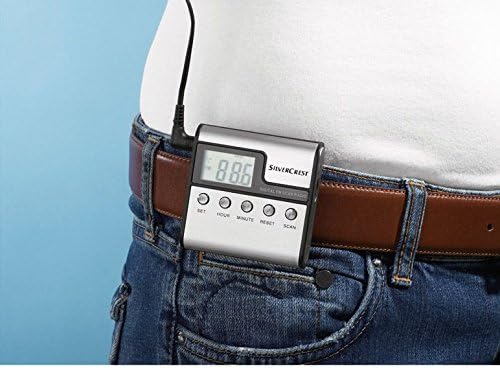
Image: The SilverCrest SR-1400 radio unit, detached from its speaker, is shown clipped to a brown leather belt on a person wearing blue jeans. The digital display shows "88.6".
3. Betjening
3.1 Tænd/sluk
To turn the radio on, press the MAGT button (if available) or a designated button. To turn it off, press and hold the same button. The digital display will illuminate when powered on.
3.2 Indstilling af tid
The radio unit features SÆT, TIME, og MINUT buttons for time adjustment.
- Tryk på SÆT Tryk én gang på knappen for at gå ind i tidsindstillingstilstanden. Timecifrene blinker.
- Brug TIME knappen for at justere timen.
- Trykke SÆT igen. Minuttifrene vil blinke.
- Brug MINUT knappen for at justere minutterne.
- Trykke SÆT en tredje gang for at bekræfte og afslutte tidsindstillingstilstanden.
3.3 FM-radioindstilling
The radio operates on the FM frequency band (87.5 to 108 MHz).
3.3.1 Automatic Channel Search (Scanning)
Tryk på SCAN button. The radio will automatically scan for available FM stations and store them in memory. The display will show the frequency as it scans.
3.3.2 Manuel indstilling
While specific manual tuning buttons are not explicitly detailed, typically you would use OP/NED or TUNE +/- buttons to manually adjust the frequency. A brief press usually adjusts by small increments, while holding the button may initiate a quick scan to the next strong station.
3.4 Lydstyrkekontrol
Juster lydstyrken ved hjælp af LYDSTYRKE OP og LYDSTYRKE NED buttons (or a rotary dial, if present on your model). Ensure the volume is at a comfortable level before placing headphones on.
3.5 Brug af snooze-funktionen
If an alarm is set (functionality not explicitly detailed but mentioned as a feature), the snooze function can be activated by pressing the SLUM button (or a designated button) when the alarm sounds. This will temporarily pause the alarm for a set period.
3.6 Nulstilling af enheden
If the device malfunctions or becomes unresponsive, you can perform a reset. Press the NULSTIL button, usually located in a small recess, using a pointed object like a paperclip. This will restore the radio to its factory default settings.
4. Vedligeholdelse
4.1 Rengøring
Wipe the radio's exterior with a soft, dry cloth. Do not use abrasive cleaners, solvents, or strong chemicals, as these can damage the surface. Avoid getting moisture into any openings.
4.2 Udskiftning af batteri
When the display dims or the radio's performance decreases, it's time to replace the batteries. Follow the battery installation steps in Section 2.1. Always use new AAA alkaline batteries and dispose of old batteries responsibly.
4.3 Opbevaring
If the radio will not be used for an extended period, remove the batteries to prevent leakage and damage. Store the device in a cool, dry place, away from direct sunlight and extreme temperatures.
5. Fejlfinding
If you encounter issues with your SilverCrest SR-1400, please refer to the following table before seeking professional assistance:
| Problem | Mulig årsag | Løsning |
|---|---|---|
| Radioen tænder ikke. | Batterierne er døde eller isat forkert. | Udskift batterierne med nye, og sørg for korrekt polaritet. |
| Dårlig FM-modtagelse. | Telescopic antenna not extended; weak signal area; headphone cable not acting as antenna (mobile use). | Fully extend the telescopic antenna. Move to an area with better signal. Ensure headphones are plugged in for mobile use. |
| Ingen lyd fra højttaler/hovedtelefoner. | Volume is too low; headphones not properly connected; speaker unit not properly attached. | Increase volume. Re-plug headphones firmly. Ensure speaker unit is securely attached to the main radio unit. |
| Det digitale display er svagt eller tomt. | Lav batteristrøm. | Udskift batterierne. |
6. Tekniske specifikationer
| Feature | Detalje |
|---|---|
| Mærke | SilverCrest (Manufactured by Targa GmbH) |
| Model | SR-1400 |
| Tuner-teknologi | FM |
| Understøttede radiobånd | FM (87.5 - 108 MHz) |
| Hardware-interface | 3.5 mm lyd |
| Kompatible enheder | Hovedtelefoner |
| Særlige funktioner | Snooze, Automatic Channel Search, Digital Display, Clock Function |
| Display Type | Digital |
| Strømkildetype | Batteridrevet |
| Batterier | 2 x AAA Alkaline (inkluderet) |
| Farve | Silver (or Black, depending on variant) |
| Forbindelsesteknologi | AUX |
7. Garanti og support
For garantioplysninger og kundesupport henvises til den dokumentation, der blev leveret ved køb, eller kontakt din forhandler. Gem din købsbevis i tilfælde af garantikrav.