
Indledning
Tak for købetasing the SENTRY CL933 Big Screen Weather Alarm Clock. This device combines a digital alarm clock with a large LCD display, providing essential information such as time, date, indoor temperature, humidity, and a weather forecast. This manual will guide you through the setup, operation, and maintenance of your new alarm clock.
Sikkerhedsoplysninger
- Udsæt ikke enheden for ekstreme temperaturer, direkte sollys eller høj luftfugtighed.
- Undgå at tabe enheden eller udsætte den for kraftige stød.
- Bland ikke gamle og nye batterier eller forskellige typer batterier.
- Fjern batterierne, hvis enheden ikke skal bruges i en længere periode.
- Rengør enheden med en blød, tør klud. Brug ikke slibende rengøringsmidler eller opløsningsmidler.
- Dette produkt er kun til indendørs brug.
Pakkens indhold
Kontroller venligst, at alle varer er til stede:
- SENTRY CL933 Big Screen Weather Alarm Clock
- Brugervejledning (dette dokument)
Produkt overview
The SENTRY CL933 features a large, easy-to-read LCD display and intuitive controls. Familiarize yourself with the main components:
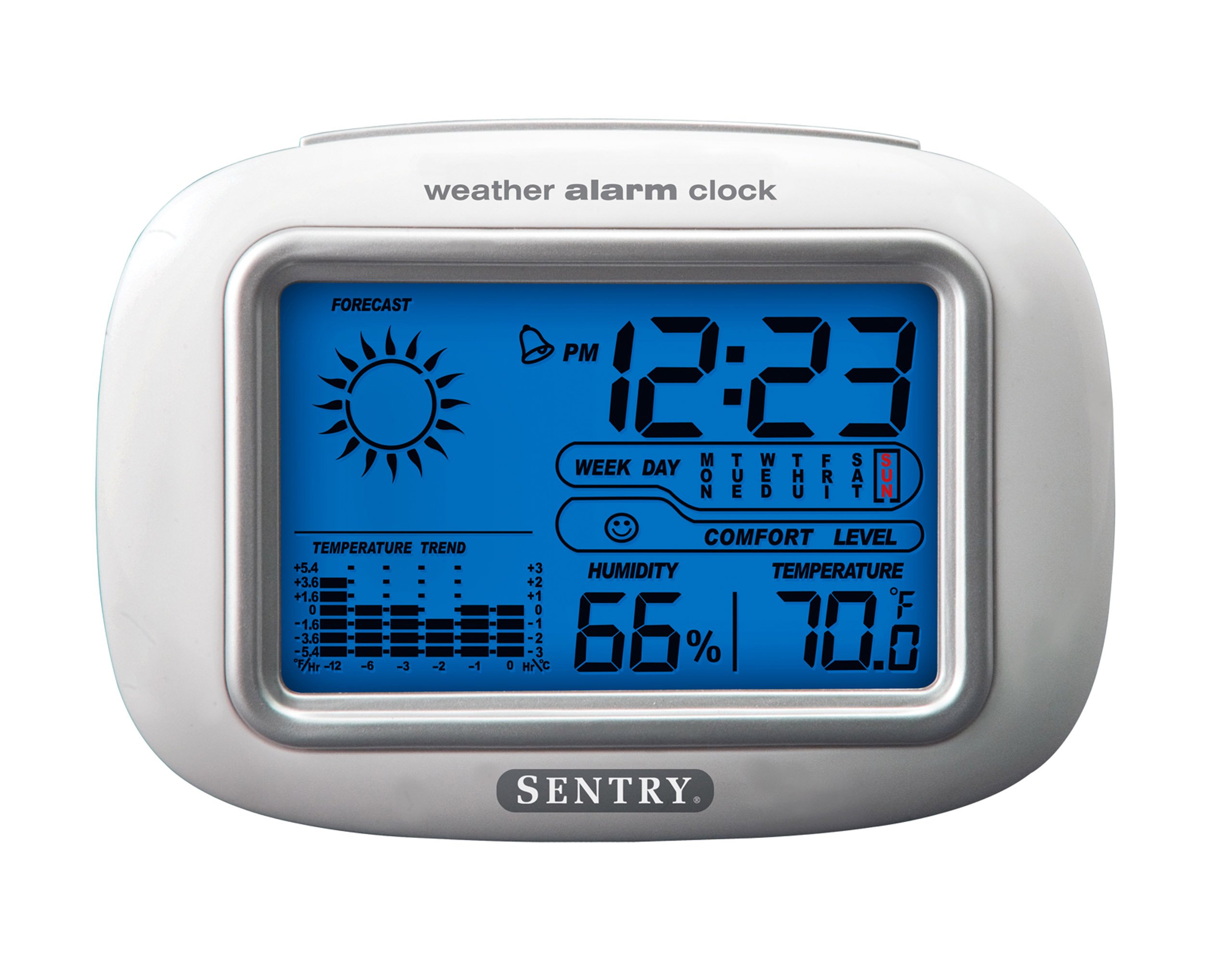
The SENTRY CL933 Big Screen Weather Alarm Clock displayed in its retail packaging, showing the clock face with time, weather forecast, humidity, and temperature readings.
Displayelementer:
- Tidsvisning: Shows current time (12/24 hour format).
- Dato og ugedag: Displays the current date and day.
- Weather Forecast Icon: Indicates predicted weather conditions (e.g., sunny, cloudy, rainy).
- Moon Phase Icon: Viser den aktuelle månefase.
- Temperaturvisning: Shows indoor temperature in Celsius or Fahrenheit.
- Fugtighedsdisplay: Shows indoor humidity percentage.
- Comfort Level Icon: Indicates the comfort level based on temperature and humidity.
- Indikator for temperaturtrend: Shows if the temperature is rising, falling, or stable over the last 12 hours.
- Alarmikon: Indicates when the alarm is set.
Control Buttons (typically on the back or sides):
- MODE/SET-knap: Bruges til at skifte mellem visningstilstande og gå ind i indstillingstilstand.
- OP/NED knapper: Used to adjust values during setting and sometimes to toggle display options.
- ALARM knap: Used to set or activate/deactivate the alarm.
- SNOOZE/LIGHT-knap: Activates the backlight and functions as the snooze button when the alarm sounds.
- °C/°F knap: Skifter mellem temperaturvisning i Celsius og Fahrenheit.
Opsætning
1. Batteriinstallation
- Find batteridækslet på bagsiden af enheden.
- Fjern dækslet ved at skubbe eller løfte det.
- Insert two (2) new AAA batteries (not included) according to the polarity indicators (+ and -) inside the compartment.
- Sæt batterirummets dæksel på igen.
- The clock will power on and the display will activate.
2. Indledende placering
Place the alarm clock on a stable, flat surface away from direct heat sources, strong vibrations, or areas with extreme temperature fluctuations for accurate readings.
Betjeningsvejledning
1. Indstilling af tid og dato
- Tryk og hold på MODE/SET button for approximately 3 seconds to enter time setting mode. The hour digit will start flashing.
- Brug UP or NED knapper for at justere timen.
- Trykke MODE/SET igen for at bekræfte timen og gå videre til minutindstillingen.
- Repeat steps 2 and 3 for minutes, year, month, and day.
- Når du har indstillet dagen, skal du trykke på MODE/SET en sidste gang for at afslutte indstillingstilstanden.
- To switch between 12-hour and 24-hour time format, press the UP knappen, mens timetallet blinker under tidsindstilling.
2. Indstilling af alarmen
- Tryk på ALARM knappen én gang for at vise det aktuelle alarmtidspunkt.
- Tryk og hold på ALARM button for approximately 3 seconds. The alarm hour digit will start flashing.
- Brug UP or NED knapper for at justere alarmtiden.
- Trykke ALARM igen for at bekræfte timen og gå til indstillingen af alarmminutten.
- Brug UP or NED knapper for at justere alarmminut.
- Trykke ALARM en sidste gang for at bekræfte og afslutte alarmindstillingstilstand.
- For at aktivere eller deaktivere alarmen skal du trykke på ALARM button briefly when the current time is displayed. An alarm icon will appear on the display when the alarm is active.
3. Snooze-funktion og baggrundsbelysning
- Når alarmen lyder, skal du trykke på SNOOZE / LYS button to activate the snooze function. The alarm will temporarily stop and sound again after a few minutes (typically 5-10 minutes).
- For at slukke alarmen helt, tryk på en hvilken som helst anden knap (f.eks. ALARM, MODE/SET) when the alarm is sounding.
- Tryk på SNOOZE / LYS button at any time to activate the backlight for a few seconds, illuminating the display for easy viewing in low light conditions. The backlight is not designed to stay on continuously to conserve battery life.
4. Valg af temperaturenhed (°C/°F)
Tryk på ° C / ° F button (usually located on the back or side) to toggle the temperature display between Celsius and Fahrenheit.
5. Understanding Weather and Environmental Displays
- Vejrudsigt: The icon (e.g., sun, clouds, rain) represents a prediction of the weather for the next 12-24 hours based on atmospheric pressure changes detected by the internal sensor. This is an estimate and may not always match official weather reports.
- Fugtighed: Displays the current indoor relative humidity percentage.
- Komfortniveau: An icon (e.g., smiley face, neutral face, frowny face) indicates the indoor comfort level based on the combination of temperature and humidity.
- Temperaturtendens: The arrow indicator shows if the indoor temperature has been rising, falling, or remaining stable over the past 12 hours.
- Månefase: The moon icon changes to reflect the current phase of the moon.
Opretholdelse
- Rensning: Tør enheden af med en blød, let damp klæde. Brug ikke skrappe kemikalier eller slibende materialer.
- Udskiftning af batteri: When the display becomes dim or functions become erratic, replace the two AAA batteries. Ensure correct polarity.
- Opbevaring: Hvis uret opbevares i længere tid, skal batterierne fjernes for at forhindre lækage.
Fejlfinding
| Problem | Mulig årsag/løsning |
|---|---|
| Skærmen er tom eller svag. | Batteries are low or incorrectly installed. Replace with new AAA batteries, ensuring correct polarity. |
| Tid/dato kan ikke indstilles. | Sørg for at trykke og holde nede MODE/SET knappen i 3 sekunder for at gå ind i indstillingstilstand. |
| Alarmen lyder ikke. | The alarm may not be activated. Press the ALARM button briefly to ensure the alarm icon is displayed. Check alarm time setting. |
| Inaccurate temperature/humidity. | The unit may be placed near a heat source, vent, or in direct sunlight. Move the clock to a more stable environment. Readings are for indoor conditions only. |
| Vejrudsigten virker forkert. | The weather forecast is an estimate based on internal barometric pressure changes and may not always align with local weather reports. It is a general trend indicator. |
Specifikationer
- Model: CL933
- Mærke: SKILDVAGT
- Skærmtype: Digital LCD med baggrundsbelysning
- Strømkilde: Batteridrevet
- Batterier påkrævet: 2 x AAA (medfølger ikke)
- Dimensioner: 6.5 x 2.25 x 4.25 tommer (16.5 x 5.7 x 10.8 cm)
- Vægt: 6.2 ounce (176 gram)
- Funktioner: Time, Date, Day of Week, Alarm, Snooze, Indoor Temperature (°C/°F), Indoor Humidity, Weather Forecast Icons, Moon Phase, Comfort Level Indicator, 12-hour Temperature Trend.
- Monteringstype: Bordplade
Garanti og support
SENTRY products are designed for reliability and performance. For any questions, technical support, or warranty inquiries, please refer to the contact information provided with your purchase or visit the official SENTRY webwebsted. Gem venligst din købsbevis til garantikrav.