
Indledning
This manual provides essential information for the proper use and care of your Kingmax 8GB SDHC Class 10 High Performance memory card. Please read these instructions carefully to ensure optimal performance and longevity of your product.
Produkt overview
The Kingmax 8GB SDHC Class 10 memory card is designed for high-speed data transfer and reliable storage. It complies with the SD 2.0 standard, offering a transfer rate of 20MB/sec and higher, making it suitable for devices requiring fast data access, such as digital cameras, camcorders, and other portable electronics. Its 8GB capacity provides ample space for photos, videos, and other digital files.
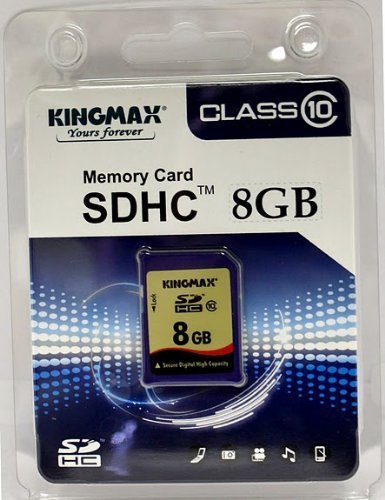
This image displays a Kingmax memory card. While the image shows a 16GB microSD card, it illustrates the general appearance of Kingmax memory products. The product covered by this manual is an 8GB SDHC Class 10 card.
Opsætning
- Kompatibilitetskontrol: Ensure your device (e.g., camera, smartphone, computer) supports SDHC (Secure Digital High Capacity) memory cards. Older devices may only support standard SD cards.
- Indsæt kortet: Locate the memory card slot on your device. Gently insert the Kingmax SDHC card into the slot with the gold contacts facing the correct direction, usually downwards or towards the device's interior. Push until it clicks into place. Do not force the card.
- Initial Formatting (Optional but Recommended): For optimal performance and to ensure compatibility with your specific device, it is recommended to format the memory card using your device's internal formatting function. Refer to your device's user manual for instructions on how to format an SD card. Bemærk: Formatering sletter alle data på kortet. Sikkerhedskopier alle vigtige data før formatering.
Betjeningsvejledning
- Datalagring: Once inserted and recognized by your device, the memory card will function as an external storage medium. You can save photos, videos, documents, and other filedirekte til kortet.
- Dataoverførsel:
- Til en computer: Insert the SDHC card into a compatible card reader connected to your computer. The card will appear as a removable drive. You can then drag and drop files or use your computer's file management system to transfer data.
- Fra en computer: Similarly, drag and drop files from your computer to the card's drive icon.
- Sikker fjernelse: Always safely eject the memory card from your computer or device before physically removing it. For computers, use the 'Safely Remove Hardware' option (Windows) or 'Eject' function (macOS). For other devices, power off the device or follow its specific instructions for card removal. This prevents data corruption.
Opretholdelse
- Fysisk beskyttelse: Keep the memory card in its protective casing when not in use to prevent dust, dirt, and static electricity from damaging the contacts. Avoid bending or applying excessive pressure to the card.
- Temperatur og luftfugtighed: Store the card in a cool, dry environment. Avoid extreme temperatures, direct sunlight, and high humidity, which can degrade the card's performance and lifespan.
- Data backup: Regularly back up important data from your memory card to another storage device (e.g., computer hard drive, cloud storage). While durable, no storage medium is infallible.
- Rensning: If the gold contacts appear dirty, gently wipe them with a clean, dry, lint-free cloth. Do not use abrasive materials or liquids.
Fejlfinding
- Kort ikke genkendt:
- Sørg for, at kortet er sat helt og korrekt i stikket.
- Genstart din enhed.
- Test the card in another compatible device or card reader to rule out a device-specific issue.
- Verify your device supports SDHC cards.
- Langsom ydeevne:
- Ensure your device supports Class 10 speeds. Older devices may not fully utilize the card's speed.
- Format the card (after backing up data) to resolve potential fragmentation issues.
- Check if the card is nearly full, which can sometimes affect performance.
- Datakorruption:
- Tag altid kortet sikkert ud, inden du fjerner det.
- Undgå at fjerne kortet under dataoverførsel eller når enheden aktivt skriver til det.
- If data is corrupted, try using data recovery software (third-party) or reformat the card if data is not critical.
Specifikationer
| Feature | Detalje |
|---|---|
| Modelnummer | KM08GSDHC10 |
| Flash-hukommelsestype | SDHC |
| Hukommelseslagringskapacitet | 8 GB |
| Sikker digital associations hastighedsklasse | Klasse 10 |
| Overførselshastighed | 20MB/sec and higher |
| Overholdelse | SD 2.0 standard |
| Dimensioner (L*B*H) | 32 x 24 x 2.1 mm |
| Voltage | 2.7V~3.6V |
| Udholdenhed | 5,000 gange |
| Fabrikant | KINGMAX |
| UPC/GTIN | 876397008413 |
| ASIN | B003M51XCE |
Garanti og support
For specific warranty information, please refer to the packaging or the official Kingmax website. If you encounter issues not covered in this manual, or require further assistance, please contact Kingmax customer support through their official channels. Keep your purchase receipt as proof of purchase for warranty claims.