
Indledning
This manual provides comprehensive instructions for the setup and operation of your RCA RCU704 4-Function Universal Remote Control. This remote is designed to control up to four different audio/video components, simplifying your home entertainment experience.
Sikkerhedsoplysninger
- Bland ikke gamle og nye batterier.
- Bland ikke alkaliske, standard (kul-zink) eller genopladelige (nikkel-cadmium) batterier.
- Fjern batterierne, hvis fjernbetjeningen ikke skal bruges i længere tid, for at forhindre lækage.
- Opbevar batterier utilgængeligt for børn.
Pakkens indhold
- RCA RCU704 Universal Remote Control
- Brugervejledning (dette dokument)
Produkt overview
The RCA RCU704 remote control features a straightforward layout for easy operation of your home entertainment devices.
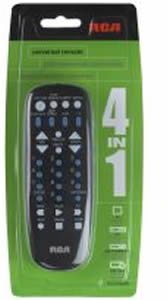
Billede: Front view of the RCA RCU704 universal remote control, showcasing its button layout and ergonomic design.
Key buttons and their functions include:
- MAGT: Tænder eller slukker den valgte komponent.
- TV, VCR, DVD, AUX: Component selection buttons to switch control to the desired device.
- VOL +/-: Justerer lydstyrken.
- CH +/-: Skifter kanaler op eller ned.
- STUM: Dæmper lydudgangen.
- INPUT/VIDEO: Selects the video input source on your TV or other display device.
- NUMBER PAD (0-9): Til direkte kanalindgang eller menu-navigation.
Opsætning
1. Batteriinstallation
- Remove the battery compartment cover located on the back of the remote control.
- Insert two fresh AAA batteries, ensuring that the (+) and (-) terminals align correctly with the markings inside the compartment.
- Sæt batterirummets dæksel på igen.
2. Programmering af fjernbetjeningen
There are two primary methods to program your universal remote to control your devices:
Metode A: Direkte kodeindtastning
- Turn on the component (e.g., TV, DVD player) you wish to control.
- Tryk og hold på KODE SØGNING button until the indicator light on the remote turns on.
- Mens du fortsætter med at holde KODE SØGNING, press and release the component button (e.g., TV, DVD) corresponding to the device you want to program. The indicator light will blink once and then remain steadily on.
- Enter the 4-digit code for your brand from the provided code list (refer to the separate code booklet that came with your remote).
- If the code is valid, the indicator light will turn off. If the code is invalid, the light will flash rapidly.
- Test fjernbetjeningen ved at trykke på MAGT button. If the component turns off, try other functions like VOL +/-. If it works, programming is complete.
- If the component does not respond or functions incorrectly, repeat the process with the next code listed for your brand.
Metode B: Automatisk kodesøgning
- Tænd den komponent, du vil styre.
- Tryk og hold på KODE SØGNING button until the indicator light on the remote turns on.
- Mens du fortsætter med at holde KODE SØGNING, press and release the component button (e.g., TV, DVD) you want to program. The indicator light will blink once and then remain steadily on.
- Ret fjernbetjeningen mod komponenten, og tryk gentagne gange på MAGT knap (eller CH+ for TVs) until the component turns off.
- Once the component turns off, immediately press the ENTER knappen for at gemme koden. Indikatorlampen slukker.
- Test the remote. If it does not work correctly, repeat the auto code search process.
Betjening af fjernbetjeningen
To operate a component after it has been programmed:
- Press the corresponding component button (TV, VCR, DVD, eller AUX) to select the device you want to control. The indicator light will flash once to confirm selection.
- Point the remote at the component and press the desired function button (e.g., MAGT, VOL +/-, CH +/-).
Opretholdelse
- Clean the remote with a soft, dry cloth. Do not use liquid cleaners or abrasive materials.
- Avoid exposing the remote to extreme temperatures, high humidity, or direct sunlight.
- Do not drop the remote or subject it to strong impacts, as this may damage internal components.
Fejlfinding
| Problem | Løsning |
|---|---|
| Fjernbetjeningen betjener ikke din komponent. | Ensure batteries are fresh and installed correctly. Reprogram the remote using a different code for your brand or try the auto code search method. Ensure the remote is pointed directly at the component and there are no obstructions. |
| Indikatorlyset tænder ikke. | Check battery installation. Replace batteries if necessary. Ensure the battery compartment cover is closed properly. |
| Some buttons work, but others don't. | The programmed code may only partially match your component. Try programming with a different code for your brand or use the auto code search to find a more compatible code. |
| Fjernbetjeningen mister programmeringen. | This is typically due to low batteries. Replace batteries with fresh ones and reprogram the remote. |
Specifikationer
- Model: RCU704 (RCARC704)
- Funktioner: 4 (TV, VCR, DVD, AUX)
- Forbindelse: Infrarød (IR)
- Magt: 2 x AAA batterier (medfølger ikke)
- Maksimal rækkevidde: 10 meter (ca. 33 fod)
- Antal knapper: 4 component selection buttons + various function buttons
- Vægt: Cirka 2.4 ounce (uden batterier)
Garanti og support
For detailed warranty information or technical support, please refer to the documentation included with your original purchase or visit the official RCA website. It is recommended to keep your purchase receipt as proof of purchase for warranty claims.
Bemærk: Specifikke garantivilkår og kontaktoplysninger til support kan variere afhængigt af region og forhandler.