
1. Introduktion
This manual provides comprehensive instructions for the installation, operation, maintenance, and troubleshooting of your Matrox G450 DualHead PCI 32MB Graphics Card. The Matrox G450 is designed to enhance your computing experience by providing reliable graphics performance and advanced multi-monitor capabilities, specifically supporting two displays simultaneously.
Please read this manual thoroughly before installing and operating the graphics card to ensure proper functionality and to prevent potential issues.
2. Opsætning og installation
2.1. Systemkrav
- Available PCI slot.
- Compatible operating system (e.g., Windows 98/ME/2000/XP, Linux).
- Minimum 64MB system RAM (recommended 128MB or higher).
- CD-ROM drive for driver installation (if not downloading).
2.2. Fysisk installation
- Sluk: Sluk computeren helt ned, og tag netledningen ud af stikkontakten.
- Åben sag: Open your computer's case according to its manufacturer's instructions.
- Find PCI-slot: Identificér et ledigt PCI-udvidelsesstik på dit bundkort.
- Fjern dækslet til slotet: Carefully remove the metal slot cover corresponding to the chosen PCI slot.
- Indsæt kort: Align the Matrox G450 graphics card with the PCI slot and press firmly but gently until it is securely seated. Ensure the card's connectors are fully engaged.
- Sikkert kort: Secure the graphics card with the screw or retention clip provided by your computer case.
- Luk sag: Replace the computer case cover and reconnect the power cord.
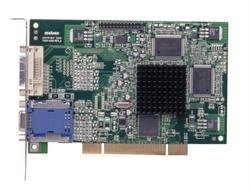
Figure 1: Matrox G450 DualHead PCI Graphics Card securely installed in a PCI slot.
2.3. Driver installation
- Tænd: Connect your monitor(s) to the DVI ports on the Matrox G450 card and power on your computer.
- Første opstart: The operating system may detect new hardware and attempt to install generic drivers. Allow this process to complete.
- Install Matrox Drivers:
- Fra CD: Insert the Matrox driver CD into your CD-ROM drive and follow the on-screen instructions.
- Fra Web: Download the latest drivers from the official Matrox webwebsted (www.matrox.com/graphics/en/support/drivers/). Run the downloaded installer and follow the prompts.
- Genstart: Restart your computer when prompted to finalize the driver installation.
Figure 2: DVI output ports on the Matrox G450 graphics card for monitor connection.
3. Betjening af grafikkortet
3.1. Skærmkonfiguration
After successful driver installation, you can configure your display settings through your operating system's display properties or the Matrox PowerDesk software (if installed).
- Opløsning: Adjust the screen resolution to match your monitor's native resolution for optimal clarity.
- Opdateringshastighed: Set the refresh rate to a comfortable level, typically 60Hz or 75Hz, to reduce flicker.
- Farvedybde: Configure the color depth (e.g., 16-bit, 24-bit, 32-bit) based on your requirements.
3.2. DualHead Functionality
The Matrox G450's DualHead feature allows you to use two monitors simultaneously. This can be configured in two primary modes:
- Udvidet skrivebord: This mode treats both monitors as a single, larger desktop area, allowing you to drag windows and applications between them. This is ideal for multitasking and increasing workspace.
- Cloned Display: This mode duplicates the content of your primary monitor onto the secondary monitor. This is useful for presentations or sharing your screen with an audience.
Access these settings through your operating system's display settings (e.g., right-click on desktop > Screen Resolution in Windows) or the Matrox display utility.
Figur 3: Eksample of a DualHead extended desktop configuration.
4. Vedligeholdelse
Proper maintenance ensures the longevity and optimal performance of your Matrox G450 graphics card.
- Driver opdateringer: Regularly check the official Matrox website for updated drivers. Installing the latest drivers can improve performance, add features, and resolve compatibility issues.
- Fjernelse af støv: Periodically open your computer case (after powering off and disconnecting power) and gently clean any dust accumulation on the graphics card's heatsink and fan (if present) using compressed air. Excessive dust can lead to overheating.
- Miljøforhold: Ensure your computer operates in a well-ventilated area with stable temperature and humidity to prevent damage to internal components, including the graphics card.
5. Fejlfinding
This section addresses common issues you might encounter with your Matrox G450 graphics card.
5.1. Ingen skærmoutput
- Tjek kabler: Ensure monitor cables are securely connected to both the graphics card and the monitor.
- Skærmstyrke: Kontroller, at din skærm er tændt og indstillet til den korrekte inputkilde.
- Card Seating: Power off the computer, open the case, and re-seat the graphics card firmly in its PCI slot.
- Test with One Monitor: If using DualHead, try connecting only one monitor to isolate the issue.
- BIOS/UEFI-indstillinger: Check your computer's BIOS/UEFI settings to ensure the PCI graphics card is selected as the primary display adapter, if applicable.
5.2. Problemer med føreren eller ustabilitet
- Geninstaller drivere: Uninstall existing Matrox drivers, restart the computer, and then perform a clean installation of the latest drivers from the Matrox webwebsted.
- Kompatibilitet: Ensure the installed drivers are compatible with your operating system version.
- Systemgendannelse: If issues began after a recent change, consider using a system restore point.
5.3. Multi-Monitor Detection Problems
- Tjek forbindelser: Verify both monitors are correctly connected to the DVI ports on the graphics card.
- Operativsystemindstillinger: Access your operating system's display settings and ensure both monitors are detected and configured for "Extend these displays" or "Duplicate these displays" is configured as desired.
- Matrox PowerDesk: Utilize the Matrox PowerDesk utility for advanced multi-monitor configuration and troubleshooting.
6. Specifikationer
| Feature | Detalje |
|---|---|
| Mærke | Matrox |
| Model | G450 DualHead PCI |
| Grafik RAM-størrelse | 32 MB |
| Grafik RAM-type | DDR SDRAM |
| Video Output Interface | DVI |
| Bustype | PCI |
| Multi-Monitor Support | DualHead (2 displays) |
7. Garantioplysninger
This Matrox G450 DualHead PCI 32MB Graphics Card is covered by a limited manufacturer's warranty. Please refer to the warranty card included with your product or visit the official Matrox webwebstedet for detaljerede vilkår og betingelser, herunder garantiperiode og reklamationsprocedurer.
Keep your proof of purchase for warranty service.
8. Teknisk support
For technical assistance, driver downloads, or further information regarding your Matrox G450 graphics card, please visit the Matrox support webwebsted:
www.matrox.com/graphics/en/support/
Du kan også finde nyttige ressourcer, ofte stillede spørgsmål og fællesskabsfora på deres webwebsted.