
1.Overview
The Microsoft LifeCam Cinema is a high-definition webcam designed for clear and smooth video communication. It features 720p HD video chat capabilities, a high-precision glass element lens for sharp image quality, and is certified for Skype. The webcam offers 360° rotation and incorporates TrueColor Technology with face tracking for bright and colorful video output.
Nøglefunktioner:
- 720p HD video chat
- High precision glass element lens for sharp image quality
- Certified for Skype
- 360° rotation
- TrueColor Technology with face tracking for bright and colorful video
2. Hvad er der i æsken
Når du åbner pakken, skal du sørge for, at alle følgende komponenter er til stede:
- Microsoft LifeCam Cinema Webcam
- USB-kabel (integreret)
- Brugervejledning (dette dokument)
- Buet selvklæbende montering
- Monteringsspænde
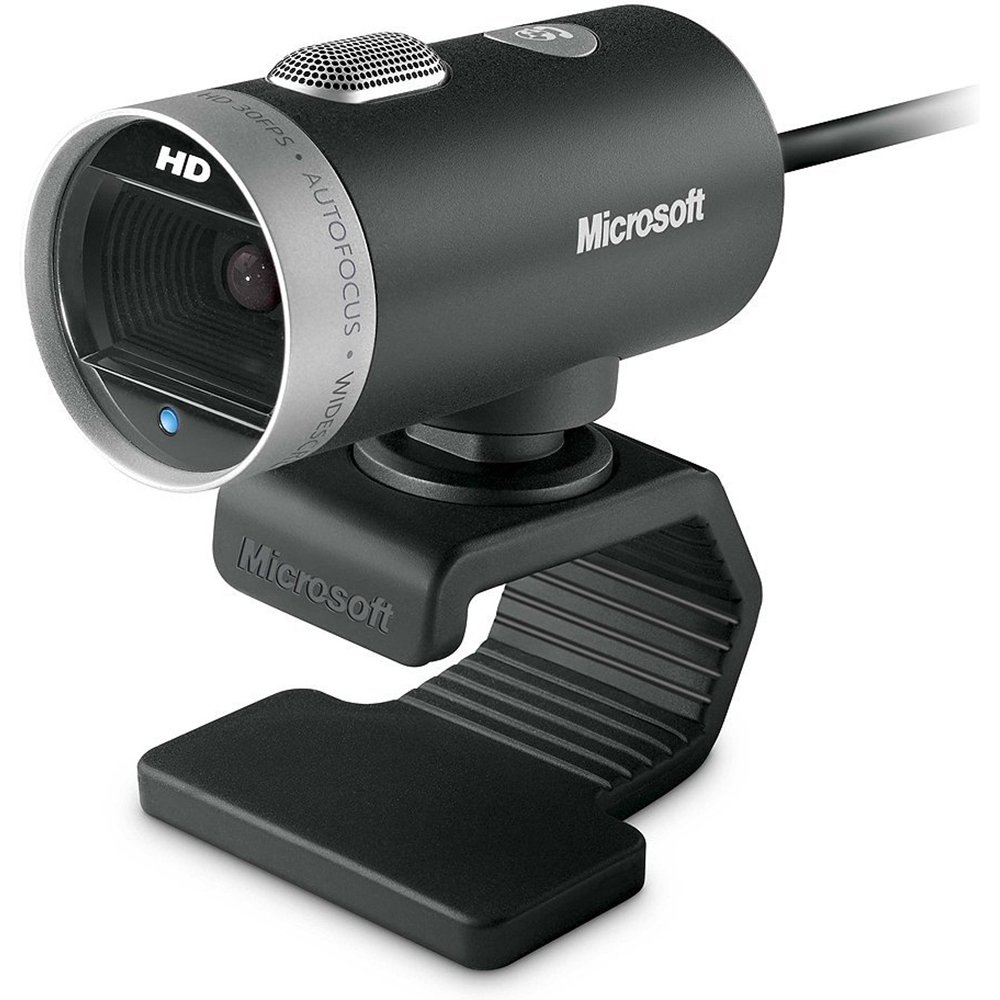
Billede: Microsoft LifeCam Cinema webcam, showing its main body, lens, microphone, and flexible stand with integrated USB cable.
3. Opsætning
- Placering af Webcam: Place the LifeCam Cinema on top of your monitor or a flat surface. The flexible stand allows for stable placement.
- Tilslutning til din computer: Plug the integrated USB cable into an available USB port on your computer.
- Driver installation: Your operating system (Windows is supported) should automatically detect the device and install the necessary drivers. If prompted, follow the on-screen instructions. You may need to download the latest drivers from the official Microsoft support website for optimal ydeevne.
- Software installation: Install any accompanying LifeCam software if desired, which may offer additional features or settings.

Billede: Microsoft LifeCam Cinema webcam securely positioned on top of a computer monitor, demonstrating its stable mounting design.
Video: An official product video demonstrating the features and usage of the Microsoft LifeCam Cinema webcam, including its 720p HD widescreen video, auto focus, high-precision glass element lens, ClearFrame Technology, and digital microphone.
4. Betjeningsvejledning
- Starting a Video Call: Open your preferred video conferencing application (e.g., Skype, Zoom, Microsoft Teams). The LifeCam Cinema should be automatically recognized as your primary camera and microphone.
- Justering af position: De webcam features 360° rotation, allowing you to easily adjust the camera angle without moving the base.
- Autofokus: Kameraet justerer automatisk fokus for at holde dig skarp og klar under videoopkald.
- TrueColor-teknologi: This feature automatically adjusts exposure for bright and colorful video, even in varying lighting conditions.
- Digital Microphone: The built-in digital microphone provides clear audio capture. Ensure it is selected as the input device in your application settings if you experience audio issues.
5. Vedligeholdelse
- Rengøring af linsen: Use a soft, lint-free cloth specifically designed for optics to gently wipe the camera lens. Avoid abrasive materials or harsh chemicals.
- Rengøring af kroppen: Tør af webkameraets krop med en blød, damp cloth. Do not immerse the device in water or use excessive moisture.
- Opbevaring: Når den ikke er i brug, skal du opbevare den webOpbevar kameraet på et rent, tørt sted væk fra ekstreme temperaturer og direkte sollys.
- Kabelpleje: Undgå at bøje eller vride USB-kablet for meget for at forhindre indvendig skade.
6. Fejlfinding
- Ingen video/kamera ikke registreret:
- Sørg for, at USB-kablet er korrekt tilsluttet i begge webkameraet og computeren.
- Prøv at tilslutte webcam til en anden USB -port.
- Genstart din computer.
- Tjek din computers Enhedshåndtering (Windows) for at se, om webcam is listed and if there are any driver issues. Reinstall drivers if necessary.
- Verify that your video conferencing software is configured to use the LifeCam Cinema as the video input device.
- Ingen lyd/mikrofon virker ikke:
- Check your computer's sound settings to ensure the LifeCam Cinema microphone is selected as the default recording device.
- Verify that your video conferencing software is configured to use the LifeCam Cinema as the audio input device.
- Ensure the microphone is not muted in your system settings or within the application.
- Dårlig videokvalitet:
- Sørg for, at kameralinsen er ren.
- Tjek din internetforbindelses hastighed; en langsom forbindelse kan påvirke videokvaliteten.
- Ensure adequate lighting in your environment. TrueColor Technology helps, but sufficient ambient light is always best.
- Luk andre programmer, der muligvis bruger systemressourcer.
7. Specifikationer
| Feature | Detalje |
|---|---|
| Mærke | Microsoft |
| Modelnummer | H5D-00001 |
| Videooptagelsesopløsning | 720p |
| Fotosensorteknologi | CMOS |
| Forbindelsesteknologi | USB |
| Farve | Sort |
| Funktioner | Low Light, Auto Focus, TrueColor Technology, Digital Microphone |
| Varedimensioner (D x B x H) | 0.71" D x 2.19" B x 1.81" H |
| Varens vægt | 0.87 pund |
| Operativsystem | Windows |
| Viewi vinkel | 360 Degrees (rotation) |
| Billedoptagelseshastighed | 30 fps |
| Kompatible enheder | PCs with specified system requirements; Skype |
8. Garanti og support
The Microsoft LifeCam Cinema (Model H5D-00001) comes with a 3 års begrænset garanti from the manufacturer, Microsoft.
For technical support, driver downloads, or further assistance, please visit the official Microsoft support webwebstedet eller se kontaktoplysningerne på din produktemballage.
You can also find additional resources and FAQs on the Microsoft support pages for LifeCam products.