
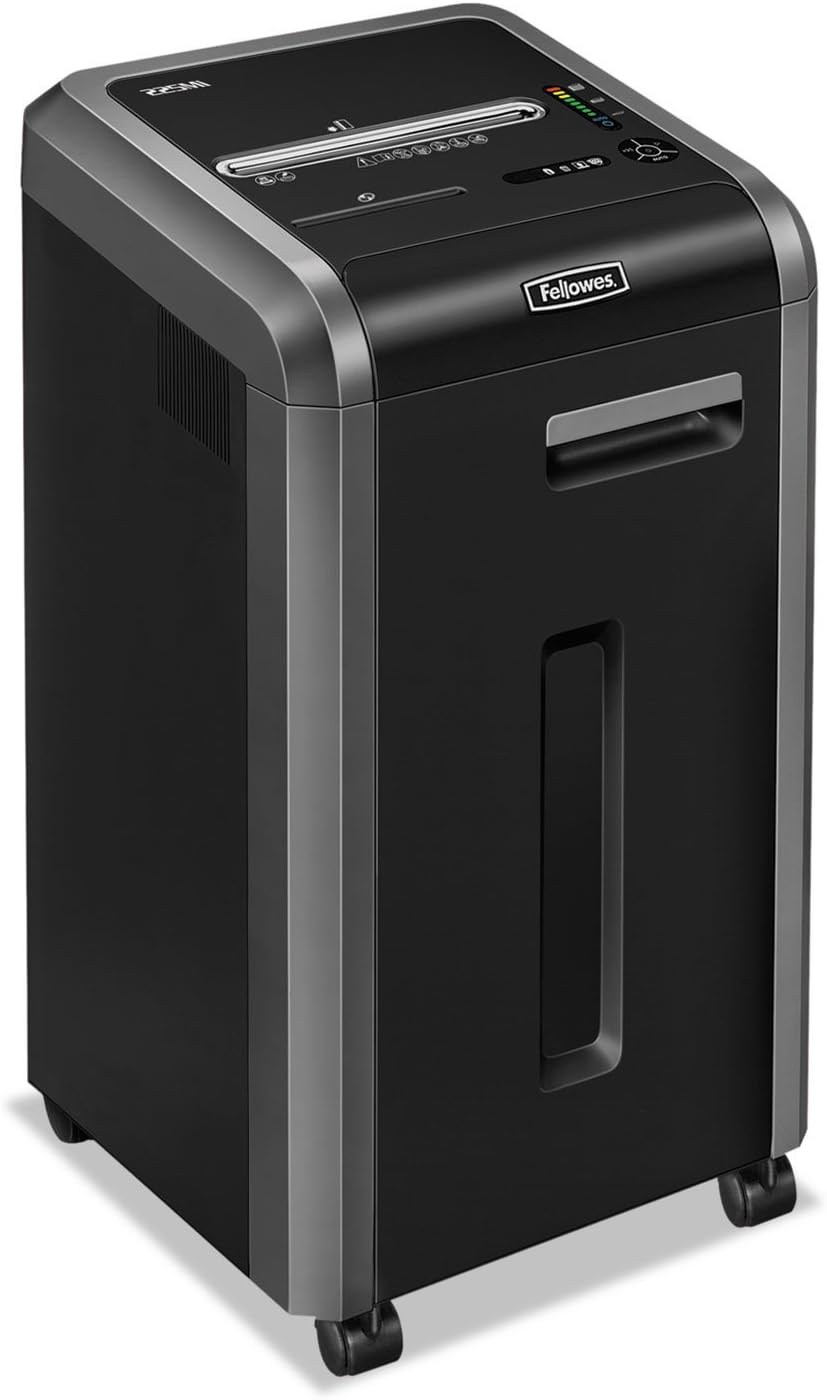
Fellowes 225Ci
Fellowes Powershred 225Ci Crosscut Paper Shredder Instruction Manual
Model: 225Ci (3825001)
1. Vigtige sikkerhedsinstruktioner
Please read these safety instructions carefully before using the shredder. Failure to follow these instructions may result in injury or damage to the product.
- Keep hands, jewelry, loose clothing, hair, and pets away from the paper entry slot.
- Do not insert more than the maximum sheet capacity into the shredder.
- Do not shred metal objects, wet paper, or adhesive materials.
- Tag altid stikket ud af stikkontakten, inden du flytter, rengør eller tømmer affaldsbeholderen.
- Brug ikke makulatoren, hvis netledningen er beskadiget.
- Opbevares utilgængeligt for børn.
- The shredder is equipped with SafeSense Technology, which stops shredding when hands touch the paper opening. However, exercise caution at all times.
2. Pakkens indhold
Bekræft at alle varer er til stede i pakken:
- Fellowes Powershred 225Ci Shredder Unit
- Instruktionsmanual
- Sample Shredder Oil
- Five Waste Bags
- Hjul (hjul)
3. Opsætning
Follow these steps to set up your shredder:
- Pak makulatoren ud: Tag forsigtigt makulatoren ud af emballagen.
- Installer hjul: If not pre-installed, insert the casters into the designated slots at the bottom of the shredder until they click into place.
- Placer makulatoren: Placer makulatoren på en flad, stabil overflade i nærheden af en stikkontakt. Sørg for tilstrækkelig ventilation omkring enheden.
- Tilslut strøm: Sæt netledningen i en jordet stikkontakt.
- Prepare Waste Bin: Pull out the 16-gallon waste bin and line it with one of the provided waste bags. Ensure the bag is properly seated. Close the bin securely.
4. Betjeningsvejledning
4.1 Tænd/sluk
- To turn on the shredder, locate the power switch (usually on the back or side) and set it to the 'ON' position.
- The control panel on top of the shredder will illuminate, indicating it is ready for operation.
- To turn off, set the power switch to the 'OFF' position.
4.2 Shredding Documents
The Powershred 225Ci can shred up to 22 sheets of paper per pass, as well as staples, credit cards, paper clips, CDs/DVDs, and junk mail.
- Ensure the shredder is powered on and in 'Auto' mode (if applicable).
- Insert paper or other shreddable items into the paper entry slot. The shredder will automatically start.
- For CDs/DVDs, use the dedicated media entry slot (if present).
- The shredder features a continuous duty motor for non-stop shredding during extended use.

4.3 SafeSense Technology
This shredder is equipped with patented SafeSense Technology. This feature automatically stops the shredding process when hands or paws touch the paper opening, enhancing user safety.

4.4 Jam Prevention
The 225Ci features 100% Jam-Proof technology. If too much paper is inserted, the shredder will automatically detect the overload, reverse the paper, and then attempt to shred it again. This helps prevent frustrating paper jams.
4.5 Waste Bin Full Indicator
The shredder is equipped with an LED bin-full indicator. When the waste bin is full, this indicator will illuminate, signaling that the bin needs to be emptied to continue shredding.
5. Vedligeholdelse
Regelmæssig vedligeholdelse sikrer optimal ydeevne og forlænger levetiden på din makulator.
5.1 Oiling the Cutters
It is recommended to oil the shredder cutters regularly, especially after emptying the waste bin or after approximately 30 minutes of cumulative shredding. Use only Fellowes brand shredder oil or a vegetable-based oil. Do not use aerosol lubricants.
- Påfør en tynd streg olie på tværs af papirindføringsåbningen.
- Run the shredder in reverse for 5-10 seconds to distribute the oil.
5.2 Tømning af affaldsbeholderen
When the LED bin-full indicator illuminates, or when the bin appears full, empty the waste bin:
- Sluk og tag stikket ud af stikket.
- Træk affaldsbeholderen ud.
- Bortskaf det hakkede materiale.
- Reinsert the waste bin securely.
- Plug in and turn on the shredder.
5.3 Rengøring
Tør ydersiden af makulatoren af med en blød, tør klud. Brug ikke slibende rengøringsmidler eller opløsningsmidler.
6. Fejlfinding
Se tabellen nedenfor for almindelige problemer og deres løsninger.
| Problem | Mulig årsag | Løsning |
|---|---|---|
| Makulatoren tænder ikke. | Not plugged in; power switch off; waste bin not fully closed. | Ensure power cord is securely plugged in. Turn power switch to 'ON'. Push waste bin in completely. |
| Papirstop. | Too much paper inserted; foreign object. | The 100% Jam-Proof system should automatically reverse and clear. If not, unplug, remove excess paper, and try again. Do not force. |
| Makulatoren stopper under drift. | Overheating; waste bin full; SafeSense activated. | Allow shredder to cool down. Empty waste bin. Remove hands from paper entry. |
| Makulatoren er støjende. | Cutters need oiling. | Oil the shredder cutters as per maintenance instructions. |
7. Specifikationer
Detailed specifications for the Fellowes Powershred 225Ci:
| Feature | Detalje |
|---|---|
| Makuleringstype | Cross-Cut |
| Makuler Størrelse | 5/32” x 1-1/2” (4x38mm) |
| Arkkapacitet | 22 ark (70gsm papir) |
| Affaldsbeholderkapacitet | 16 gallons (60 liter) |
| Shreds Materials | Paper, Staples, Paper Clips, Credit Cards, CDs/DVDs, Junk Mail |
| Sikkerhedsniveau | P-4 |
| Sikkerhedsfunktioner | SafeSense-teknologi |
| Jam Prevention | 100% Jam-Proof System |
| Motortype | Kontinuerlig Pligt |
| Dimensioner (H x B x D) | 30.75" x 17.75" x [Depth not specified in image, using 17.75" as a placeholder for depth based on typical shredder proportions] |
| Vægt | 93 lbs (42.18 kg) |
| Energibesparelse | Energibesparelsessystem |

8. Garanti og support
The Fellowes Powershred 225Ci is backed by a comprehensive warranty:
- Product and Service Warranty: 2 år fra købsdatoen.
- Cutter Warranty: Lifetime warranty on the shredder cutters.
For technical assistance, warranty claims, or to purchase accessories, please contact Fellowes customer support. Refer to the contact information provided in your product registration or on the official Fellowes webwebsted.