
Indledning
This manual provides essential instructions for the safe and efficient operation of your Optoma TX612 XGA DLP Multimedia Projector. Please read this manual thoroughly before using the projector and retain it for future reference. The Optoma TX612 is designed to deliver clear and vibrant images for various presentation environments.
Sikkerhedsoplysninger
- Do not look directly into the projector lens når lamp is on. The intense light can damage your eyes.
- Sørg for korrekt ventilation omkring projektoren. Bloker ikke ventilationsåbninger as this can lead to overheating.
- Avoid placing the projector in direct sunlight, near heat sources, or in environments with high humidity or excessive dust.
- Use only the power cord supplied with the projector. Connect to a properly grounded outlet.
- Forsøg ikke selv at servicere dette produkt. Overlad al service til kvalificeret servicepersonale.
- Tag netledningen ud from the wall outlet before cleaning or if the projector will not be used for an extended period.
Produktegenskaber
- Høj lysstyrke: 3500 ANSI lumens for clear, easy-to-read text and vibrant images.
- Højt kontrastforhold: 3000:1 contrast ratio enhances image detail.
- Strømbesparende: Standby VGA and audio pass-through features reduce power consumption.
- Trådløs forbindelse: Supports optional wireless dongle for flexible setup.
- Sikkerhedsfunktioner: Control panel lock and password protection to customize security settings.
- Lav vedligeholdelse: Filter-free design contributes to a low cost of ownership.
Opsætning
1. Fysiske forbindelser
Connect your video sources and audio devices to the appropriate ports on the rear panel of the projector. Ensure all cables are securely connected.
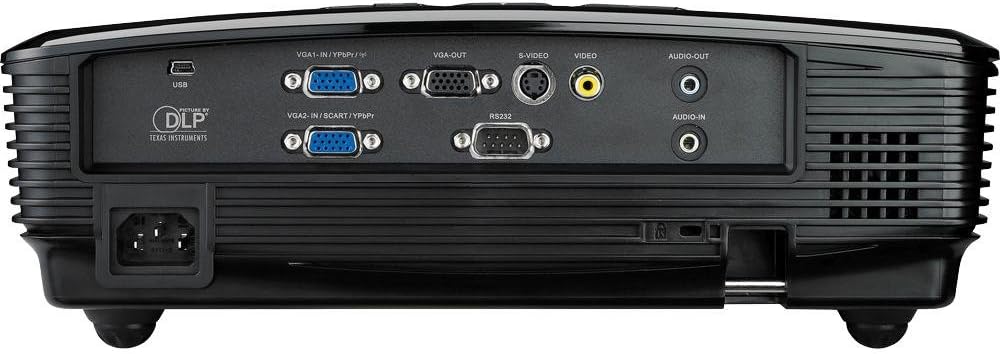
This image displays the rear panel of the Optoma TX612 projector, highlighting various connectivity options including VGA-IN (VGA1-IN/YPbPr, VGA2-IN/SCART/YPbPr), VGA-OUT, S-VIDEO, VIDEO, AUDIO-OUT, AUDIO-IN, RS232, and USB ports, along with the power input.
- VGA-IN (VGA1-IN/YPbPr, VGA2-IN/SCART/YPbPr): Connect to a computer or other VGA-compatible device.
- VIDEO: Connect to composite video sources.
- S-VIDEO: Connect to S-Video sources.
- AUDIO-IN: Connect audio cables from your source device.
- AUDIO-OUT: Connect to external speakers if desired.
- USB: For service or optional wireless dongle.
- RS232: Til projektorstyring via en computer eller et styresystem.
- Strømindgang: Tilslut den medfølgende strømledning her.
2. Tænd/sluk
- For at tænde: Tilslut netledningen og tryk på Magt button on the control panel or remote control. The power indicator light will turn on.
- For at slukke: Tryk på Magt button twice. The projector will enter a cooling down cycle before completely shutting off. Do not unplug the projector during the cooling cycle.
3. Billedjustering
Adjust the projected image using the lens rings and control panel buttons.

This image shows the top of the Optoma TX612 projector, featuring the control panel with buttons for power, source selection, re-sync, and navigation. Also visible are the focus and zoom rings for lens adjustment.
- Fokusring: Drej på FOKUS ring around the lens until the image is sharp and clear.
- Zoomring: Drej på ZOOM ring to adjust the size of the projected image.
- Keystone-korrektion: Brug menupunkterne til at korrigere trapezformet forvrængning, hvis projektoren ikke er helt vinkelret på skærmen.
Betjening af projektoren
1. Valg af inputkilde
Tryk på KILDE button on the control panel or remote control to cycle through available input sources (VGA1, VGA2, Video, S-Video, etc.) until your desired source is displayed.
2. Menu navigation
Tryk på MENU button to access the On-Screen Display (OSD) menu. Use the arrow buttons to navigate through options and the ENTER button to select. Press MENU igen for at forlade.
- Billedindstillinger: Adjust brightness, contrast, color, tint, and sharpness.
- Skærmindstillinger: Configure aspect ratio, keystone correction, and projection mode.
- Setup Settings: Manage language, auto power off, and security features.
Opretholdelse
- Lamp Udskiftning: Projektoren lamp har en begrænset levetid. Når lamp indikatoren lyser, eller billedet bliver svagt, vil lamp may need replacement. Refer to the full service manual for detailed lamp replacement instructions or contact qualified service personnel.
- Rengøring af linsen: Brug en blød, fnugfri klud, der er specielt designet til optiske linser. Brug ikke slibende rengøringsmidler eller opløsningsmidler.
- Rengøring af projektoren Casing: Tør casing med en blød, damp klæde. Undgå at bruge skrappe kemikalier.
- Filterfrit design: The Optoma TX612 features a filter-free design, reducing the need for regular filter cleaning.
Fejlfinding
| Problem | Mulig løsning |
|---|---|
| Intet billede vises |
|
| Billedet er sløret |
|
| Billedet er forvrænget (trapezformet) |
|
| Ingen lyd |
|
Specifikationer
| Feature | Detalje |
|---|---|
| Modelnummer | TX612 |
| Skærmopløsning | 1024 x 768 (XGA) |
| Lysstyrke | 3500 ANSI Lumens |
| Kontrastforhold | 3000:1 |
| Forbindelsesteknologi | Wireless (with optional dongle) |
| Speciel funktion | Integrerede højttalere |
| Produktdimensioner | 9.21 x 12.76 x 3.82 tommer |
| Varens vægt | 10 pund |
| Fabrikant | Optoma |
| Sprog | engelsk |
Garanti og support
For detailed warranty information, technical support, or service inquiries, please refer to the warranty card included with your product or visit the official Optoma webwebsted. Behold din købskvittering som købsbevis i tilfælde af garantikrav.
Online ressourcer: For the latest drivers, firmware updates, and additional support documentation, please visit www.optoma.com.