
1. Introduktion
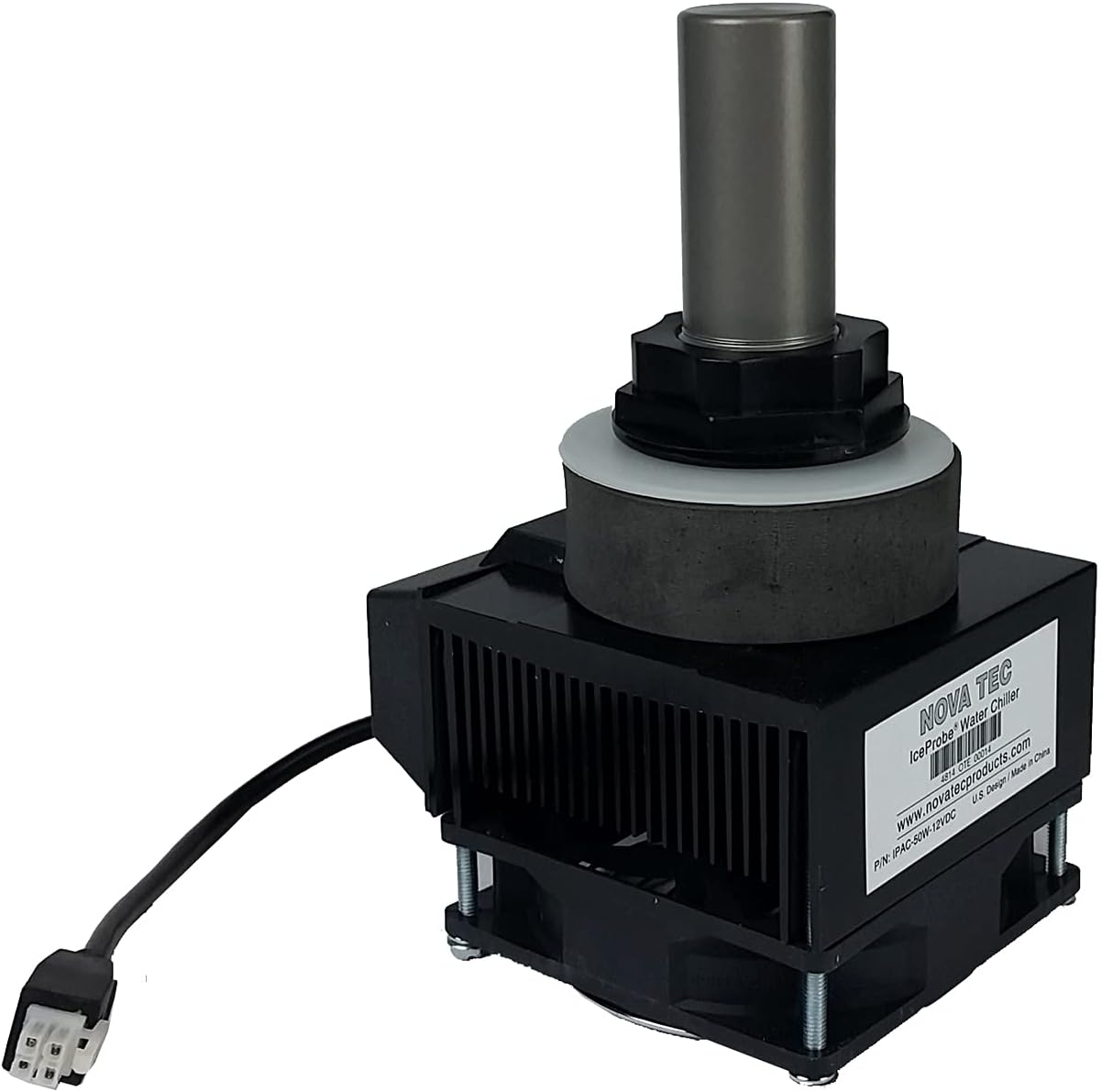
The Nova IceProbe Thermoelectric Aquarium Chiller is designed to provide a reliable cooling solution for small aquariums. Utilizing advanced thermoelectric technology, this unit efficiently converts electricity into cooling power to maintain desired water temperatures. This manual provides essential information for the proper installation, operation, and maintenance of your IceProbe chiller.
2. Sikkerhedsoplysninger
- Afbryd altid strømmen, før du udfører vedligeholdelse eller installation.
- Sørg for, at strømforsyningen voltage matches the chiller's requirements (120V).
- Do not operate the chiller if the power cord or plug is damaged.
- Keep the chiller's fan area clear of obstructions to ensure proper airflow and prevent overheating.
- This device is intended for indoor use with aquariums only.
- A drip loop should be created for all power cords to prevent water from traveling along the cord and reaching electrical outlets.
3. Pakkens indhold
Når du åbner pakken, skal du kontrollere, at alle komponenter er til stede og ubeskadigede:
- Nova IceProbe Thermoelectric Aquarium Chiller unit
- Watertight securing nut
- Silicon washer
- Power cord (5' 9" length)
- Probe cord (6' length)
4. Specifikationer
| Modelnummer | IPAC-50W-120V |
| Dimensions (Unit with probe) | 4" (W) x 4 3/4" (D) x 7 1/2" (H) |
| Strømkabellængde | 1,98 m |
| Længde af sondeledning | 6' |
| Fabrikant | NOVA TEC |
| Oprindelsesland | Kina |
5. Opsætningsvejledning
The IceProbe chiller is designed for easy integration into various aquarium setups, including siphon overflows, prefilters, sumps, or directly into plastic aquariums. Installation requires drilling a 1 1/4" hole.
- Forbered installationsstedet: Identify a suitable location for the chiller. This could be a bulkhead in a sump, an overflow box, or a drilled hole in a plastic aquarium wall. Ensure there is at least 3-1/8" minimum interior clearance for the cooling probe and 1" air circulation space around the exterior fan unit.
- Bor hullet: Carefully drill a 1 1/4" diameter hole at the chosen installation point. Ensure the hole is clean and free of debris.
- Indsæt sonden: Insert the cooling probe through the drilled hole from the inside of the aquarium/sump.
- Sikr enheden: Place the silicon washer over the probe on the exterior side of the aquarium/sump, followed by the watertight securing nut. Tighten the nut firmly by hand to create a secure, watertight seal. Do not overtighten.
- Position the Chiller: Ensure the exterior fan unit is positioned to allow for adequate airflow. The fan should not be obstructed.
- Connect to Temperature Controller: The IceProbe chiller does not have an integrated on/off switch or temperature controller. It provides continuous chilling when powered. To regulate the aquarium temperature, you skal connect the chiller to a separate, external temperature controller (not included). This controller will turn the chiller on and off based on your set temperature parameters.
- Strømtilslutning: Once the chiller is securely installed and connected to a temperature controller, plug the temperature controller into a power outlet. Ensure a drip loop is formed with the power cord.

6. Betjeningsvejledning
The IceProbe chiller operates continuously when powered. Its cooling function is managed by an external temperature controller. Follow these guidelines for optimal performance:
- Temperaturkontrol: Set your desired temperature range on your external temperature controller. The controller will activate the chiller when the water temperature exceeds the upper limit and deactivate it when the temperature falls below the lower limit.
- Kølekapacitet: The cooling capacity of a single IceProbe unit varies with water volume and ambient air temperature. Refer to the "Typical Temperature Pulldown" chart below for estimated performance.
- Flere enheder: For larger aquariums or greater temperature reduction, multiple IceProbe units can be used.
- Luftstrøm: Ensure the fan on the exterior unit has unrestricted airflow. Blocked airflow will reduce cooling efficiency and may lead to overheating.
Typical Temperature Pulldown (°F)

| Chillers | Galloner af vand | ||
|---|---|---|---|
| 10 | 20 | 40 | |
| 1 | 6-8 | 3-4 | 1-2 |
| 2 | 10-12 | 6-8 | 3-4 |
Note: These values are approximate and can vary based on ambient room temperature, aquarium insulation, water circulation, and other environmental factors.
7. Vedligeholdelse
Regular maintenance ensures the longevity and efficient operation of your IceProbe chiller.
- Rengør blæseren: Periodically inspect the fan on the exterior unit for dust and debris accumulation. Gently clean with a soft brush or compressed air to ensure optimal airflow.
- Inspect the Probe: Check the cooling probe inside the aquarium for any algae or mineral buildup. Clean gently with a soft cloth or sponge if necessary.
- Tjek forbindelser: Ensure all electrical connections are secure and the watertight securing nut remains tight.
- Vandkvalitet: Maintaining good aquarium water quality will help prevent excessive buildup on the cooling probe.
8. Fejlfinding
If you encounter issues with your IceProbe chiller, consider the following common troubleshooting steps:
- Chiller Not Cooling:
- Verify the chiller is receiving power from the temperature controller.
- Check the temperature controller settings to ensure it is set to activate the chiller.
- Ensure the fan on the exterior unit is spinning and not obstructed.
- Confirm the cooling probe is submerged in water.
- Check for excessive dust or debris on the fan or cooling probe.
- Utilstrækkelig køling:
- Ensure adequate air circulation around the exterior fan unit.
- Verify the aquarium size is within the recommended cooling capacity (refer to the "Typical Temperature Pulldown" chart). For larger tanks or greater temperature drops, consider adding a second IceProbe unit.
- Check ambient room temperature; higher room temperatures will reduce cooling efficiency.
- Ensure the cooling probe is clean and free of buildup.
- Usædvanlig støj:
- Inspect the fan for any obstructions or loose components.
- Sørg for, at enheden er sikkert monteret og ikke vibrerer mod andre overflader.
Hvis fejlfindingstrinene ikke løser problemet, bedes du kontakte kundesupport.
9. Garantioplysninger
The Nova IceProbe Thermoelectric Aquarium Chiller unit comes with a one-year warranty against defects in materials and workmanship from the date of purchase. This warranty covers manufacturing defects under normal use. It does not cover damage resulting from misuse, neglect, improper installation, accidents, or unauthorized repairs.
For warranty claims, please retain your proof of purchase and contact customer support.
10. Kundesupport
For technical assistance, troubleshooting guidance beyond this manual, or warranty inquiries, please contact NOVA TEC customer support. Refer to the manufacturer's webwebstedet eller produktemballagen for de mest aktuelle kontaktoplysninger.
Fabrikant: NOVA TEC


