
1. Introduktion
This instruction manual provides comprehensive guidance for the use and enjoyment of your Disney-Pixar Wall-E (Three-Disc Special Edition) DVD. Please read through the following sections to understand the product's features, operation, and maintenance.
The Wall-E (Three-Disc Special Edition) DVD offers the acclaimed animated film along with a variety of bonus content, designed to enhance your viewoplevelse.
2. Opsætning
To begin enjoying your Wall-E DVD, follow these simple steps:
- Pak DVD'en ud: Tag forsigtigt DVD-coveret ud af emballagen.
- Åbn sagen: Open the DVD case to access the discs. This edition includes three discs.
- Insert Disc 1 (Feature Film & Bonus): Gently remove Disc 1 from its tray. Insert the disc into your DVD player or computer's DVD drive with the label side facing up.
- Tilslut til skærm: Ensure your DVD player is properly connected to your television or display device.
- Tænd: Turn on your television/display and DVD player.

Image 1: Wall-E (Three-Disc Special Edition) DVD case. The front cover features Wall-E and EVE, with the title and edition details.
3. Betjeningsvejledning
Once the DVD is loaded, the main menu should appear on your screen. Use your DVD player's remote control to navigate the menu options.
3.1 Playing the Feature Film
- From the main menu, select "Play Movie" or a similar option to start the film.
- You may also have options to select specific scenes or adjust audio/subtitle settings.
3.2 Accessing Special Features
The Wall-E (Three-Disc Special Edition) includes extensive bonus content spread across the discs. Navigate to the "Special Features" or "Bonus Content" section from the main menu to explore these options.

Image 2: Inside of the Wall-E DVD case, displaying Disc 1 (Feature and Bonus) on the right and a list of scene selections on the left.
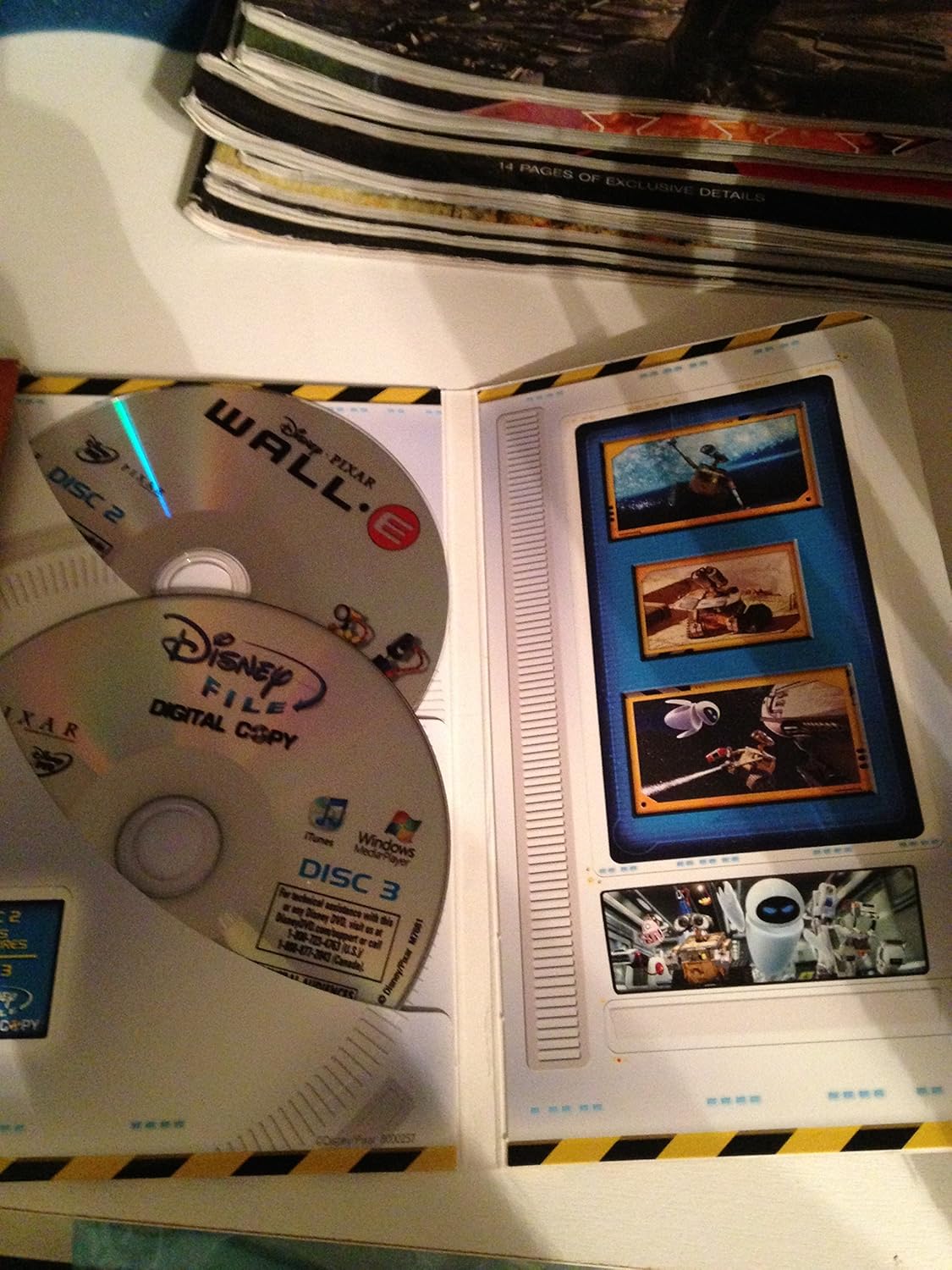
Image 3: Inside of the Wall-E DVD case, showing Disc 2 and Disc 3 (Digital Copy) in their respective trays.
4. Special Features Overview
This special edition DVD set offers a wealth of additional content:
- BURN-E: An exclusive animated short film.
- Presto: The comical short film that played with Wall-E in theaters.
- Commentaries and Making-Of Featurettes: In-depth looks at the film's production.
- Slettede scener: Director Andrew Stanton's insights on scenes not included in the final cut.
- Four Video Games: Interactive games for further engagement.
- Fly-throughs of the Film's Major Sets: Explore the detailed environments of Wall-E.
- 'Lots of Bots' Children's Storybook: An interactive storybook.
4.1 Behind the Scenes Content
Explore the creative process behind Wall-E with these insightful videos:
Video 1: Behind the Scenes of Wall-E. This video offers a glimpse into the production and creative decisions behind the film.
Video 2: Amazon.com Talks to Wall-E. An interview segment discussing aspects of the film and its characters.
Video 3: Wall-E Geek-O-Rama Video. A featurette exploring the technical and creative details that appeal to fans.
4.2 Film Content Previews
View clips related to the film's narrative:
Video 4: Wall-E Meets Eve. A clip from the film showcasing the first encounter between Wall-E and EVE.
Video 5: Wall E Trailer. The official trailer for the Wall-E film, providing a summary of its plot and themes.
5. Specifikationer
| Feature | Detalje |
|---|---|
| MPAA-vurdering | G (General Audience) |
| Direktør | Andrew Stanton |
| Medieformat | AC-3, Box set, Collector's Edition, Color, Dolby, Multiple Formats, NTSC, Widescreen |
| Køretid | 1 time og 38 minutter |
| Udgivelsesdato | 18. november 2008 |
| Skuespillere | Ben Burtt, Elissa Knight, Fred Willard, Jeff Garlin, Macintalk |
| Sprog | engelsk |
| Studie | Disney-Pixar |
| ASIN | B001EOQWEO |
| Antal diske | 3 |
| Produktdimensioner | 6.27 x 0.54 x 6.81 tommer; 0.01 ounce |
6. Fejlfinding
If you encounter issues while using your Wall-E DVD, consider the following common solutions:
- Disken afspilles ikke: Ensure the disc is clean and free of scratches or smudges. Wipe gently with a soft, lint-free cloth from the center outwards.
- Springe over eller fryse: Clean the disc as described above. Check your DVD player for any dust or debris in the disc tray.
- Ingen lyd/video: Verify that your DVD player is correctly connected to your TV/display and audio system. Check the input source on your TV.
- Problemer med menunavigation: Ensure your remote control batteries are charged and that there are no obstructions between the remote and the DVD player.
- Digital Copy Issues: Refer to the specific instructions provided with the digital copy disc or packaging for activation and usage details, as these often require online registration and specific software.
7. Pleje og vedligeholdelse
To ensure the longevity and optimal performance of your Wall-E DVD:
- Handle Discs Carefully: Always hold discs by their edges to avoid touching the playing surface.
- Opbevar korrekt: Keep discs in their original case when not in use to protect them from dust, scratches, and direct sunlight.
- Rensning: If a disc becomes dirty, gently wipe it with a soft, dry, lint-free cloth. For stubborn marks, use a specialized disc cleaning solution.
- Undgå ekstreme forhold: Do not expose discs to extreme temperatures or humidity.
8. Garanti og support
Specific warranty information for the Disney-Pixar Wall-E (Three-Disc Special Edition) DVD is typically provided within the product packaging or on the official Disney-Pixar website. Please refer to those resources for details regarding warranty coverage and customer support options.
For technical assistance with your DVD player or related equipment, consult the instruction manual provided with that specific device or contact its manufacturer's support.