
KLH KL-300i
KLH AUDIO KL-300i Nostalgia 5-n-1 System
Model: KL-300i
Indledning
Tak for købetasing the KLH AUDIO KL-300i Nostalgia 5-n-1 System. This integrated audio system combines classic and modern audio playback capabilities, including a turntable, CD player, cassette player, AM/FM radio, and an iPod dock. This manual provides essential information for setting up, operating, and maintaining your system to ensure optimal performance and longevity.
Sikkerhedsoplysninger
Læs venligst alle sikkerhedsinstruktioner omhyggeligt, inden du bruger dette produkt. Gem denne manual til senere brug.
- Strømkilde: Tilslut kun enheden til en stikkontakt med vekselstrøm med den angivne lydstyrke.tage.
- Ventilation: Sørg for tilstrækkelig ventilation. Bloker ikke ventilationsåbningerne.
- Vand og fugt: Udsæt ikke enheden for regn eller fugt. Placer ikke genstande fyldt med væsker, såsom vaser, på enheden.
- Varme: Placer ikke enheden i nærheden af varmekilder såsom radiatorer, varmeapparater, komfurer eller andre apparater (herunder ampløftere), der producerer varme.
- Rensning: Tag stikket ud af stikkontakten før rengøring. Brug kun en tør klud.
- Service: Forsøg ikke selv at servicere dette produkt. Overlad al service til kvalificeret servicepersonale.
Pakkens indhold
Bekræft, at alle nedenstående varer er inkluderet i pakken:
- KLH AUDIO KL-300i Main Unit
- Fjernbetjening
- Ekstra indgangskabel
- AM/FM Antenna Wire
- Instruktionsmanual (dette dokument)
Produkt overview
Familiarize yourself with the various components and controls of your KLH AUDIO KL-300i system.
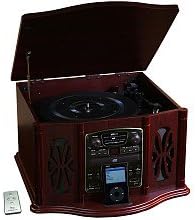
This image displays the KLH AUDIO KL-300i Nostalgia 5-n-1 System. The unit features a dark wood finish. The top lid is open, revealing a turntable. Below the turntable, the front panel includes controls for the CD player, AM/FM radio tuner, and an iPod dock. A small remote control is visible to the left of the main unit.
Kontrol på frontpanelet:
- Power knap: Tænder eller slukker for enheden.
- Funktionsvælger: Switches between Phono, CD, Radio, iPod, and Aux modes.
- Lydstyrkeknap: Justerer masterlydstyrkeniveauet.
- CD Player Controls: Afspil/pause, stop, spring frem/tilbage.
- Radiotuner: AM/FM band selector, Tuning knob.
- iPod-dock: Connector for iPod devices.
- Aux-indgangsstik: 3.5 mm indgang til eksterne lydenheder.
- Hovedtelefonstik: 3.5 mm udgang til privat lytning.
Toppanel:
- Pladespiller: Til afspilning af vinylplader.
- Låg: Protects the turntable when not in use.
Sidepanel:
- Kassettedeck: For playing audio cassette tapes.
Opsætning
Follow these steps for initial setup of your audio system.
- Placering: Place the unit on a stable, flat surface away from direct sunlight, heat sources, and excessive dust or moisture. Ensure there is adequate space around the unit for ventilation.
- Tilslut antenne: For optimal AM/FM radio reception, connect the supplied antenna wire to the antenna terminal on the rear of the unit. Extend the wire fully for better reception.
- Strømtilslutning: Sæt netledningen i en almindelig stikkontakt.
- Første gang tændt: Press the Power button on the front panel to turn on the unit.
Betjeningsvejledning
Generel drift:
- Tænd/sluk: Tryk på Power-knappen for at tænde eller slukke for enheden.
- Funktionsvalg: Use the Function Selector knob or buttons to choose your desired audio source (Phono, CD, Radio, iPod, Aux).
- Lydstyrkejustering: Drej lydstyrkeknappen for at øge eller mindske lydniveauet.
Betjening af pladespiller:
- Lift the lid of the unit.
- Placer en vinylplade på pladetallerkenen.
- Select the appropriate speed (33 1/3, 45, or 78 RPM) using the speed selector switch. For 45 RPM records, place the included adapter on the spindle if needed.
- Gently lift the tonearm and position the stylus over the desired starting groove of the record.
- Lower the tonearm slowly onto the record. Playback will begin automatically.
- To stop playback, gently lift the tonearm and return it to its rest.
Betjening af CD-afspiller:
- Press the Function Selector to CD mode.
- Tryk på udskubningsknappen for at åbne cd-skuffen.
- Placer en cd i bakken med etiketten opad.
- Press the Eject button again to close the tray. The CD will begin playing automatically or display the track count.
- Use the Play/Pause, Stop, and Skip buttons to control playback.
Cassette Player Operation:
- Sæt et kassettebånd i kassetteåbningen på siden af enheden.
- Tryk på knappen Afspil for at starte afspilningen.
- Use the Fast Forward (FF) button to advance the tape quickly.
- To stop playback, press the Stop/Eject button. Pressing it halfway will eject the tape.
AM/FM-radiofunktion:
- Press the Function Selector to Radio mode.
- Select either AM or FM band using the band selector switch.
- Rotate the Tuning knob to search for radio stations.
- Adjust the antenna wire for best reception.
iPod Dock Operation:
- Press the Function Selector to iPod mode.
- Carefully place your compatible iPod device onto the iPod dock connector.
- Use your iPod's controls to select and play music. Audio will be routed through the KLH AUDIO system's speakers.
Aux-In Operation:
- Press the Function Selector to Aux mode.
- Connect an external audio device (e.g., MP3 player, smartphone) to the Aux-In jack on the front panel using the supplied 3.5mm auxiliary cable.
- Play audio from your external device. The sound will be played through the KLH AUDIO system's speakers.
Brug af fjernbetjening:
The remote control primarily operates the CD player functions (Play, Pause, Stop, Skip). Note that the remote cannot turn the unit on or off.
Opretholdelse
Proper care will ensure the longevity of your system.
- Rengøring af enheden: Tør enhedens yderside af med en blød, tør klud. Brug ikke slibende rengøringsmidler, voks eller opløsningsmidler.
- Styluspleje: Handle the turntable stylus with extreme care. Clean the stylus periodically with a soft brush, brushing from back to front.
- CD/kassettepleje: Keep CDs and cassette tapes clean and free of dust. Store them in their cases when not in use.
Fejlfinding
If you experience issues with your system, refer to the following common problems and solutions.
| Problem | Mulig årsag | Løsning |
|---|---|---|
| Ingen strøm | Netledningen er ikke sat ordentligt i. | Kontroller netledningens forbindelse til enheden og stikkontakten. |
| Ingen lyd | Volume too low; Incorrect function selected; Headphones connected. | Increase volume; Select correct function; Disconnect headphones. |
| Pladespiller drejer ikke | Unit not powered on; Belt dislodged. | Ensure unit is on; Contact service if belt issue suspected. |
| Dårlig radiomodtagelse | Antennen er ikke trukket ud eller placeret korrekt. | Extend and adjust the antenna wire for better signal. |
| CD'en afspiller ikke | CD inserted incorrectly; CD is scratched or dirty. | Ensure CD is label-side up; Clean or replace CD. |
Specifikationer
| Feature | Specifikation |
|---|---|
| Strømkilde | AC 120V ~ 60Hz |
| Dimensioner (B x D x H) | Ca. 43.2 cm x 43.2 cm x 26.7 cm (17 x 17 x 10.5 cm) |
| Pladespiller hastigheder | 33 1/3, 45, 78 omdr./min |
| Radiofrekvensområde | AM: 530-1710 kHz, FM: 88-108 MHz |
| CD-kompatibilitet | CD, CD-R/RW |
| iPod Dock | Compatible with older generation iPods (30-pin connector) |
Garanti og support
This product is covered by a limited manufacturer's warranty. For specific warranty terms and conditions, please refer to the warranty card included with your purchase or contact KLH customer support. If you require technical assistance or have questions not covered in this manual, please contact KLH customer service through their official webwebstedet eller de kontaktoplysninger, der følger med dit produkt.
Ask a question about this manual
Ask about setup, troubleshooting, compatibility, parts, safety, or missing instructions. Manuals+ will review the question and use this page’s manual context to help answer it.