
Indledning
This manual provides detailed instructions for the proper setup, operation, and maintenance of your Kodak EasyShare M893IS Digital Camera. Please read this manual thoroughly before using your camera to ensure optimal performance and longevity.
1. Opsætning
1.1. Batteriinstallation og opladning
The Kodak EasyShare M893IS uses a rechargeable Lithium-Ion battery. Ensure the battery is fully charged before first use.
- Locate the battery compartment door on the bottom or side of the camera.
- Skub låsen for at åbne rummet.
- Insert the Li-Ion battery with the contacts facing inward, ensuring it clicks into place.
- Luk batteridækslet ordentligt.
- Connect the camera to a power source using the provided USB cable for in-camera charging. The charging indicator light will show the charging status.

Figur 1.1: Side view of the camera, indicating the general location of the battery compartment.
1.2. Installation af hukommelseskort
The camera supports SD/SDHC memory cards (not included). A memory card is required to store photos and videos.
- Open the battery compartment door. The memory card slot is usually located next to the battery.
- Insert the SD/SDHC card into the slot with the metal contacts facing the correct direction (refer to the diagram inside the compartment). Push until it clicks into place.
- Luk batterirummets låge.
2. Betjening af dit kamera
2.1. Kamerakontroller overview
Familiarize yourself with the main controls of your Kodak EasyShare M893IS camera.

Figur 2.1: Forside view of the camera. Key components include the lens, flash, and microphone.
- Power knap: Located on the top panel, turns the camera on/off.
- Udløserknap: Press halfway to focus, fully to capture a photo.
- Zoom-greb: Controls the 3x optical zoom and 5x digital zoom.
- Tilstandsvælger/knap: Selects shooting modes (e.g., Auto, Program, Scene modes).
- LCD skærm: 2.7-inch display for framing shots, reviewbilleder og navigere i menuer.
- Navigationstast/OK-knap: Bruges til menunavigation og valg.
- Menu-knap: Giver adgang til kameraindstillinger og -valgmuligheder.
- Review/Playback Button: Displays captured photos and videos.
- Slet knap: Removes unwanted images or videos.
- Del knap: For easy sharing options (if configured).
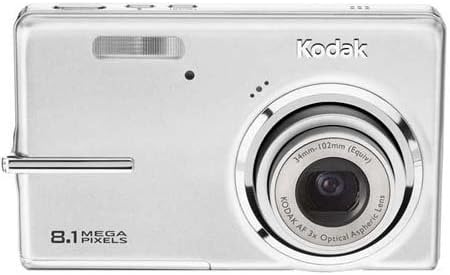
Figur 2.2: Bagside view of the camera, showing the 2.7-inch LCD and control buttons.
2.2. Tage billeder
- Tænd kameraet ved at trykke på tænd/sluk-knappen.
- Select your desired shooting mode using the Mode dial/button. Common modes include:
- Auto: Kameraet justerer automatisk indstillingerne til de fleste situationer.
- Scenetilstande: Specific settings for various scenarios like 'Night mode' or 'Sports'.
- Frame your shot using the LCD screen. Use the zoom lever to adjust the 3x optical zoom or 5x digital zoom.
- Press the Shutter button halfway down to allow the camera to focus (Contrast Detection Auto Focus, Multi-zone, Center Spot options available). A green frame indicates focus lock.
- Press the Shutter button fully to capture the image. The camera features optical image stabilization to reduce blur.
- For low-light conditions, adjust the flash mode (Auto, On, Off, Slow Synch) or utilize the High ISO (up to 1600) setting.
2.3. Optagelse af videoer
- Switch the camera to video recording mode (refer to your camera's mode dial/menu for the video icon).
- Indram dit motiv på LCD-skærmen.
- Press the Shutter button to start recording. Press it again to stop.
- Videos are recorded in VGA resolution (640 x 480 at 15 fps or 320 x 240 at 30 fps) in MJPEG format.
2.4. Adviewog håndtering af medier
- Tryk på Review/Playback button to view dine fotos og videoer.
- Use the directional pad to scroll through your media.
- To delete an unwanted item, select it and press the Delete button. Confirm deletion when prompted.
- Connect the camera to a computer via USB to transfer files.
3. Vedligeholdelse
3.1. Rengøring af kameraet
- Linse: Use a soft, lint-free cloth specifically designed for camera lenses. Gently wipe in a circular motion. Avoid using harsh chemicals.
- LCD skærm: Wipe with a soft, dry microfiber cloth. For stubborn smudges, slightly dampRengør kluden med vand eller en skærmrens.
- Kamerahus: Brug en blød, tør klud til at tørre støv og fingeraftryk væk.
3.2. Batteripleje
- Opbevar batteriet på et køligt, tørt sted, når det ikke er i brug.
- Undgå at aflade batteriet helt ofte for at forlænge dets levetid.
- Hvis kameraet opbevares i længere tid, skal batteriet fjernes.
3.3. Opbevaring
Store the camera in a protective case or bag to prevent scratches and damage from dust or moisture. Avoid extreme temperatures.
4. Fejlfinding
| Problem | Mulig årsag | Løsning |
|---|---|---|
| Kameraet tænder ikke. | Batteriet er afladet eller isat forkert. | Charge the battery. Ensure the battery is inserted correctly with contacts aligned. |
| Billederne er slørede. | Kamerarystelser, motivbevægelse eller forkert fokus. | Hold the camera steady. Ensure the subject is within the camera's focus range. Use optical image stabilization. Increase ISO in low light. |
| Meddelelsen "Hukommelseskortfejl". | Memory card is full, corrupted, or incorrectly inserted. | Insert a new or empty SD/SDHC card. Reinsert the card. Format the card (this will erase all data). |
| Blitzen går ikke ud. | Flash is set to "Off" or battery is low. | Change flash mode to "Auto" or "On". Charge the battery. |
| Kan ikke overføre billeder til computeren. | Incorrect USB connection or driver issues. | Ensure USB cable is securely connected to both camera and computer. Try a different USB port. Check computer's device manager for driver issues. |
5. Specifikationer
| Feature | Detalje |
|---|---|
| Modelnavn | Easyshare M893IS |
| Fotosensor opløsning | 8.1 MP |
| Optisk zoom | 3x |
| Digital Zoom | 5x |
| Billedstabilisering | Optisk |
| Skærmstørrelse | 2.7 tommer LCD |
| Understøttet File Format | JPEG (Stills), MJPEG (Video) |
| Video opløsning | 640 x 480 (15 fps), 320 x 240 (30 fps) |
| ISO-følsomhed | Udvidet ISO Minimum 80, Udvidet ISO Maksimum 1600 |
| Minimum lukkerhastighed | 4 sekunder |
| Maksimal lukkerhastighed | 1/2000 sekunder |
| Flash-tilstande | Auto, On, Off, Slow Synch |
| Batteritype | Lithium Ion |
| Forbindelse | USB |
| Compatible Flash Memory | SD, SDHC (op til 32 GB) |
| Varens vægt | 0.35 pund |
| Farve | Sølv |
6. Garantioplysninger
Your Kodak EasyShare M893IS Digital Camera is covered by a 1 års begrænset garanti fra købsdatoen. Denne garanti dækker fabrikationsfejl og udførelse under normal brug. Den dækker ikke skader forårsaget af misbrug, ulykker, uautoriserede ændringer eller eksterne årsager.
Please retain your proof of purchase for warranty claims. For detailed terms and conditions, refer to the warranty card included with your product or visit the official Kodak support webwebsted.
7. Kundesupport
If you encounter any issues not covered in the troubleshooting section or require further assistance, please contact Kodak Customer Support.
- Online support: Visit the official Kodak support webwebsted med ofte stillede spørgsmål, drivere og softwaredownloads.
- Telefonsupport: Refer to your product packaging or the Kodak webwebsted for regionale kontaktnumre.
- When contacting support, please have your camera model (M893IS) and serial number ready.