
1. Introduktion
This manual provides essential instructions for the safe and efficient operation of your Sharp LC-37XD1E Full HD LCD Television. Please read this manual thoroughly before using the television and retain it for future reference. It covers setup, operation, maintenance, and troubleshooting.
2. Sikkerhedsoplysninger
- Strømkilde: Connect the television only to an AC 220V-240V, 50Hz power supply.
- Ventilation: Sørg for tilstrækkelig ventilation omkring fjernsynet. Bloker ikke ventilationsåbningerne.
- Vand og fugt: Udsæt ikke fjernsynet for regn eller fugt. Placer ikke genstande fyldt med væske oven på fjernsynet.
- Rensning: Tag stikket ud af stikkontakten før rengøring. Brug en blød, tør klud.
- Service: Forsøg ikke selv at servicere dette produkt. Overlad al service til kvalificeret servicepersonale.
3. Pakkens indhold
Bekræft at alle varer er til stede i pakken:
- Sharp LC-37XD1E LCD Television
- Fjernbetjeningsenhed
- Strømledning
- Table Stand (if included)
- Brugervejledning (dette dokument)
4. Opsætning
4.1. Fysisk placering
Place the television on a stable, level surface using the provided table stand, or mount it on a wall using a compatible VESA wall mount (sold separately). Ensure proper ventilation by leaving space around the unit.
4.2. Tilslutning af eksterne enheder
Connect your external devices to the television's input ports. Ensure the television is powered off before making any connections.
- HDMI: For high-definition video and audio from devices like Blu-ray players, game consoles, or set-top boxes. The TV has 2 HDMI ports.
- SCART: For standard-definition video and audio from devices like DVD players or VCRs. The TV has 2 SCART ports.
- AV/S-Video In: For composite video and S-Video connections.
- PC In: Til tilslutning af en computer.
- RS232C: For service or control purposes.
- Lydudgang: Til tilslutning af eksterne lydsystemer.
4.3. Strømtilslutning
After all connections are made, plug the power cord into the television's power input, then into a wall outlet (AC 220V-240V, 50Hz).
4.4. Initial Setup Wizard
Upon first power-on, the television may guide you through an initial setup wizard to configure language, country, and channel scanning. Follow the on-screen instructions.
5. Betjeningsvejledning
5.1. Grundlæggende betjening
- Tænd/sluk: Tryk på Magt knappen på fjernbetjeningen eller tv'et.
- Kanalvalg: Brug CH +/- buttons or the number buttons on the remote.
- Lydstyrkejustering: Brug VOL +/- knapper på fjernbetjeningen.
5.2. Fjernbetjening
The remote control allows full functionality of your Sharp LC-37XD1E television. Familiarize yourself with its buttons.
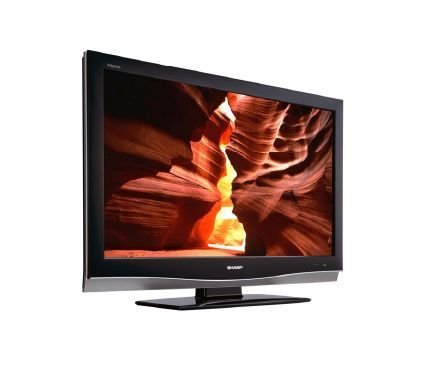
Image: Sharp LC-37XD1E Remote Control. This image displays the black remote control unit for the Sharp LC-37XD1E television, featuring various buttons for power, channel, volume, input selection, menu navigation, and numeric input.
- Power knap: Tænder eller slukker for tv'et.
- Nummerknapper (0-9): Vælg kanaler direkte.
- DTV/EPG/ESD/RADIO: Buttons for digital TV functions, Electronic Program Guide, and radio.
- Lydstyrke op/ned (+/-): Justerer lydniveauet.
- Kanal op/ned (P ^/v): Skifter kanal sekventielt.
- AV-TILSTAND: Cycles through available AV modes.
- OMGIVE: Activates or deactivates surround sound.
- MENU: Åbner hovedmenuen for justering af indstillinger.
- Navigationsknapper (op/ned/venstre/højre): Used to navigate through menus.
- OK knap: Bekræfter valg i menuer.
- EXIT/RETURN: Afslutter menuer eller vender tilbage til forrige skærm.
- Farveknapper (rød, grøn, gul, blå): Used for specific functions in certain menus or interactive services.
5.3. Valg af input
Tryk på Input or Kilde button on the remote control to cycle through connected input sources (HDMI1, HDMI2, SCART1, SCART2, AV, S-Video, PC).
5.4. Menunavigation og indstillinger
Tryk på MENU button to access the main settings menu. Use the navigation buttons to move between options and OK at vælge. Almindelige indstillinger omfatter:
- Billedindstillinger: Adjust brightness, contrast, color, sharpness, and aspect ratio (16:9).
- Lydindstillinger: Adjust bass, treble, balance, and select audio modes (Nicam A2 / Surround).
- Kanalindstillinger: Scan for channels, edit channel lists.
- Tidsindstillinger: Set current time and sleep timer.
6. Vedligeholdelse
- Rengøring af skærm: Tør forsigtigt skærmen af med en blød, fnugfri klud. Ved genstridige mærker, tør let afampRengør kluden med vand eller en specialiseret skærmrens. Sprøjt ikke væske direkte på skærmen.
- Skabsrengøring: Tør fjernsynskabinettet af med en blød, tør klud.
- Ventilation: Periodically check that the ventilation openings on the back of the television are not obstructed by dust or debris.
- Strømledning: Inspect the power cord regularly for any damage. If damaged, replace it with an approved cord.
7. Fejlfinding
Før du kontakter kundesupport, kan du prøve følgende løsninger på almindelige problemer:
| Problem | Mulig løsning |
|---|---|
| Ingen strøm | Ensure the power cord is securely plugged into both the TV and the wall outlet. Check if the wall outlet is functioning. |
| Intet billede, men der er lyd | Check the input source selection. Ensure the connected device is powered on and sending a signal. |
| Ingen lyd, men der er billede | Kontroller lydstyrken, og sørg for, at tv'et ikke er slået fra. Kontroller lydkabelforbindelserne til eksterne enheder. |
| Fjernbetjening virker ikke | Udskift batterierne i fjernbetjeningen. Sørg for, at der ikke er nogen forhindringer mellem fjernbetjeningen og tv'ets IR-sensor. |
| Dårlig billedkvalitet | Adjust picture settings (brightness, contrast, sharpness). Check antenna or cable connections. For external devices, ensure high-quality cables are used. |
8. Specifikationer
Technical specifications for the Sharp LC-37XD1E LCD Television:
| Feature | Detalje |
|---|---|
| Modelnavn | LC-37XD1E |
| Skærmstørrelse | 37 tommer (93.98 cm) |
| Displayteknologi | LCD |
| Opløsning | 1920 x 1080 pixels (Fuld HD) |
| Aspektforhold | 16:9 (1.78:1) |
| Lysstyrke | 450 cd/m² |
| Kontrastforhold | 1200:1 |
| Svartid | 6 ms |
| Viewing-vinkel (H/V) | 176° / 176° |
| Lydsystem | Nicam A2 / Surround |
| Højttaler udgangseffekt | 20 watt |
| HDMI porte | 2 |
| SCART-porte | 2 |
| Andre input | AV/S-Video In, PC In, RS232C |
| Lydudgang | Ja |
| Strømkrav | AC 220V-240V, 50Hz |
| Strømforbrug | 20 watt (typisk) |
| Dimensioner (B x H x D) | 92 cm x 60 cm x 11.5 cm (uden stativ) |
| Vægt | 21 kg |
9. Garanti og support
For garantioplysninger henvises til garantikortet, der følger med dit produkt, eller besøg den officielle Sharp-side. website. For technical support or service inquiries, please contact Sharp customer service through their official channels.