
1. Introduktion
Tak for købetasing the GPX CDP6806DT Personal CD Player. This manual provides important safety instructions, operational guidelines, and maintenance procedures to ensure optimal performance and longevity of your device. Please read this manual thoroughly before using the product and retain it for future reference.
2. Sikkerhedsoplysninger
Vigtige sikkerhedsinstruktioner
- Udsæt ikke enheden for vand eller fugt.
- Undgå at placere enheden i nærheden af varmekilder såsom radiatorer, varmeapparater, komfurer eller andre apparater (herunder ampløftere), der producerer varme.
- Forsøg ikke at skille enheden ad eller ændre den. Overlad al service til kvalificeret servicepersonale.
- Use only the specified batteries (2 x AA batteries). Ensure correct polarity when inserting batteries.
- Fjern batterierne, hvis enheden ikke skal bruges i en længere periode.
- Undgå at lytte ved høj lydstyrke i længere perioder for at forhindre høreskader.
- Rengør kun enheden med en tør klud.
3. Pakkens indhold
Carefully unpack your GPX CDP6806DT Personal CD Player and ensure all items are present:
- GPX CDP6806DT Personal CD Player
- Brugervejledning (dette dokument)
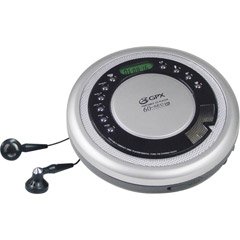
Figure 1: GPX CDP6806DT Personal CD Player. This image illustrates the compact design and general appearance of the device.
4. Kontrol og funktioner
Familiarize yourself with the controls and features of your GPX CDP6806DT for optimal use.
- LCD-skærm: 6-digit display for track number, time, and FM frequency.
- PLAY/PAUSE (►/−): Press to start or pause CD playback.
- STOP (■): Press to stop CD playback.
- SKIP/SEARCH (◀◀/▶▶): Press to skip tracks. Hold to search within a track.
- LYDSTYRKE (+/-): Justerer lydudgangsniveauet.
- MODE/PROG: Selects playback mode (Repeat, Random) or programs CD tracks.
- FM TUNER (ON/OFF/BAND): Switches to FM radio mode, turns FM on/off, or changes FM band.
- FORUDINDSTILLING (+/-): Navigates saved FM radio presets.
- CD-rum: Area for inserting audio CDs.
- Batterirum: Located on the bottom, holds 2 AA batteries.
- Hovedtelefonstik (3.5 mm): Tilslutter hovedtelefoner til privat lytning.
Figure 2: GPX CDP6806DT Controls Layout. This image provides a visual reference for the location of various buttons and ports on the device.
5. Opsætning
5.1 Batteriinstallation
The GPX CDP6806DT requires two (2) AA batteries (not included) for portable operation.
- Find batterirummet i bunden af enheden.
- Skub batterirummets dæksel åbent.
- Isæt to AA-batterier, og sørg for at polerne (+ og -) vender korrekt som angivet i batterirummet.
- Luk batterirummets dæksel forsvarligt.
5.2 Tilslutning af hovedtelefoner
For private listening, connect your 3.5mm stereo headphones (not included) to the headphone jack located on the side of the unit.
6. Betjeningsvejledning
6.1 CD-afspilning
The unit supports CD and CD-R/RW disc formats.
- Open the CD compartment lid by gently pressing the OPEN button (if present, or lifting the lid).
- Placer en CD med etiketsiden opad på den midterste spindel.
- Luk låget til cd-rummet godt, indtil det klikker.
- Tryk på AFSPIL/PAUSE (►/−) button to begin playback. The track number and elapsed time will appear on the LCD display.
- Tryk på for at sætte afspilningen på pause AFSPIL/PAUSE (►/−). Tryk igen for at genoptage.
- Tryk på for at stoppe afspilningen STOP (■) knap.
- Tryk på for at springe til næste spor SKIP/SEARCH (▶▶).
- To go back to the beginning of the current track, press SKIP/SEARCH (◀◀) once. Press twice to go to the previous track.
- To search rapidly forward or backward within a track, hold down SKIP/SEARCH (▶▶) or (◀◀) henholdsvis.
- Juster lydstyrken ved hjælp af LYDSTYRKE (+/-) kontroller.
6.2 FM-radiofunktion
The unit features a digital FM tuner with station presets.
- Skub til FM TUNER switch to the ON position or press the BAND knappen for at gå ind i FM-tilstand.
- Tryk på SKIP/SEARCH (▶▶) or (◀◀) knapperne til manuelt at indstille til den ønskede frekvens.
- To auto-scan and save stations, hold down the AFSPIL/PAUSE (►/−) button (or refer to specific instructions for auto-scan if available on the device).
- To recall saved presets, use the FORUDINDSTILLING (+/-) knapper.
6.3 CD Programming (24-Track)
Du kan programmere op til 24 spor til afspilning i en bestemt rækkefølge.
- Når cd'en er stoppet, skal du trykke på MODE/PROG button. "PROG" will flash on the display.
- Brug SKIP/SEARCH (▶▶) or (◀◀) knapperne til at vælge det første spor, du vil programmere.
- Trykke MODE/PROG again to confirm the selection. The display will show the program number and the next available program slot.
- Repeat steps 2 and 3 to add up to 24 tracks to your program.
- Når du har programmeret alle de ønskede numre, skal du trykke på AFSPIL/PAUSE (►/−) for at starte programmeret afspilning.
- To clear the program, press the STOP (■) knap to gange.
6.4 Anti-Skip Protection (ASP)
The GPX CDP6806DT features a 60-second Anti-Skip Protection system. This system buffers audio data to minimize interruptions caused by minor shocks or vibrations during CD playback. The ASP activates automatically when a CD is playing.
7. Vedligeholdelse
7.1 Rengøring af enheden
- Tør enhedens yderside af med en blød, tør klud.
- Brug ikke slibende rengøringsmidler, voks eller opløsningsmidler.
- If the CD lens needs cleaning, use a specialized CD lens cleaner disc or a soft, lint-free cloth designed for optical lenses.
7.2 Pleje af batterier
- Remove batteries if the unit is not used for an extended period to prevent leakage.
- Bland ikke gamle og nye batterier eller forskellige typer batterier.
- Bortskaf brugte batterier ansvarligt i henhold til lokale regler.
8. Fejlfinding
If you experience issues with your GPX CDP6806DT, please consult the following table for common problems and solutions.
| Problem | Mulig årsag/løsning |
|---|---|
| Enheden tænder ikke. | Check if batteries are inserted correctly with proper polarity. Ensure batteries are fresh and not depleted. |
| Ingen lyd fra hovedtelefoner. | Ensure headphones are fully plugged into the headphone jack. Increase the volume level. Test with another pair of headphones. |
| CD'en springer over, eller afspilningen afbrydes. | Ensure the CD is clean and free of scratches or smudges. Clean the CD with a soft, lint-free cloth. Ensure the unit is on a stable surface or held steadily during use. |
| CD'en afspiller ikke. | Ensure the CD is inserted correctly with the label side up. Close the CD compartment lid completely. Check if the CD is a supported format (CD, CD-R/RW). |
| FM-radiomodtagelsen er dårlig. | Extend the headphone cable as it acts as the antenna. Try moving to a different location. |
9. Specifikationer
- Mærke: GPX
- Model: CDP6806DT
- Understøttede diskformater: CD, CD-R/RW
- Anti-Spring beskyttelse: 60 sekunder
- Vise: 6-cifret LCD
- Radio: Digital FM Tuner with Presets
- CD Programming: 24-sporet
- Strømkilde: 2 x AA batterier (medfølger ikke)
- Forbindelse: 3.5 mm hovedtelefonstik (ekstra)
10. Garanti og support
For detailed warranty information, please refer to the warranty card included with your original product packaging. For technical support, service inquiries, or to purchase replacement parts, please visit the official GPX webwebstedet eller kontakt deres kundeserviceafdeling ved hjælp af de kontaktoplysninger, der findes i din produktdokumentation.
Gem venligst dit købsbevis for garantikrav.